


Outsourced IT Support Houston: A Practical Guide for SMBs
A Tuesday morning outage doesn't wait for a convenient meeting. At a 40-person logistics company near the Port of Houston, printers freeze, Microsoft 365 stops syncing, and the office manager starts rebooting network equipment while the owner watches dispatch work slow down. The company may have one capable IT employee, but that person is already handling user tickets, vendor calls, security alerts, and the aging firewall.
That kind of incident pushes a Houston business toward outsourced IT support. The immediate problem isn't only that equipment failed. It's the missing documentation, weak backup verification, limited coverage after business hours, and lack of a second technical team when the primary employee is unavailable. A provider can build monitoring, support, security, and recovery processes around those weaknesses. It can't magically restore systems that were never backed up or take responsibility for a scope the contract excludes.
The question I want every Houston business owner to ask is simple: what gets answered at 11 p.m. when a server fails, and who can fix it? That answer matters during hurricane-season remote work, for energy-sector contractors that depend on continuous access, and during tax or audit periods when even a short interruption creates a backlog.
Table of Contents
- When a Houston Office Stalls and IT Support Has to Step In
- What Outsourced IT Support Actually Means for Houston SMBs
- Core Services You Should Expect From an Outsourced IT Partner
- Pricing Models, SLAs, and What 24/7 Support Really Covers
- Real Benefits and the Risks Most Houston Providers Won't Mention
- How to Choose and Migrate to the Right Outsourced IT Provider
- Putting It All Together for Your Houston Business
- Houston Outsourced IT Support FAQs
When a Houston Office Stalls and IT Support Has to Step In
The owner usually doesn't start by searching for “managed services.” They start after an outage, a ransomware scare, a failed cloud migration, or a weekend when nobody could reach the person who knows how the network works.
The failure chain is usually predictable
One internal generalist becomes the unofficial owner of everything. They know the firewall password, the backup routine, the Microsoft 365 quirks, and which switch controls the warehouse. That arrangement can work until the employee takes leave, leaves the company, or faces several failures at once.
Then the weak points line up:
- Aging infrastructure: A firewall or switch continues operating without a replacement plan.
- Missing documentation: Nobody has a current map of users, devices, vendors, permissions, or recovery steps.
- Reactive maintenance: Patching and backup checks happen after someone remembers them.
- After-hours uncertainty: The business has a phone number, but no clear answer about who engineers the incident overnight.
- Physical-site dependency: Remote support can't repair a dead printer, damaged cabling, or a local network failure without an on-site path.
Outsourced IT support should replace that fragile chain with defined ownership. The provider should know what assets exist, monitor important systems, handle routine support, maintain security controls, and explain how escalation works.
The buyer's real test: Don't ask whether a provider says “24/7.” Ask which incident types receive immediate engineering attention outside business hours.
Houston adds practical pressure. A storm can force staff to work remotely while office equipment remains inaccessible. An engineering contractor may need secure access to project systems from multiple locations. A tax practice may face its busiest workload when a neglected laptop, identity issue, or backup failure is least welcome.
The right partner reduces those risks through preparation and accountability. It won't eliminate every outage, replace every physical technician, or make an unclear contract useful. Those limits should be visible before you sign.
What Outsourced IT Support Actually Means for Houston SMBs
Think of an outsourced IT partner as a contracted pit crew for your office technology. A pit crew doesn't wait for the car to break down before learning where the critical components are. It prepares, watches for problems, performs scheduled work, and brings specialists when the repair exceeds the driver's skill set.
That differs from a body shop model, where the business calls only after something has already failed. Both models have a place, but they transfer risk differently.
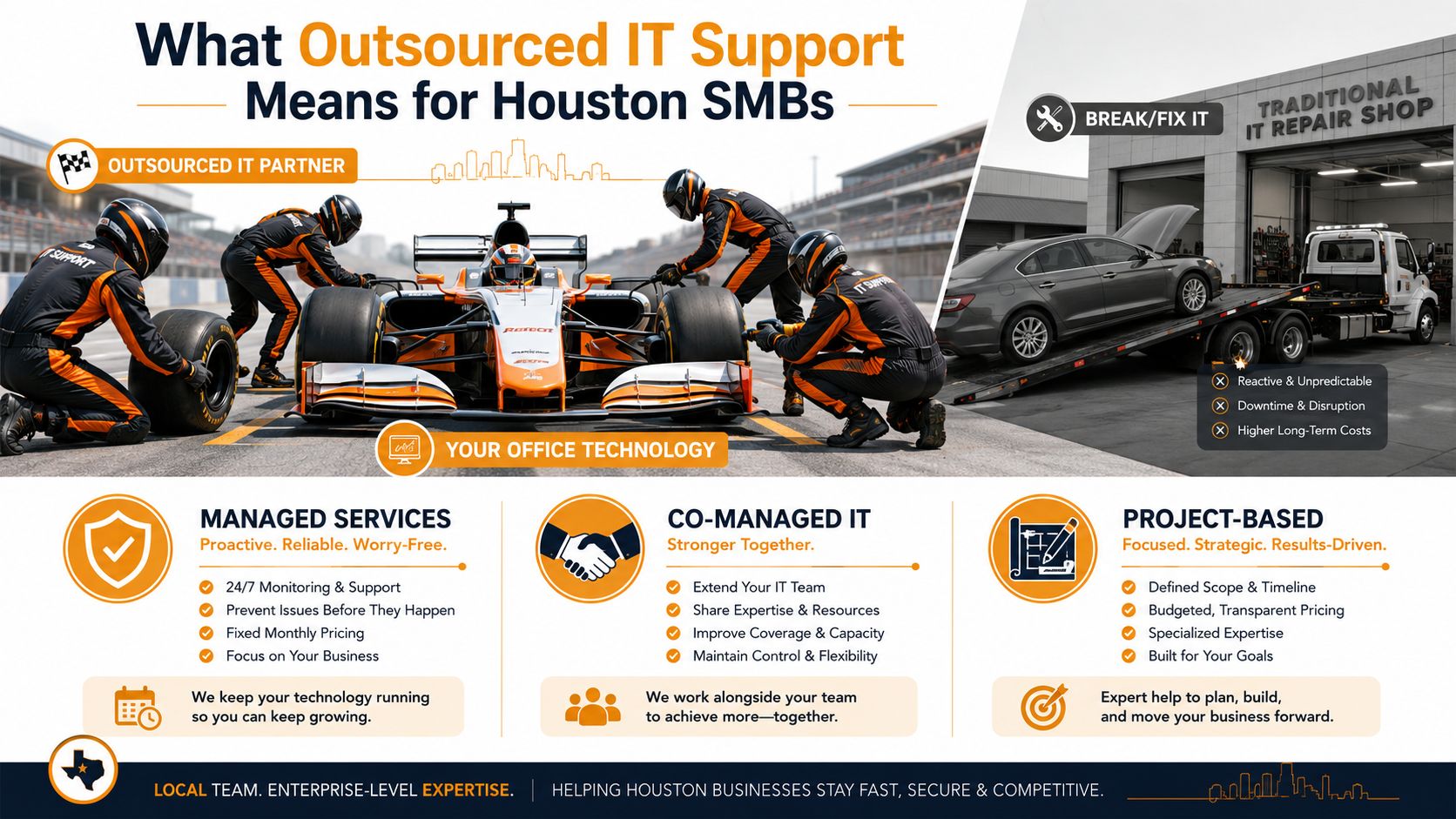
Three common engagement models
Break/fix support means you pay when you need help. This suits a very small office with limited dependence on technology, a one-time repair, or a project that doesn't justify ongoing management. The trade-off is obvious. The provider has little incentive to prevent the next failure, and your costs rise when several problems appear together.
Fully managed support places an agreed technology scope under a recurring service. The provider handles routine assistance, monitoring, maintenance, and defined security or cloud responsibilities. A 10-user accounting firm in Sugar Land might choose a focused plan covering users, Microsoft 365, endpoints, and backups. A 75-user engineering firm in the Energy Corridor will usually need broader ownership, stronger escalation, and more deliberate continuity planning.
Co-managed support keeps internal IT in place while an outside team fills specific gaps. That may mean nights and weekends, advanced network work, security operations, Microsoft 365 administration, or project capacity during an office move. It works well when the internal employee understands the business but can't provide every specialty or every hour of coverage.
A hybrid arrangement can also preserve a CIO-level advisor while another team runs helpdesk and monitoring. The contract should state who makes decisions, who owns credentials, and who communicates with employees.
For a plain-English overview of service-desk responsibilities, Ollo help desk for compliance offers useful context, particularly for organizations that need support processes to align with compliance work. The resource doesn't replace a Houston-specific scope review, but it can help owners identify questions their provider should answer.
Core Services You Should Expect From an Outsourced IT Partner
A credible outsourced IT support program is a service stack, not a phone number. Each component should solve a recognizable business problem and have an owner.
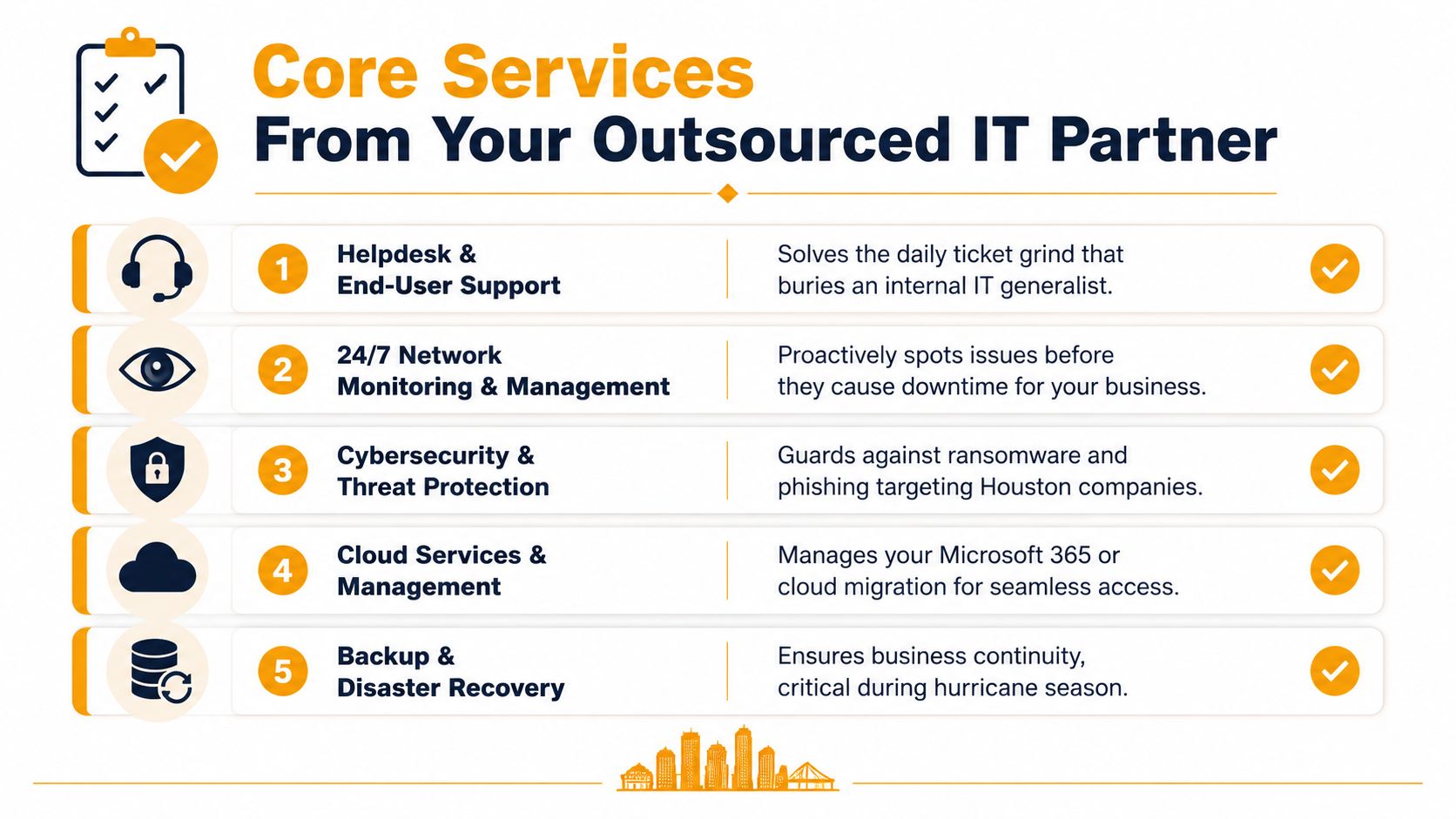
Helpdesk and end-user support
The helpdesk absorbs password issues, application errors, printer problems, onboarding requests, and access questions that otherwise bury an internal generalist. Ask whether users reach trained technicians or merely submit tickets into a queue. Also ask how the provider handles an urgent business interruption compared with a routine software request.
Good support includes user communication, ticket ownership, escalation, and closure notes. Those records become valuable when a recurring issue involves a Microsoft 365 account, endpoint, VPN connection, or vendor application.
Monitoring and maintenance
Monitoring should identify a failing drive, stopped backup, unavailable service, or outdated system before employees discover it during a closing deadline. Patching matters for the same reason. It reduces the number of known weaknesses sitting on endpoints and servers, but the provider should explain maintenance windows, exceptions, reboot policies, and failed-patch handling.
The phrase “24/7 monitoring” doesn't tell you whether a human acts on an alert. Require an escalation path and examples of the reports you receive.
Networks and remote access
Houston offices often combine wireless users, wired devices, cloud applications, remote employees, and more than one location. A business in The Woodlands may need reliable remote access, while a company near the port may connect its main office to a warehouse or operational site.
Network management should cover configuration records, equipment lifecycle planning, Wi-Fi performance, VPN access, and site connectivity. It should also clarify when remote troubleshooting ends and an on-site visit begins.
Microsoft 365 and cloud administration
Cloud administration includes more than licensing. Someone needs to manage user creation and removal, access permissions, mailbox settings, device policies, collaboration tools, and security controls. Offboarding deserves special attention because former-user access, shared files, and recovery methods can remain overlooked.
For a broader view of what proactive support can include, review proactive IT support services and compare the described scope with the line items in your proposal.
Security, backup, and recovery
Endpoint protection, multifactor authentication, phishing education, identity monitoring, and email defenses address different parts of the attack surface. Treating one product as “cybersecurity” is a shortcut, not a program.
Backups need equal scrutiny. Ask where copies are stored, who receives failure alerts, how restores are requested, and how often recovery is demonstrated. A backup that has never been restored is an assumption.
Projects and physical support
A complete catalog may include hardware procurement, repairs, cabling coordination, office moves, server refreshes, printer support, and cloud migrations. These items may be outside the recurring fee, which is acceptable if the pricing and approval process are clear. The mistake is assuming they are included because the proposal uses broad language such as “complete IT support.”
Pricing Models, SLAs, and What 24/7 Support Really Covers
A Houston office can pay for “24/7 support” and still wait until morning for meaningful help. Price matters, but the key buying question is what the contract covers after hours and how the provider proves recovery when a major service fails. Fully managed IT support for SMBs commonly runs about $125 to $175 per user per month, while senior-engineer labor commonly runs $175 to $295 per hour, according to the Houston MSP pricing index. Treat those figures as market context, not a quote.
Compare the risk transfer, not just the fee
| Model | Typical Cost/User/Month | SLA Response Window | After-Hours Engineering | Common Exclusions |
|---|---|---|---|---|
| Flat-fee managed | $125 to $175, market reference | Must be written into contract | May be included, limited, or escalated | Projects, hardware, cabling, vendors |
| Tiered managed | Varies by selected scope | Usually differs by priority | Often limited to higher tiers | Advanced security, on-site work, migrations |
| Break/fix | No recurring user fee, hourly work applies | Often best effort | Usually separate or unavailable | Monitoring, prevention, recovery planning |
Per-device pricing ties the bill to equipment. Per-user pricing is easier to budget when employees use several devices. An all-inclusive model works only when the proposal defines users, locations, support channels, project boundaries, and excluded vendors. Ask the provider to identify those limits before comparing monthly fees.
An SLA should state response time, resolution expectations, uptime language, exclusions, escalation rules, and service credits. Response is not resolution. An automated acknowledgment may arrive quickly while the employee waits for a technician who can complete the work.
Challenge the 24/7 claim
A staffed phone line at night does not prove that an engineer can isolate an identity attack, restore a service, or coordinate an on-site response. Ask four direct questions:
- Who answers at night?
- Which incident categories receive immediate engineering?
- What happens during a storm or regional outage?
- What work waits until the next business day?
According to the Global IT Benchmark 2026 from HappySignals, outsourced help desks report 1 hour 3 minutes more lost time per incident and 2 hours 8 minutes more per request compared with in-house support. That report-specific benchmark makes ticket latency a productivity risk, not merely a customer-service complaint.
Ask for the last recovery test report, including the services tested, restore time, failures found, and corrective actions. A provider that cannot show evidence of a restore exercise has not proved its recovery promise. For the cost variables that shape managed support proposals, review factors determining managed IT support service costs. Teams handling high-volume customer requests can also apply the prioritization and escalation practices described in e-commerce support queue management.
Real Benefits and the Risks Most Houston Providers Won't Mention
A Houston SMB gains more than a help desk when outsourcing is structured properly. The right provider adds senior engineers, security specialists, cloud administrators, documented processes, and coverage that does not depend on one employee being available. Judge that value by what remains covered after hours and how recovery is proven, not by the monthly fee alone.
MarketsandMarkets' managed services market forecast projects the global managed services market will grow from USD 460.59 billion in 2026 to USD 705.22 billion by 2031, an 8.9% CAGR. The same report projects SME growth at 10.41% CAGR. This market forecast shows why Houston businesses have access to a mature outsourcing market, but it does not prove that a particular provider delivers value.
The benefits are practical
- Predictable planning: A defined recurring scope makes routine support easier to budget.
- Broader expertise: You gain specialist knowledge without hiring every role internally.
- Faster onboarding: A documented process can provision accounts, devices, permissions, and security settings consistently.
- Better records: Ticket histories, asset inventories, and review reports support audits and management decisions.
- Continuity during disruption: Remote support and cloud administration remain useful when staff cannot reach a Houston office.
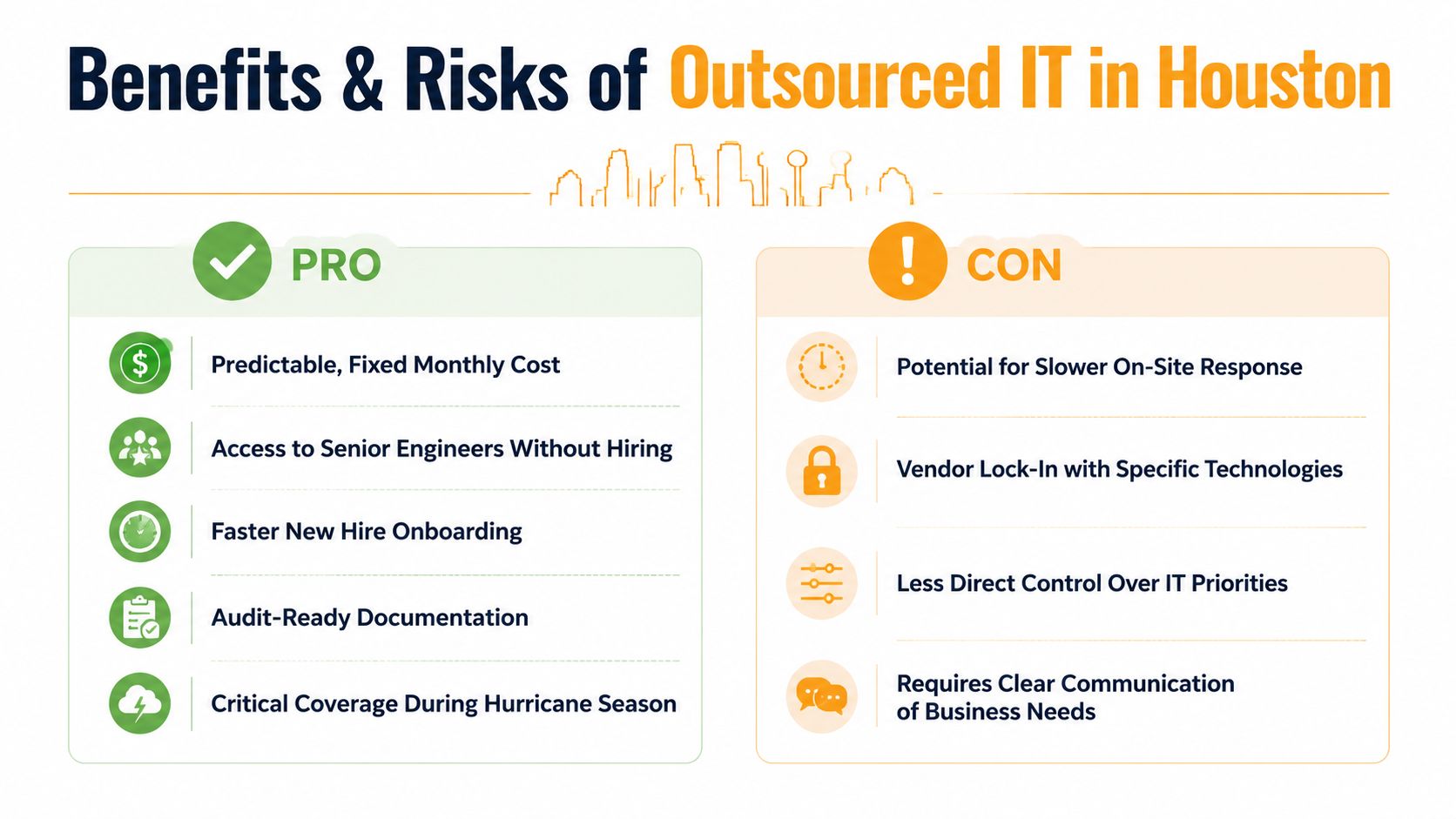
The risks need contractual controls
Vendor lock-in begins when the provider holds the only current credentials, network diagrams, backup details, or administrative records. It also grows when employees stop understanding their own environment. Scope gaps create another exposure. A provider managing endpoints but excluding identity, cloud applications, or physical network failures may leave the hardest incidents outside the agreement.
Require current documentation, credential ownership, data export, transition assistance, and cooperation at termination in the contract. These terms preserve access and reduce disputes when the relationship ends. Ask who performs after-hours work, which systems receive priority, and what evidence the provider supplies after recovery testing. A 24/7 phone line has little value if engineering response and restoration wait until the next business day.
How to Choose and Migrate to the Right Outsourced IT Provider
You can run a serious provider search this week if you stop treating the sales call as a technology demonstration. Start with your own facts, then make each candidate prove its operating model.
Begin with discovery
Create a basic inventory of endpoints, servers, cloud services, network equipment, software, vendors, and locations. Record the problems that interrupt work, the support hours you need, and the systems that must remain accessible during storms, weekends, and late-night incidents.
Map compliance obligations before requesting proposals. A healthcare practice, government contractor, financial business, or organization handling sensitive client data may need different controls, evidence, retention practices, and provider agreements.
Use this worksheet:
- Inventory: List all endpoints, servers, applications, locations, and critical vendors.
- Risk map: Identify identity, backup, network, endpoint, and physical-site dependencies.
- Pain log: Record recurring outages, slow access, unresolved tickets, and user complaints.
- Coverage plan: Define who must respond during business hours, nights, weekends, and storm conditions.
- Recovery requirement: State which systems need restoration first and what evidence you expect after testing.
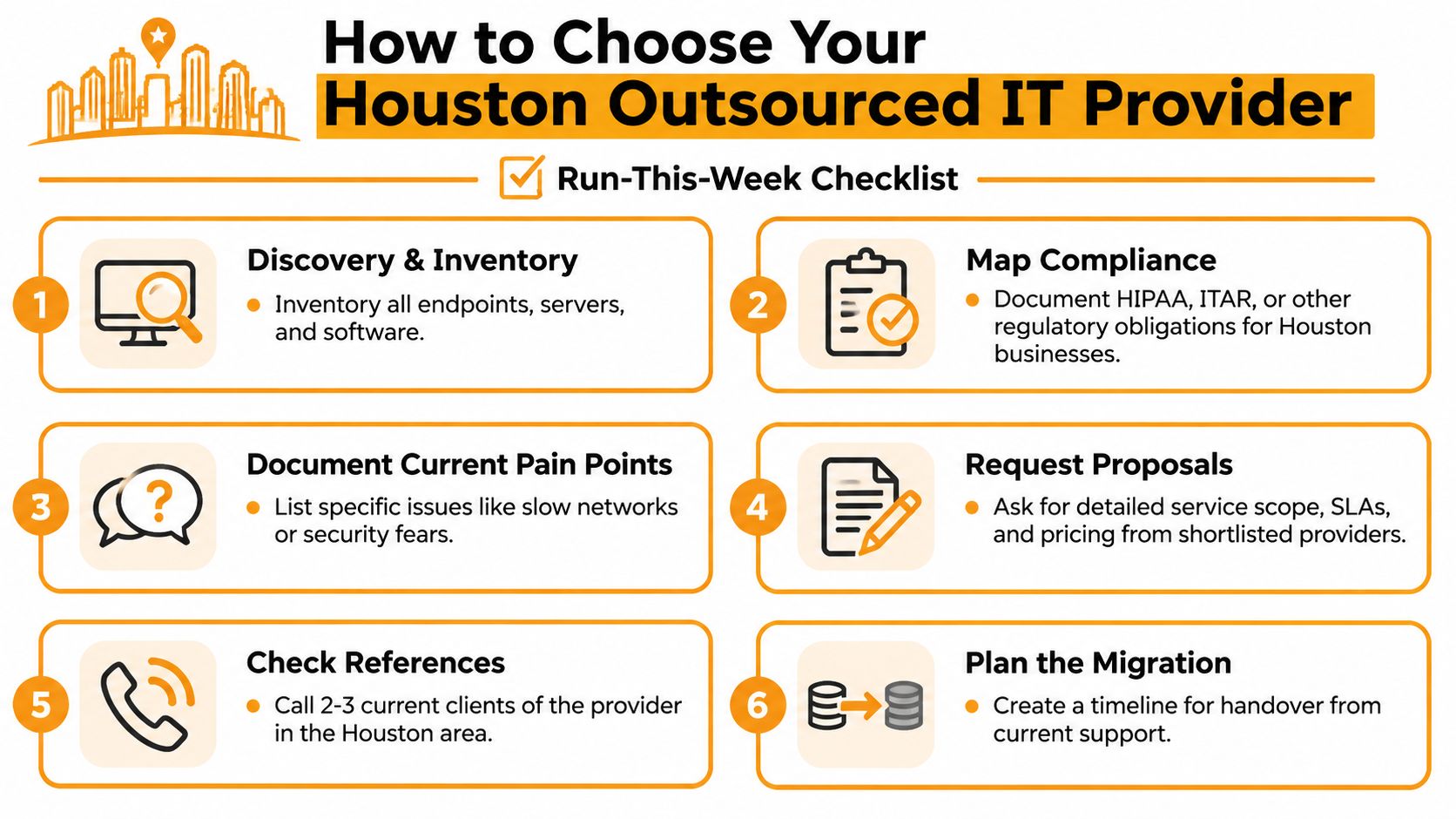
Evaluate three providers against the same questions
Request written proposals from three candidates. Require the service scope, named response and resolution targets, after-hours workflow, on-site process, project rates, exclusions, reporting examples, and ownership of credentials.
Ask for a sample monthly report and a documented recovery exercise. A tabletop test can demonstrate decision-making, while a live restore provides stronger evidence that the technical process works. Don't accept a general statement that backups are “verified.”
Watch for these red flags:
- No onboarding timeline: The provider can't explain discovery, documentation, and handover.
- Vague credential ownership: The contract doesn't say who controls administrator accounts.
- Offshore-only first contact: There is no named escalation path for urgent Houston incidents.
- Unclear termination terms: A long commitment lacks reasonable exit protection or transition duties.
- Blended scope: Helpdesk, security, projects, and physical work appear in one promise without boundaries.
For a second framework to compare against your worksheet, use this guide on how to choose a managed service provider.
Migrate in controlled phases
Start with asset discovery and documentation, then transfer identity and access administration. Next, move monitoring and backup responsibilities, communicate the new support process to users, and run the old and new workflows in parallel long enough to catch gaps.
Don't cut over every dependency at once without a rollback plan. Require the incoming provider to identify unresolved risks, confirm administrator access, test alert delivery, and document what remains outside scope. A clean handover is more valuable than a dramatic launch date.
Putting It All Together for Your Houston Business
Choose outsourced IT support by evidence, not by the number on the first quote. Your shortlist should show verifiable after-hours coverage, written response commitments, a practical local presence when remote work can't solve the problem, and a transparent distinction between recurring services and hourly projects.
The provider should also explain recovery in operational terms. Which system gets restored first? Who authorizes the response? What report proves the test occurred? How does the plan change when a Houston office is inaccessible during severe weather?
The broader market is moving toward cloud-first delivery. A 451 Research forecast cited by S&P Global estimated cloud managed services would rise from just under USD 11 billion in 2021 to USD 26 billion by 2026, a 19.8% CAGR, while the aggregate managed services market was forecast to approach USD 100 billion by 2026. The S&P Global summary of the managed services forecast provides that context. Your contract still needs to address the local realities that global growth doesn't solve.
Apply four filters before signing: verified SLA, clear scope, credible escalation, and proof of recovery. The remaining operational questions appear below.
Houston Outsourced IT Support FAQs
Does 24/7 support mean a live engineer at 2 a.m.?
Not necessarily. It may mean ticket intake, an answering service, monitoring alerts, or a true engineering response. Ask which incident types receive immediate action and which wait until morning.
How do I verify recovery readiness?
Request the latest recovery test report, the systems tested, the outcome, unresolved issues, and the person responsible for remediation. A promise without test evidence isn't enough.
Which contract terms should we refuse?
Refuse vague scope, automatic renewal without performance protections, unclear credential ownership, capped effort hidden behind “unlimited” users, and termination language that leaves you without documentation or transition help.
Does outsourcing make sense for a five-person shop?
It can, especially when the business depends on Microsoft 365, handles sensitive information, or has no internal backup for the owner or office manager. A focused support and security plan may fit better than full management. Waiting until a failure forces the decision usually gives you fewer choices.
IT Cloud Global, LLC provides remote and on-site Houston IT support, helpdesk assistance, proactive monitoring, Microsoft 365 and cloud administration, network services, cybersecurity, repair, and disaster recovery support. Visit IT Cloud Global, LLC to discuss what needs immediate after-hours coverage, what belongs in a managed scope, and how your recovery process can be tested before the next outage.
- IT Security Assessment: A Practical Guide for Houston SMBs
- How to Prevent Data Breaches: A Practical Playbook for SMBs
- Remote Desktop IT Support Guide 2026
- Endpoint Protection vs Antivirus: A Houston Guide
- Houston IT Support: A 2026 Guide for SMBs
- What Is Network Access Control: Why Your Business Needs It
- Hybrid Cloud Management: A Practical Guide for SMBs