


What Is Network Redundancy and Why Your Business Needs It
Your office is full, phones are ringing, and someone just says the internet is down. The card reader won't connect, Microsoft 365 won't open, cloud apps are stalled, and everybody starts asking the same question, how long is this going to last? For a 25-person shop or a 150-person operation, that moment is rarely a technology problem alone. It's payroll, sales, support, and customer trust sitting still until traffic can move again.
That's where network redundancy comes in. It's the design choice that decides whether one failed switch, a cut fiber line, or an ISP outage becomes a five-minute hiccup or a lost workday. If your business depends on cloud apps, VoIP, payment systems, or remote staff, redundancy is not an abstract enterprise idea. It's the difference between staying open and watching work pile up.
A helpful outside resource for service teams that live on uptime is IT companies answering service, because support availability matters when the network stops cooperating. If you already rely on managed support, the right monitoring and response plan can make the difference between a fast failover and a long outage, as discussed in managed IT support service can prevent downtime.
Table of Contents
- The Moment Everything Stops Working
- What Network Redundancy Actually Means
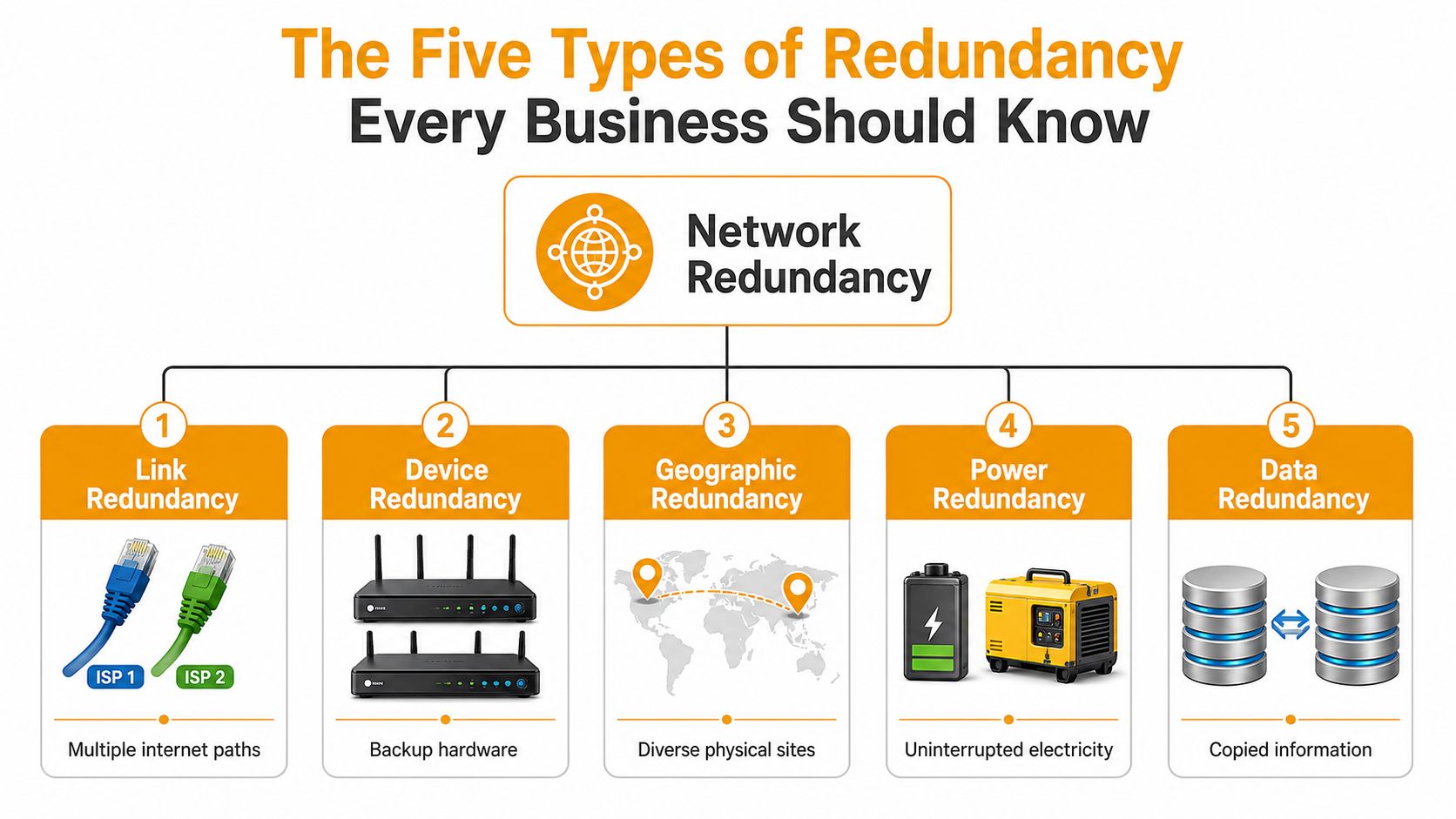
- The Five Types of Redundancy Every Business Should Know
- From Backup Links to Uptime Tiers
- What Redundancy Costs and What Downtime Costs More
- Why Redundancy Alone Is Not the Same as Resilience
- Designing, Implementing, Testing, and Avoiding Common Pitfalls
- Questions to Ask Your MSP and How IT Cloud Global Can Help
The Moment Everything Stops Working
The outage usually doesn't announce itself. A receptionist sees a frozen browser tab. A warehouse lead cannot scan orders. Someone in accounting says the shared drive is slow, then it goes silent. Within minutes, people start guessing, but the underlying problem is usually simpler, a single point of failure somewhere between your staff and the apps they depend on.
For a Houston business, that break can be a local switch, an ISP circuit, a cloud access path, or even a power issue in the closet that holds the gear. If the design has no backup path, traffic has nowhere else to go. If the design does include redundancy, the network can move around the problem and keep working while someone repairs the failed part.
That matters even when the failure seems small. A bad router port or a fiber cut can become a full stop if the environment depends on one route, one provider, or one box. Good response planning and dependable support help, especially for offices that need a real person to answer quickly when the lights are still on but the business is effectively stuck. The operating model behind managed IT support that helps prevent downtime plays a part in that readiness, and so does an IT companies answering service that can pick up when teams cannot afford to wait.
Practical rule: if one broken component can stop sales, calls, and cloud apps at the same time, you've found a redundancy gap.
The human side is easy to see. Employees wait, customers wait, and managers spend money while nobody can move work forward. The technical side is just as direct, no alternate path means no automatic recovery. That is why network redundancy stopped being a luxury and became part of basic business continuity planning.
What Network Redundancy Actually Means
Network redundancy means building backup capacity into the network so a failure doesn't take everything down. In enterprise designs, that usually means duplicate critical paths, devices, and services so traffic can be rerouted when a link, switch, router, ISP circuit, or power source fails. The goal is not to own more hardware for its own sake. The goal is to remove single points of failure before they get the chance to become an outage. That definition is grounded in enterprise network design guidance from Arelion's network redundancy guide.
A highway analogy makes this easier. If one lane closes and the rest of the road can absorb the traffic, you get a slowdown. If the only road into the city shuts down, everything stops. Redundancy is the design work that gives traffic another route, another entrance, or another bridge so one incident doesn't paralyze the whole commute.
Paths, devices, and services
In practice, redundancy shows up in three layers. Paths cover alternate routes for traffic. Devices cover backup hardware like routers, switches, and firewalls. Services cover the things that make failover work, such as routing behavior and synchronized state between active and standby equipment.
That last part matters more than most owners expect. If a standby box has stale settings or no session awareness, the handoff can be messy even though the hardware is technically there. A concise explanation of that automatic handoff model appears in the earlier technical guidance on what is network redundancy, where the focus is on traffic moving without manual intervention.
Redundancy is spare capacity with a purpose. It exists so the business doesn't notice a failure the way it would notice a power outage in a storefront.
For a 50-person business, the concept doesn't need to be complicated. You're not trying to build a telecom carrier. You're trying to make sure one failed piece doesn't shut off email, payment processing, file access, or customer communication.
The Five Types of Redundancy Every Business Should Know
Different failures call for different backup strategies, and SMBs usually need a blend instead of one giant fix. The useful way to think about redundancy is by the layer it protects.
Link redundancy
Link redundancy means multiple internet paths or network links. If one circuit fails, traffic can shift to another. A small office might keep a primary fiber line and a secondary wireless or broadband connection for continuity when the main provider has trouble. For businesses that depend on cloud apps all day, a backup internet path can keep email and SaaS access alive even if the primary line goes dark.
Device redundancy
Device redundancy is backup hardware, usually paired routers, switches, or firewalls. If the primary unit dies, the standby unit takes over. This is especially useful when the office has one security gateway or one core switch that everything depends on. Dual hardware matters most when the equipment is central to every user, not just a small corner of the network.
Path redundancy
Path redundancy is about how traffic moves through the network. High-value designs use automatic failover with synchronized state between primary and standby devices, and they're often paired with protocols such as HSRP, VRRP, and LACP plus multiple network paths so connectivity can continue without manual intervention. That's the mechanism that keeps a failover from feeling like a reset to every employee. The technical foundation for that behavior is summarized in the automatic failover reference material.
Site redundancy
Site redundancy protects businesses that can't afford to lose a building, not just a box. That can mean a second office, a cloud-based fallback for critical apps, or a different location that can carry the work if the primary site is unavailable. For a company with one headquarters and a handful of remote staff, site diversity may live partly in cloud services and partly in the way users connect to them.
Power redundancy
Power redundancy keeps the rest of the stack alive. UPS units, generators, and backup power sources protect switches, firewalls, and internet equipment from simple electricity loss. If the network gear has no power, even perfect link redundancy won't help. A small office with a strong internet plan can still go dark if the closet loses power and nobody planned for it.
| Scenario | Typical Cost Impact | Risk if Skipped |
|---|---|---|
| Backup internet line | Adds a second path for continuity | One ISP failure can stop cloud apps and calls |
| Paired network hardware | Adds standby equipment and failover setup | One device failure can take down the office |
| Backup power | UPS or generator support | A brief power loss can stop the whole network |
A good 4g backup for business nbn example shows how practical redundancy can be when the main line is unreliable. The point isn't to memorize terms. The point is to match the backup to the failure that would hurt your business most.
From Backup Links to Uptime Tiers
Redundancy becomes easier to buy when you can tie it to an availability target instead of a vague feeling of safety. That's why uptime tiers became such a useful industry shorthand. They turn design choices into a measurable outcome.
A Tier 1 facility is associated with 99.671% uptime, or up to 28.8 hours of downtime per year, while Tier 4 is associated with 99.995% uptime, or about 26.3 minutes of downtime annually, according to the data-center tier framework in the source material on network redundancy history and uptime tiers. The same framework shows how 99.9% availability allows about 8.76 hours of downtime per year, while 99.999% reduces that to about 5.26 minutes. That jump is why engineers talk about “more nines” when they talk about redundancy.
How to read the tiers
A higher tier usually means more duplicated infrastructure, better fault isolation, and tighter operational discipline. It doesn't just mean “more gear.” It means the design can survive a broader set of failures without service interruption.
For a small or midsize business, the useful question isn't which tier sounds best. It's how much interruption the business can tolerate before money, service, or reputation starts leaking away. If your team can work around a short outage by switching to mobile hotspots or rescheduling a few tasks, your target may differ from a company that processes live transactions all day.
One practical way to think about it is this, redundancy moves you closer to the higher-availability end of the spectrum, but it only matters if the rest of the network design can absorb the failure. The tier model helps owners stop thinking in terms of “backup stuff” and start thinking in terms of “acceptable downtime.”
Decision point: set the outage tolerance first, then design the redundancy to meet it.
For businesses that also back up critical data offsite, the same mindset applies to storage and recovery planning. The broader continuity picture is covered in backup data offsite, because uptime and recoverability usually have to work together, not separately.
What Redundancy Costs and What Downtime Costs More
Redundancy is easier to justify when you compare it to what an outage costs. A recent industry guide says redundancy typically adds 40%–80% to connectivity costs, a basic active-passive setup may add $100–$300 per site per month, and full active-active diversity can double network spend. Those are meaningful numbers for an SMB budget, especially when the team is trying to balance growth, payroll, and IT.
Now compare that with the cost of being down. Enterprise telecom downtime is cited at $5,600–$9,000 per minute, which means a 60-minute outage can cost roughly $336,000–$540,000 before you count lost revenue, idle employees, churn, or recovery work. That's the basic math behind the business case for redundancy. The investment is real, but the cost of skipping it can be much larger. Those figures come from the industry guide at SociumIT's network redundancy resource.
| Scenario | Typical Cost Impact | Risk if Skipped |
|---|---|---|
| Basic active-passive redundancy | $100–$300 per site per month | One failover event can still become a major outage if it is not designed well |
| Broader connectivity redundancy | 40%–80% added to connectivity spend | Higher exposure to a single circuit, provider, or path failure |
| Full active-active diversity | Can double network spend | The office stays dependent on one live path and one live device set |
For a 25-person or 150-person business, the right answer usually isn't “buy everything.” It's “buy enough redundancy to protect the work that would be expensive to stop.” That could mean one backup ISP, a standby firewall, backup power for the network closet, or a second way to reach cloud apps when the primary path fails.
The ROI question is straightforward. If a short outage can shut down ordering, support, or field operations, redundancy is insurance against a very expensive bad day. If the business can absorb a brief interruption with little harm, the design can be lighter. The key is making that decision with the outage math in front of you, not after the failure hits.
Why Redundancy Alone Is Not the Same as Resilience
Many teams buy backup gear and assume the problem is solved. It isn't. Redundancy is not the same as resilience, because duplicate hardware can still fail in correlated ways, and it can also hide operational risk if nobody tests the handoff. That gap is called out clearly in the discussion of redundancy versus resiliency, where the warning is that duplication alone can create complexity if it isn't tested and managed as part of a broader strategy.
The hidden failure modes
The most common trap is shared dependency. Two circuits that enter the building through the same conduit are not independent. Two devices with the same firmware and the same bad configuration can fail the same way. Two providers that ultimately depend on the same physical route can look diverse on paper while still sharing risk in real life.
Cloud and SaaS reachability adds another layer. For many SMBs, the bottleneck is no longer only the LAN. It's whether users can reach Microsoft 365, Azure, AWS, or Google Cloud reliably through the public internet. If email, file sharing, or line-of-business apps live in the cloud, redundancy has to protect that path too.
That changes the design conversation. A redundant switch stack is useful, but it won't help if the office loses the only path to the SaaS apps the business uses every hour. Resilience means the network, the failover logic, the cloud dependencies, and the monitoring all work together.
Good rule of thumb: if failover has never been tested with live traffic, it's still a theory, not a safeguard.
The practical takeaway is simple. Add redundancy where it removes real risk, then prove it works under pressure. Without testing, duplicated gear can become a false sense of safety, which is worse than having a clear gap because people stop looking for the gap.
Designing, Implementing, Testing, and Avoiding Common Pitfalls
The best redundancy plans start with a map. Mark every place where one failure can stop users, then rank those points by business impact. That usually means the internet edge, core switching, firewall, power, and cloud access paths. From there, build the backup in the order that protects the most important work first.
A practical sequence
- Identify single points of failure. Look for one provider, one device, one power source, or one physical path that carries too much responsibility.
- Choose the right redundancy layer. Use link, device, path, site, or power redundancy based on the failure you're trying to prevent.
- Document failover behavior. Everyone who supports the network should know what happens when a path drops, and what normal looks like after recovery.
- Test the switchover. Scheduled failover drills matter because untested redundancy often fails in the messy way you least expect.
- Monitor the backup path. A standby circuit that nobody watches is just a bill, not a safeguard.
The checklist in disaster recovery testing checklist is a useful complement here because failover and recovery need the same discipline.
Common mistakes show up fast once you know where to look. A “diverse” circuit can still share the same physical entry point. A backup firewall can mirror a bad configuration. A second internet provider can be no better than the first if both services depend on the same inside-the-building bottleneck. And the most expensive mistake of all is the set-and-forget setup, where nobody tests the standby path until the primary path has already failed.
For SMBs, the goal is not perfection. The goal is reliable continuity for the systems that keep people productive. If your redundancy plan can't be explained in plain language, tested without drama, and monitored every day, it's not ready.
Questions to Ask Your MSP and How IT Cloud Global Can Help
A managed IT provider should be able to answer a few direct questions without hand-waving.
- Where are our single points of failure? Ask for the exact devices, links, and services that can stop the business.
- What fails over automatically? Make them separate true automatic recovery from manual intervention.
- How often do you test failover? If the answer is vague, the process is probably weak.
- How do you monitor backup-path health? A spare link that's down for weeks is not redundancy.
- What documentation will we have? You want diagrams, escalation steps, and recovery notes that someone else can follow.
- How do you protect cloud and SaaS access? This matters if the business depends on Microsoft 365, Azure, AWS, Google Cloud, or similar services.
If you're comparing providers in Houston, IT Cloud Global, LLC designs and maintains wired and wireless networks, implements low-voltage cabling, monitors environments 24/7, and supports cloud platforms including Microsoft 365, Azure, AWS, and Google Cloud. That kind of work matters because redundancy is not just a diagram, it's a network you have to operate every day.
A provider's value shows up in the boring moments, when they're watching health, documenting failover, and fixing the weak link before the outage hits. That's the standard to use when you evaluate help for a small or midsize business.
If you want a redundancy plan that fits how your Houston office works, contact IT Cloud Global, LLC for a conversation about network design, failover testing, and cloud access protection. They can help you map the weak points, build the right backup paths, and keep the whole setup monitored so your team isn't stuck waiting when the next outage shows up.