


Legacy System Migration: The Real-World Guide Houston SMBs
Your accounting application has been running for years, your file server still supports daily operations, and one employee knows which settings must never be touched. Then a vendor ends support, an integration stops working, or a hardware failure turns a routine morning into an outage. The business doesn't experience that event as a technology problem. Customers can't place orders, staff can't access records, and leadership has to approve emergency repairs without knowing whether the fix will last.
That's the execution gap in legacy system migration. Most organizations understand that old platforms create risk, but many still underestimate the dependencies, testing effort, business disruption, and rollback work required to move safely. A sound migration isn't a dramatic replacement project. It's a controlled business change that starts with evidence, limits the blast radius, and gives the team a reliable way back if production behaves differently than testing.
Table of Contents
- Why Legacy Migration Matters Before Your Systems Fail
- Discovery and Assessment Steps You Cannot Skip
- Choosing the Right Migration Strategy for Your Business
- Managing Risk Through Testing and Cutover Planning
- Estimating Costs, Timelines, and Security Requirements
- When to Migrate Yourself and When to Bring in Help
Why Legacy Migration Matters Before Your Systems Fail
A Houston business can keep an old system alive for years through patches, workarounds, and institutional memory. That apparent stability can be misleading. Unsupported software may lack current security fixes, aging infrastructure can be difficult to replace quickly, and a small integration change can expose assumptions nobody documented.
The business case is broader than avoiding a failure. A 2023 survey of 500 business and IT leaders found that 95% were moving at least some mainframe workloads to cloud or distributed platforms, with an average of 37% of applications already moved off the mainframe. The survey also reported $12.5 billion in collective cost savings and about $25 million in average annual cost savings per organization, while only 14% said their modernization project was complete (Kyndryl's mainframe modernization survey).
Those figures describe large enterprises, not a typical small business budget. They do show an important pattern: migration usually happens in phases. Companies preserve systems that still deliver value, then move workloads where cloud economics, scalability, or integration justify the effort. That approach is more practical than treating every legacy application as a candidate for immediate replacement.
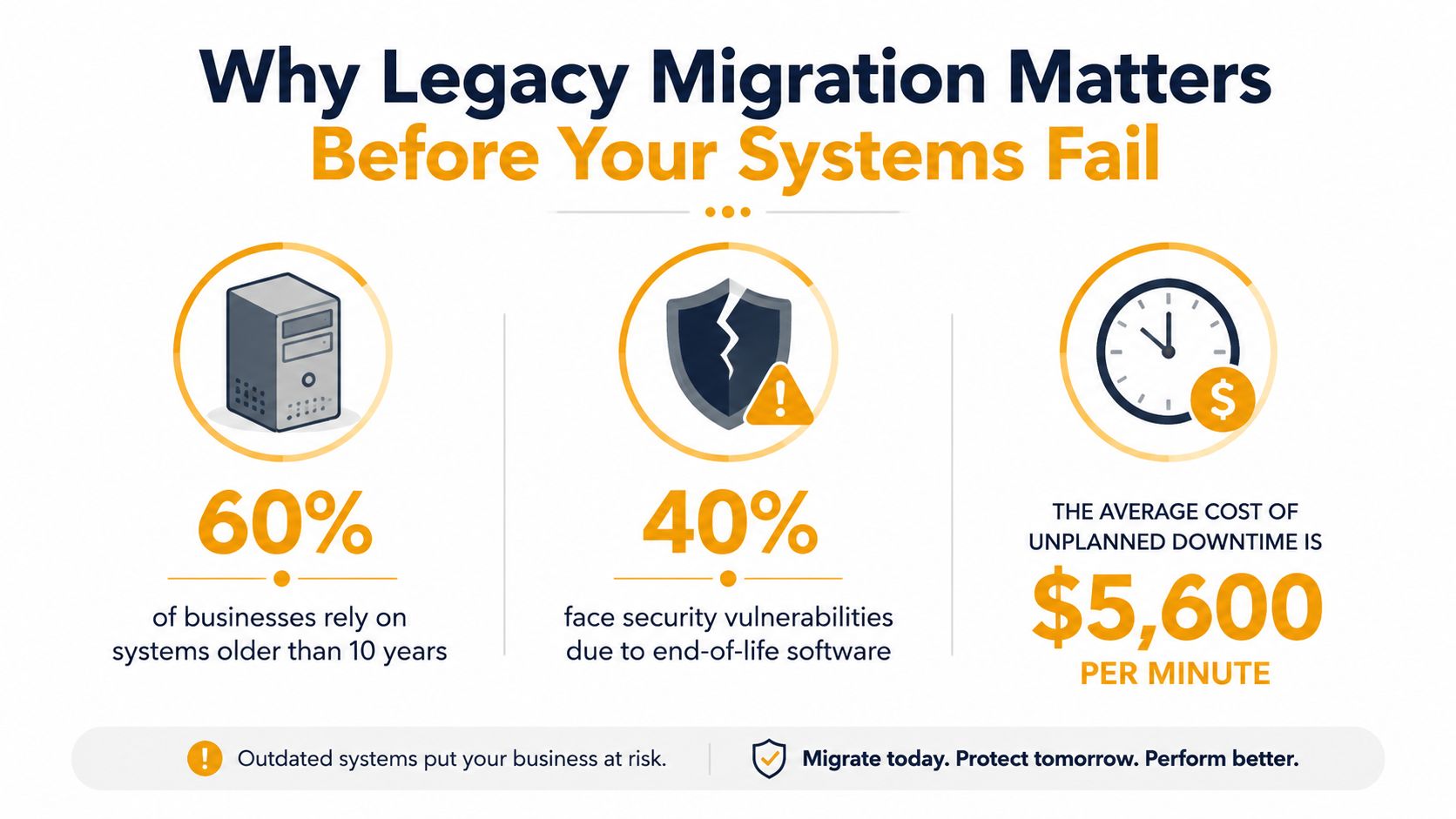
Planned change beats emergency repair
A reactive project starts with pressure. The team has limited choices, key people are unavailable, and nobody has time to validate whether the replacement supports every operational exception. A planned project starts with an inventory, business priorities, test data, and an agreed maintenance window.
A benchmark on phased migration reported a 92% success rate, 30% to 45% cost reductions, and 40% to 60% performance improvements, while rapid wholesale transitions achieved a 58% success rate (legacy migration risk guidance from SKBH Technology). Those results shouldn't be treated as a guarantee for your environment. They do support a practical conclusion: bounded workloads, formal risk controls, and staged delivery are safer than a big-bang cutover.
The right target may be a hybrid environment rather than a clean break. One application might move to a cloud platform, another might remain on-premises because of a device dependency, and a shared database might need an interim integration layer. That isn't failure. It's often the most responsible route for a business that can't tolerate prolonged downtime.
Practical rule: Migrate before the system forces your schedule. A controlled project gives you choices that an outage takes away.
Discovery and Assessment Steps You Cannot Skip
Migration estimates become unreliable when the team doesn't know what it owns. Start by creating a working inventory, not a polished diagram that hides uncertainty. Record every application, server, database, operating system, scheduled task, user group, vendor connection, backup job, and manual export that supports a business process.
Build a dependency map
For each system, ask four questions:
- Who uses it: Identify departments, external users, administrators, and the person who handles exceptions.
- What it exchanges: Document files, database connections, APIs, email workflows, printers, scanners, payment services, and identity providers.
- When it runs: Capture batch schedules, month-end jobs, overnight processing, report generation, and maintenance periods.
- What breaks without it: Connect the technical component to the business activity, such as billing, order fulfillment, payroll, or customer support.
The last question matters most. A server that appears low priority may host a file share used by a critical accounting workflow. A reporting tool may depend on a database view created years ago. The migration boundary follows business dependencies, not the labels in an asset spreadsheet.
Interview staff who perform the work, not only the system administrator. Ask them what they export manually, which screens they avoid, what they do when the application returns an error, and which reports must be available at specific times. Long-serving employees often know about operational connections that never made it into technical documentation.
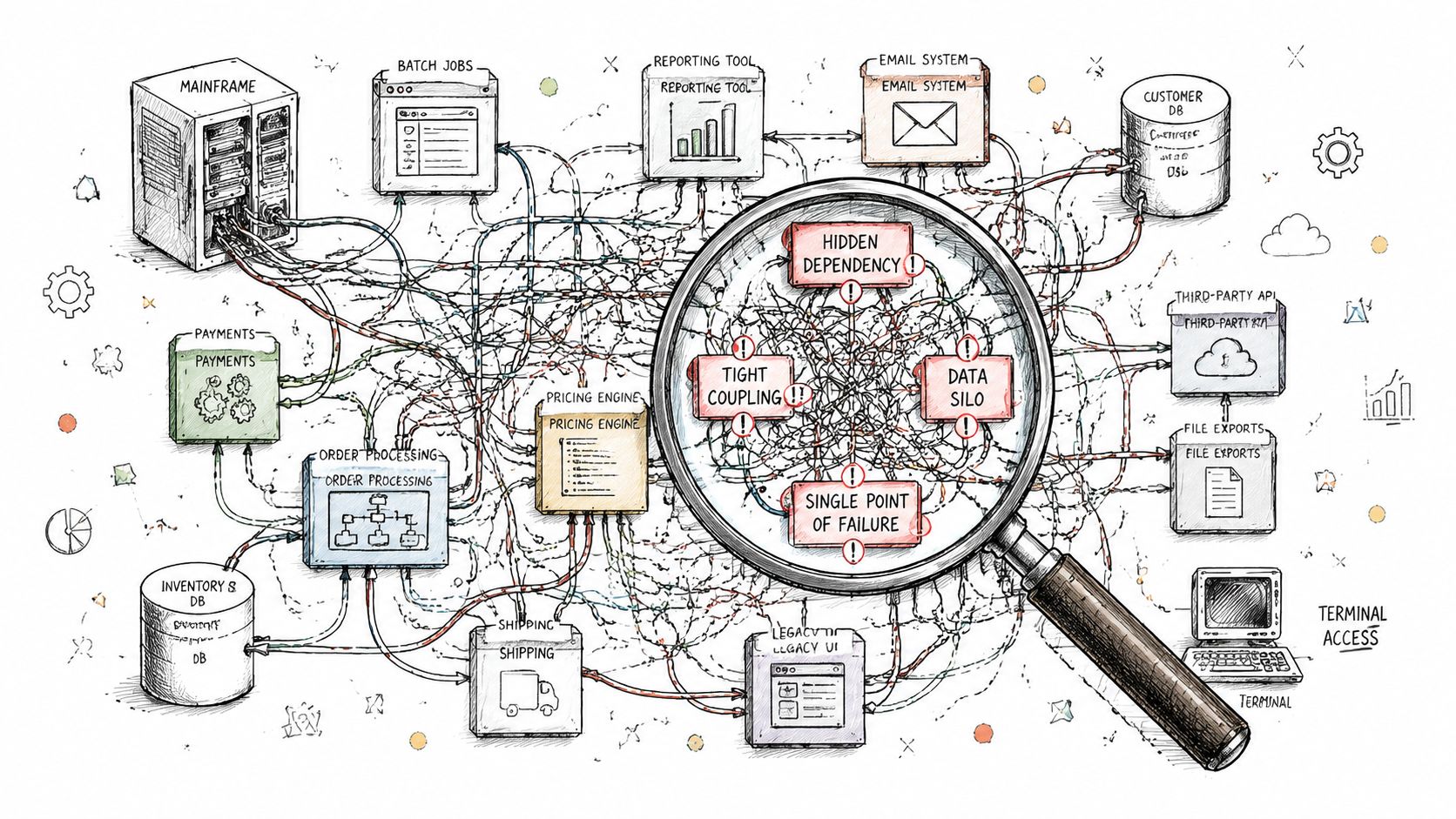
Establish a baseline before changing anything
Measure current behavior so the new environment has something concrete to match. Capture response times for important transactions, batch completion behavior, backup and restore results, error logs, storage growth, peak usage periods, and the reports users rely on. Also document data retention rules, access permissions, and any compliance obligations tied to the information.
Then classify each workload:
- Move: The dependency is understood and the target platform supports the workload with manageable changes.
- Improve: The application works, but its database, operating system, interfaces, or deployment model needs modernization.
- Replace: The system no longer fits the business process, support model, or integration requirements.
- Retain temporarily: The workload needs special handling, or its replacement depends on another migration.
Don't promise a date until these classifications are defensible. Discovery isn't administrative overhead. It's the work that prevents an apparently small migration from becoming an unplanned rewrite.
Choosing the Right Migration Strategy for Your Business
The safest strategy is the least disruptive option that solves the actual business problem. A company struggling with server maintenance doesn't automatically need a rewritten application. A company blocked by rigid workflows may gain little from moving the same code to a different host.
| Strategy | Best fit | Main advantage | Main trade-off |
|---|---|---|---|
| Lift and shift | The application is stable, dependencies are known, and the immediate concern is infrastructure | Fastest path with limited code change | Carries technical debt into the new environment |
| Replatform | The application is viable, but the operating system, database, or hosting layer is constraining it | Improves compatibility or scalability without changing core logic | Requires engineering and careful regression testing |
| Refactor | The business needs maintainability, cleaner integrations, or better control over selected components | Creates stronger long-term flexibility | Takes more time and demands deeper technical knowledge |
| Replace | The current product no longer fits the process or has no sustainable support path | Can simplify ownership and modernize the workflow | Requirements gaps can create major operational risk |
Lift and shift works well when a small business needs to leave aging hardware but can't redesign the application immediately. It reduces infrastructure exposure, but it doesn't fix inefficient code, brittle interfaces, or poor data structures.
Replatforming is often the sensible middle ground. For example, a business might keep its application logic while moving to a supported database service or a more maintainable hosting model. The team still needs to test drivers, authentication, reports, scheduled jobs, and backup behavior.
Refactoring should be selective. Rework the module that causes repeated incidents or blocks integration, rather than rewriting stable functionality just because the code is old. Replacing may be appropriate for a redundant accounting, ticketing, or inventory product, but only after users validate workflows, permissions, reports, data history, and exception handling.
The strangler pattern can reduce exposure by placing new capabilities around the old system and shifting functions gradually. It also creates an architectural risk: temporary integrations can become permanent. To avoid that, define ownership, exit criteria, and interface boundaries early. Teams evaluating cloud designs should also review architecture advice from SpecStory, Inc., particularly where a platform choice could make future moves difficult.
A migration to a cloud environment may be part of the answer, but it isn't a strategy by itself. Use this on-premises to cloud migration guide to frame the hosting decision around dependencies, security, operations, and business continuity rather than location alone.
Choose based on business urgency, internal skills, compliance constraints, growth plans, and tolerance for downtime. The most expensive mistake is selecting a strategy because it sounds modern, then discovering that the organization can't operate it.
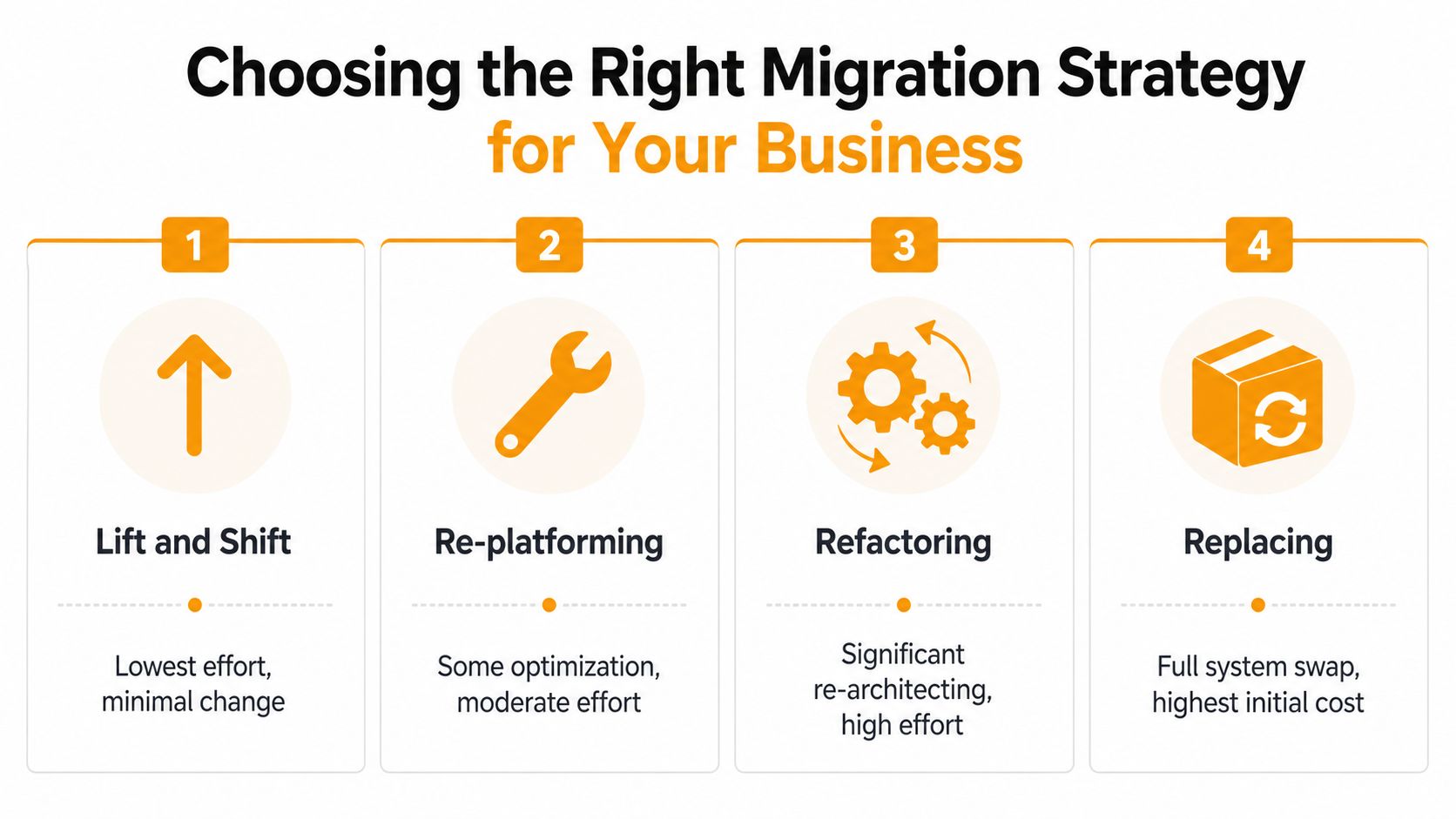
This video offers a visual introduction to the distinctions among common migration approaches:
Managing Risk Through Testing and Cutover Planning
A migration plan becomes credible when it explains how the team will detect failure, who will respond, and how operations will continue. Create a risk register before implementation begins. Give every risk an owner, a trigger, a mitigation, and a decision deadline.
Typical entries include incomplete data mapping, an unavailable vendor contact, failed authentication, report discrepancies, slow transactions, missing permissions, incompatible printers, and a backup that can't be restored. Rank each item by business impact and detectability. Don't hide uncertainty by assigning every risk a low rating.
Test in layers
Testing should progress from narrow checks to realistic business use:
- Component testing: Confirm individual scripts, services, interfaces, calculations, and data transformations.
- Integration testing: Verify that systems exchange the right records, formats, credentials, and error responses.
- Data validation: Reconcile source and target records using agreed rules. Check totals, relationships, dates, permissions, and retained history.
- User acceptance testing: Give representative employees real workflows, including unusual cases and manual exceptions.
- Performance validation: Test peak business activity, scheduled processing, reporting, backups, and recovery procedures.
Users shouldn't be asked whether the new system “looks good.” Give them acceptance criteria. They should confirm that an order can move through its complete process, that a manager can approve it, that the correct report is produced, and that an administrator can recover from a failed job.
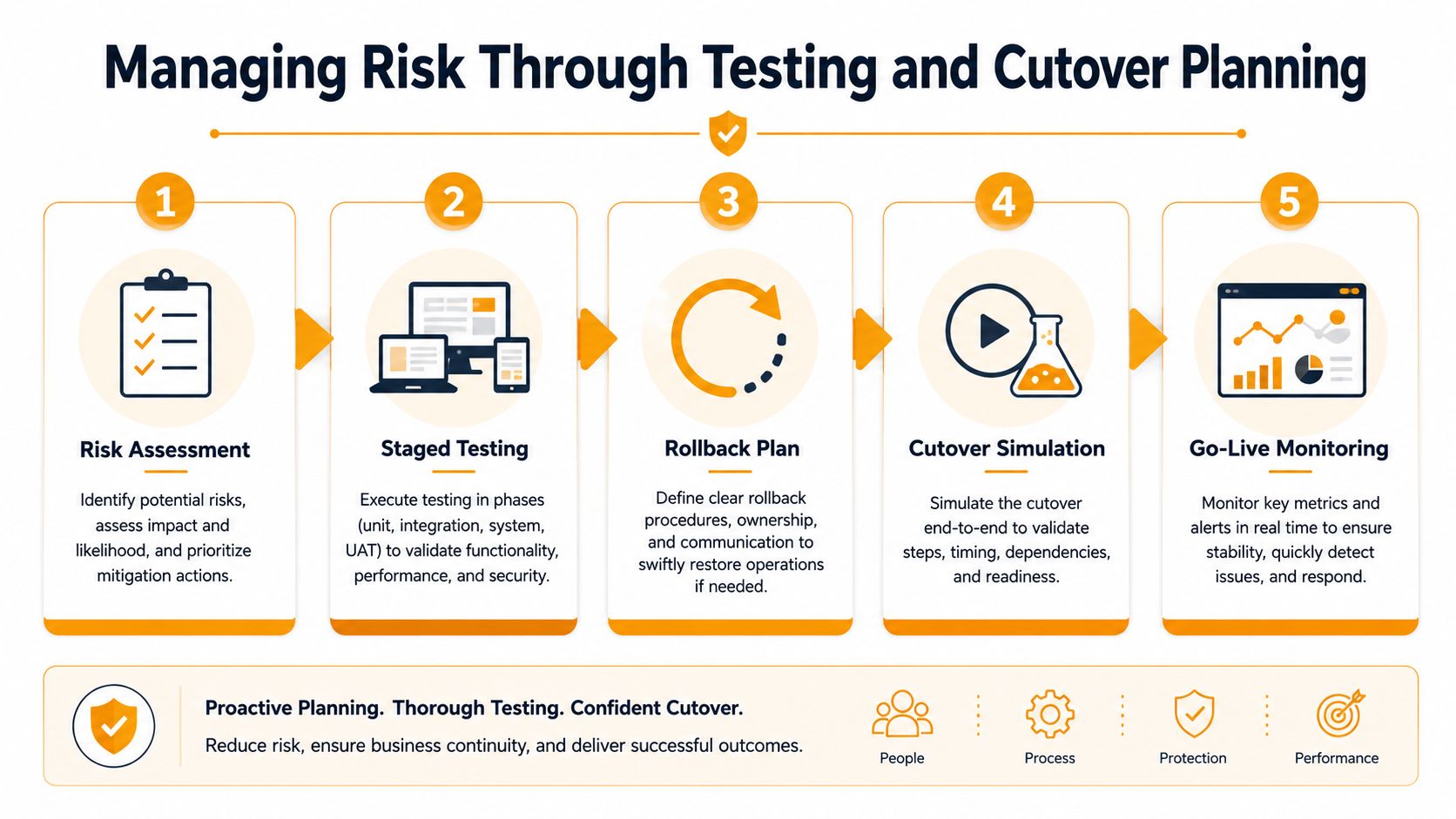
Treat rollback as a deliverable
Rollback planning is not a sentence saying “restore the old system if needed.” Define exactly what happens to new transactions, how data gets reconciled, who authorizes the decision, and how staff communicate the change. Preserve the source environment in a known-good state, confirm that backups restore successfully, and rehearse the steps in an environment that resembles production.
A cutover plan should identify the sequence of actions, responsible people, validation checkpoints, vendor contacts, communication templates, and go or no-go criteria. Schedule the work around the business calendar, then conduct a cutover simulation. The simulation should include a failed deployment, an incomplete data load, a user access problem, and a decision to stop.
Rollback is a business capability, not a technical afterthought. If nobody can explain how the company returns to a working state, the migration isn't ready for production.
Keep the old and new environments available long enough to compare results, but don't leave parallel operations undefined. Decide which system is authoritative, how changes are recorded, and when the legacy platform becomes read-only. After launch, monitor transactions, queues, logs, user reports, performance, and backup jobs. A small command center with named decision-makers is more useful than a large group chat where nobody owns the outcome.
Organizations that need a broader checklist can use these cloud migration mistakes and risk controls as a review point before scheduling cutover.
Estimating Costs, Timelines, and Security Requirements
Leadership needs an estimate it can challenge and update, not a single optimistic figure. Separate known costs from assumptions, then show which discovery findings would change the estimate. Include target infrastructure, licensing, migration engineering, data preparation, testing, training, temporary parallel operations, vendor support, monitoring, backup, and contingency work.
Kyndryl's 2025 update reported that the average mainframe modernization project cost fell from $9.1 million in 2024 to $7.2 million in 2025, a 19.8% decline, while expected ROI reached 288%, 297%, and 362% for modernizing on the mainframe, integrating with other platforms, and moving applications off the mainframe respectively (Kyndryl's modernization survey PDF). These are enterprise benchmark figures, not a quote for an SMB. They demonstrate why your estimate should distinguish migration approach, scope, and expected value.
Build a timeline that can survive discovery
Use milestones tied to evidence:
- Assessment complete: Inventory, dependencies, data boundaries, stakeholders, and acceptance criteria are documented.
- Pilot accepted: A bounded workload has passed functional, integration, data, and recovery tests.
- Migration rehearsal complete: The team has measured the cutover sequence and confirmed rollback.
- Production approval: Business owners have signed off on risks, downtime, support coverage, and go or no-go rules.
- Stabilization complete: Monitoring shows consistent operation and the remaining legacy responsibilities are assigned.
Don't compress testing to preserve a launch date. If discovery uncovers undocumented interfaces, the responsible response is to revise the schedule and explain why. A credible timeline includes time for remediation, user training, vendor response, and post-launch monitoring.
Carry security into the target environment
Map security controls before data moves. Confirm encryption during transfer and while stored, identity and access changes, privileged account handling, logging, audit-trail preservation, retention requirements, backup isolation, and incident response ownership. Regulated information requires more than a secure network path. The team must preserve evidence that access, changes, approvals, and data handling remain controlled.
For small businesses, security decisions should be written into the acceptance criteria. A system isn't ready because it loads quickly if former employees retain access, logs disappear during the transfer, or backups can't support recovery. Ask the target provider how it handles administrative access, monitoring, restoration tests, and compliance documentation before approving the architecture.
When to Migrate Yourself and When to Bring in Help
A self-directed migration can work when the environment is small, applications are relatively independent, the team has current infrastructure skills, and the business can assign someone to own discovery, testing, communications, and support. Start with a non-critical workload and keep the scope narrow. If the internal team can't protect time for the project, the apparent savings of doing it alone will disappear in delays and corrective work.
Bring in help when systems are tightly coupled, the data is regulated, the migration window is uncertain, or one employee holds most of the operational knowledge. External support is also sensible when the target environment involves hybrid identity, multiple cloud platforms, complex networking, or a replacement application that changes business workflows. The partner should strengthen your team, not take ownership of decisions your business must make.
Use application modernization services as a reference when comparing technical approaches and support models. During provider selection, ask for a dependency-mapping method, sample risk register, testing responsibilities, rollback procedure, escalation model, documentation deliverables, and post-cutover support terms. A provider that promises a fast move without asking about users, data, integrations, and recovery deserves caution.
A practical starting checklist for this week:
- Name the business owner: Assign one person who can make scope and go or no-go decisions.
- Inventory the estate: List applications, infrastructure, data stores, integrations, vendors, and manual workarounds.
- Interview users: Capture the workflows and exceptions that technical diagrams miss.
- Choose a pilot: Select a bounded workload with visible value and manageable operational risk.
- Write acceptance and rollback criteria: Define what must work, who approves launch, and how the business returns to the old system.
Legacy system migration becomes manageable when the team replaces optimism with evidence. Start with the inventory, protect the rollback path, and let each successful phase earn the right to expand.
IT Cloud Global, LLC helps Houston businesses assess aging infrastructure, plan migrations, architect hybrid or cloud environments, and support platforms such as AWS, Google Cloud, and Microsoft Azure and Microsoft 365. Visit IT Cloud Global, LLC to discuss your current dependencies, security requirements, and a practical migration roadmap.
- DevOps Implementation for SMBs: A Practical Roadmap
- On Premises to Cloud Migration: A Practical Guide 2026
- Application Modernization for SMBs: Boost Efficiency &
- Software Development Services: A Practical Guide for 2026
- Cleveland IT Services: Your Partner Guide for 2026
- Houston IT Support: A 2026 Guide for SMBs
- Modernization of Technology for Houston SMBs