


Recovery Point Objective: A Practical Guide for SMBs
A ransomware alert hits your Houston office before breakfast. By midmorning, your team has rebuilt the accounting system from last night's backup. The database opens, but today's invoices, shipment updates, customer messages, and payment records are missing. Nobody needs a lecture on disaster recovery at that point. They need to know whether the business can reconstruct the lost work.
That question is the practical meaning of recovery point objective, or RPO. It defines how far back your restored data may be after a disruption. The right RPO isn't selected from a backup product menu. It's set by the amount of data your business can afford to lose, workload by workload.
Table of Contents
- Why Recovery Point Objective Matters Before the Next Outage
- What Recovery Point Objective Means
- RPO Compared to RTO, Backup Retention, and SLA Recovery Promises
- How to Calculate and Set RPO for Each System
- Realistic RPO Targets and the Cost Trade-offs They Demand
- Implementing RPO with Cloud Providers and Managed Services
- Testing Your RPO So It Survives a Real Outage
- Putting It Together and Choosing the Right Partner
Why Recovery Point Objective Matters Before the Next Outage
A ransomware alert hits a Houston office before breakfast. By midmorning, the accounting system is restored from the previous night's backup, but today's invoices, shipment updates, customer messages, and payment records are gone. The team needs to know whether the business can reconstruct that lost work, not hear another general lecture about disaster recovery.
A daily backup can look responsible on paper and still leave a serious gap. If an outage occurs shortly before the next scheduled job, the organization could lose nearly a full day of transactions, as explained in this business continuity planning guidance.
The first question is “How much recent data can this system lose before the business takes unacceptable damage?” That answer defines the recovery point objective, or RPO. Choose it by workload and business impact. Select backup technology only after that decision.
RPO controls the data-loss ceiling
RPO sets the maximum acceptable age of the latest usable data point when an outage occurs. A daily backup creates a potential loss window of about 24 hours. A 4-hour backup or replication cycle reduces that window to roughly four hours. The technology matters because it must meet the business's stated tolerance.
The same gap has different consequences across systems. Losing a day of archived marketing files may be inconvenient. Losing a day of point-of-sale transactions, patient records, payroll changes, or customer orders can create reconciliation work, compliance problems, and disputes about what happened.
Stop using one backup rule for every workload
A Houston professional services firm may need tighter protection for billing records than for old project folders. A retailer may require frequent protection for its sales database while accepting a wider window for a static administrative share. A medical practice may set one target for clinical records and another for office documents.
Treat every critical workload as a separate business decision:
- Identify the business owner: The person accountable for the process should define the loss tolerance, not the backup vendor.
- Separate systems by impact: Accounting, operations, email, shared files, and line-of-business applications rarely deserve identical targets.
- Document the decision: Record the RPO beside the workload, its owner, and its recovery method.
- Fund the risk deliberately: Spend more on systems where recent data affects revenue, service delivery, safety, or compliance.
Practical rule: One company-wide RPO usually describes the backup software, not the business risk.
What Recovery Point Objective Means
The NIST glossary definition of recovery point objective defines RPO as the maximum acceptable amount of time since the last data recovery point. In practical terms, it sets how far back your business can afford to go after an outage.
A Houston bookkeeping firm that records transactions continuously has a different recovery position from one that copies its ledger once each day. If both lose their systems at closing time, the first may recover nearly current work, while the second may lose the day's entries. The software is only part of the answer. The recovery cadence determines the gap.
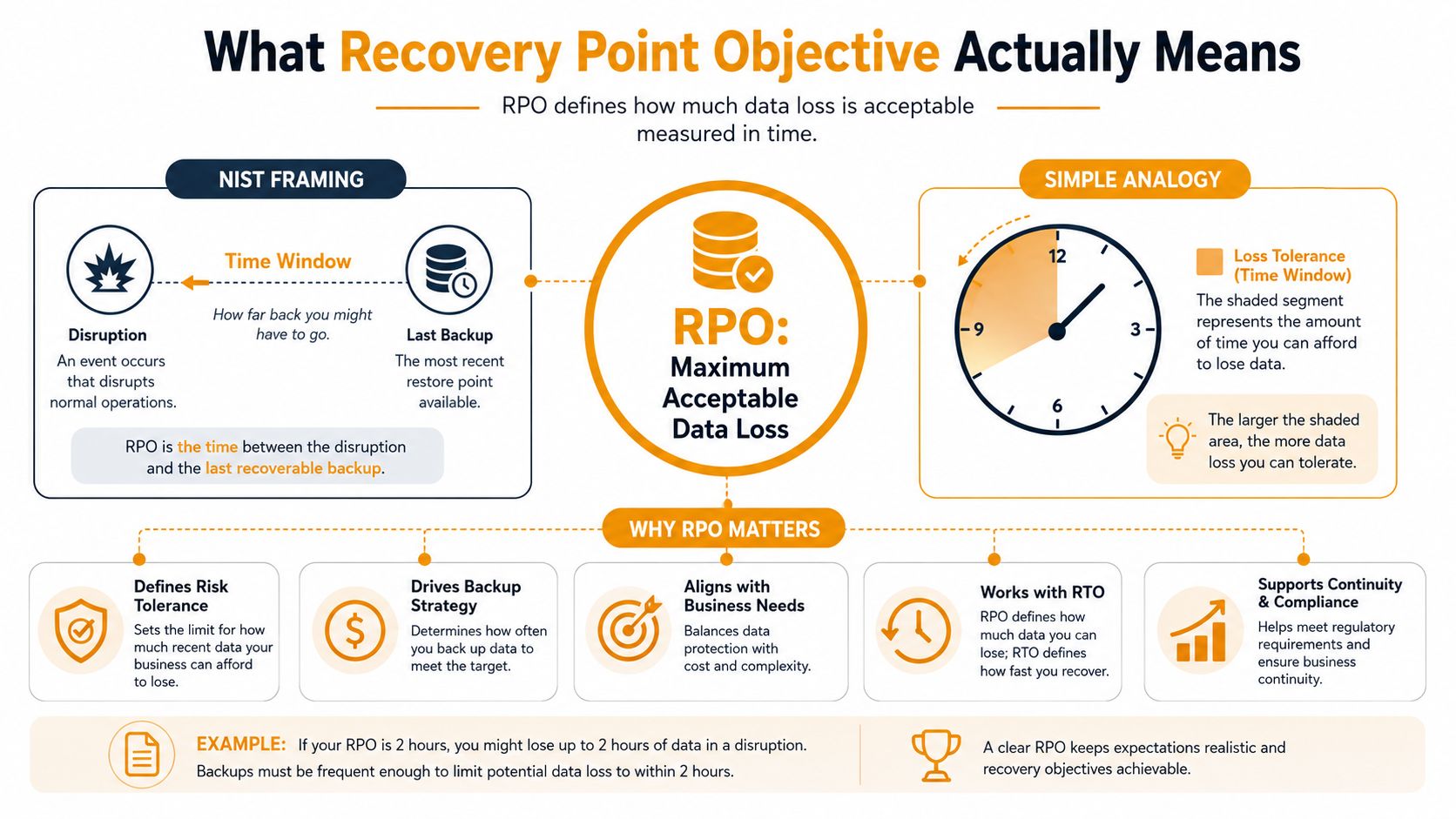
RPO is a business tolerance, not a vendor setting
Start with the consequence of losing recent data. A missed transaction that triggers a customer dispute, manual re-entry, or regulatory concern deserves a tighter target. Data that changes rarely or can be recreated may support a wider one.
The workload's target then drives the technical design. A shorter RPO usually means more frequent backups, more replication, additional storage, stronger network capacity, and closer monitoring. A longer RPO can reduce those demands, but it leaves a larger gap when the primary environment fails.
Set RPO by workload, not by company-wide habit. Billing, point-of-sale records, payroll, email, shared files, and line-of-business applications carry different risks. The business owner should define the tolerable loss, document it beside the recovery method, and approve the related spending. A backup vendor should not make that decision.
The time window is the part people miss
Suppose the business accepts an RPO of four hours. At failure, the available recovery point must be usable and no older than that window. A scheduled job does not satisfy the target if its copy is incomplete, corrupted, application-inconsistent, or impossible to restore.
RPO is not the same as backup frequency. Frequency describes how often a protection process runs. RPO describes the age of the last usable recovery point when recovery begins. A platform can run jobs on schedule and still miss the business target if replication falls behind or restores fail.
Reserve the recovery planning guidance for the later cost-tradeoff discussion. The practical rule here is simple: choose the data-loss tolerance first, then select technology that can meet it.
RPO Compared to RTO, Backup Retention, and SLA Recovery Promises
Small businesses often place RPO, recovery time objective, retention, and service-level promises in the same mental bucket. They're different controls, and confusing them creates recovery plans that look complete on paper while leaving critical decisions unanswered.
RPO measures data loss. RTO measures downtime. If a company sets a four-hour RPO, it's defining how much recent information it may lose. If it sets an RTO of four hours, it's defining how quickly the service must become usable again. One concerns the recovery point. The other concerns the recovery duration.
One firm, four different questions
Take a 25-seat professional services firm using QuickBooks in the cloud, Microsoft 365 for email, and an on-premises file server. The firm might decide that billing data needs a tighter RPO than older project files. It might also require the email service and file server to return within different time limits.
Here's how the terms separate:
| Term | Question it answers | Example decision |
|---|---|---|
| RPO | How much recent data can we lose? | Billing records must restore from a sufficiently recent point. |
| RTO | How long can the service remain unavailable? | Staff need access to a critical application within the agreed recovery window. |
| Backup retention | How long do we keep historical recovery points? | The firm preserves older copies for operational, legal, or audit needs. |
| SLA recovery promise | What does a provider promise about its service? | A cloud provider describes availability or restoration responsibilities under its contract. |
A provider's recovery promise may describe the provider's infrastructure, not the condition of your customer records after a cyberattack or accidental deletion. Read the contract, then verify what data protection, restoration responsibility, exclusions, and testing obligations belong to your business.
For broader planning context, these business continuity strategies from Wonderment Apps provide useful terminology comparisons. Your backup design also needs to account for where copies live and how they're recovered, which is why an offsite backup approach belongs in the same conversation.
Don't let a long retention period reassure you about a weak RPO. Keeping old backups for years won't recover transactions that never made it into a usable recovery point.
How to Calculate and Set RPO for Each System
You can establish useful RPOs without building an enterprise committee. Start with the people who operate each process, then make them answer what failure would cost.
A four-step working method
1. Classify the workload.
Separate systems by business impact. A point-of-sale database, payroll platform, clinical application, and customer order system usually deserve more attention than an archive share. Classification should reflect the consequence of missing recent data, not the age or price of the server.
2. Estimate the tolerable loss.
Ask what the team would have to reconstruct after losing recent changes. Count invoices, orders, approvals, records, messages, and work products qualitatively if exact financial modeling isn't available. The useful answer may be “a few hours of sales activity is unacceptable,” not a false precision that nobody can defend.
3. Translate tolerance into cadence.
If the business chooses a 10-minute RPO, protection must run at least every 10 minutes, according to cloud RTO and RPO guidance from AvePoint. A 24-hour RPO can often be served by one daily backup, but the scheduled interval only establishes a possibility. The recovery point still has to be complete and usable.
4. Validate the result.
Restore the workload. Check the recovery-point timestamp, application consistency, records, permissions, and dependencies. A failed or unverified backup doesn't count toward the objective because the true RPO is based on the last usable recovery point, not the last job that reported activity.
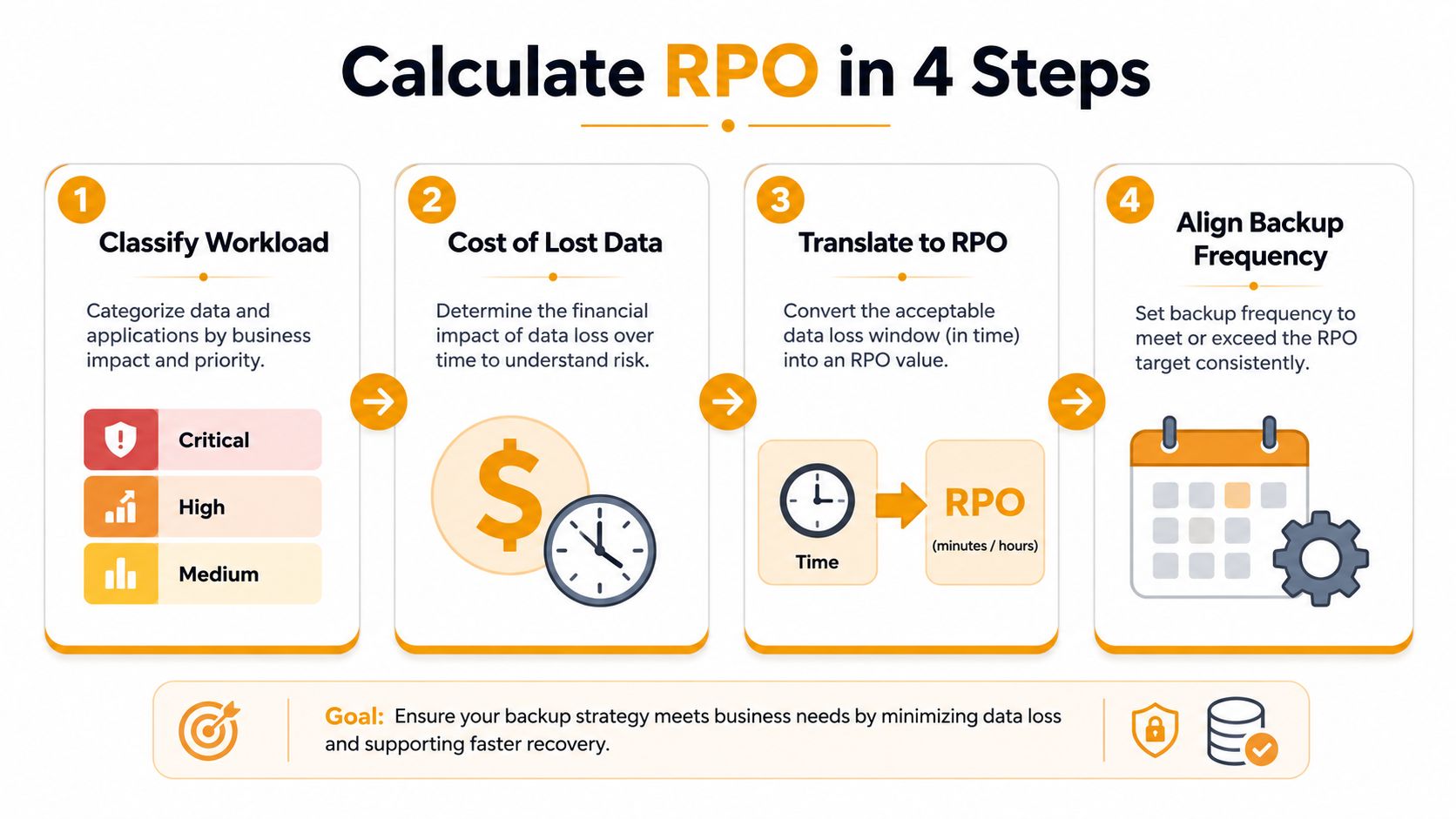
A retailer's practical workload map
A small retailer might classify its point-of-sale database as critical, its HR system as important but less time-sensitive, and its shared file drive as mixed. Sales records change throughout the day and may need frequent protection. HR documents may tolerate a wider interval. The shared drive should be split by content, because active purchasing files and old reference material don't carry the same consequence.
For each system, record four items:
- Owner: Who decides whether the target is acceptable?
- RPO: How old may the usable recovery point be?
- Protection method: Backup, snapshot, replication, or a combination.
- Proof: When did the team last restore and verify it?
AWS and practical RPO planning guidance from Fortiv both reinforce the need to define targets per workload and test actual recovery. A documented target without a tested restore is an aspiration, not an operating control.
Realistic RPO Targets and the Cost Trade-offs They Demand
The right RPO depends on the workload, not the backup product. A small Houston business may need frequent protection for transactions or patient scheduling, while older documents can tolerate a wider gap. Paying for the tightest target across every system wastes money and adds operational work without reducing a meaningful business risk.
Shorter RPOs require more frequent protection, storage, network activity, monitoring, application coordination, and recovery testing. The actual burden varies with data volume, change rate, platform, retention policy, and recovery architecture.
RPO tiers and what each one costs
| RPO Tier | Backup Method | Storage Overhead | Complexity | Best Fit |
|---|---|---|---|---|
| 24-hour daily backup | Scheduled full or incremental backup | Lower relative overhead | Lower operational complexity | Archived documents, infrequently changing HR material, and noncritical file shares |
| 4-hour incremental backup | Frequent incremental backup or replication | Moderate overhead | Moderate monitoring and restore coordination | Billing data, operational files, and business systems where a workday gap is unacceptable |
| 1-hour near-continuous snapshot | Hourly snapshots or frequent point-in-time protection | Higher overhead | More monitoring, application consistency checks, and recovery planning | Active customer records, order processing, and heavily used line-of-business applications |
| Minutes-level replication | Near-continuous replication to a secondary environment | Highest relative overhead | High orchestration, network, failover, and testing requirements | Systems where even a short transaction gap creates serious operational consequences |
A 10-person law firm might accept a wider RPO for older case documents, yet require tighter protection for active matter files and billing records. A 60-person healthcare practice may need stronger protection for clinical and scheduling systems than for general administrative material. The workload decides the tier, and the business owner should approve that decision.
Don't chase the smallest number everywhere
A very low RPO is a poor choice when its infrastructure and operational burden exceed the consequence of the data gap. Recovery objectives should match business requirements. Minimal data loss is not automatically worth the added cost.
Use a tiered model. Give the strongest protection to systems that generate revenue, deliver services, or hold irreplaceable records. Give less demanding workloads a sensible daily or periodic target. Put the savings toward monitoring, restore testing, and staff readiness. AWS reliability planning documentation supports defining recovery objectives around business needs rather than applying one target everywhere.
The practical question is simple: what would a lost hour cost this specific workload, and what would preventing that loss require? Answer it system by system before buying a tighter protection tier.
Implementing RPO with Cloud Providers and Managed Services
Cloud platforms provide useful controls, but they don't know which of your workloads matter most. AWS, Microsoft Azure, and Google Cloud can supply snapshots, backups, replication, and recovery orchestration. Your team still has to define the business tolerance first.
For AWS, AWS Backup can centralize protection policies across supported resources, while Amazon S3 Cross-Region Replication can support geographically separate copies for suitable object workloads. Those services may fit different RPO designs, but neither one decides whether your accounting system can lose an hour of work.
Azure offers controls such as Azure Blob point-in-time restore and cross-region replication options. Point-in-time recovery can support a restore-oriented design, while replication can support a more continuously protected architecture when the workload and consistency model justify it. Microsoft 365 also requires deliberate administration because cloud-hosted email, files, identities, and collaboration data still need an agreed recovery approach.
Google Cloud provides persistent disk snapshots and replication-related architecture options for workloads running on its platform. The correct selection depends on whether you're protecting a virtual machine, database, object store, or application with several coordinated components.
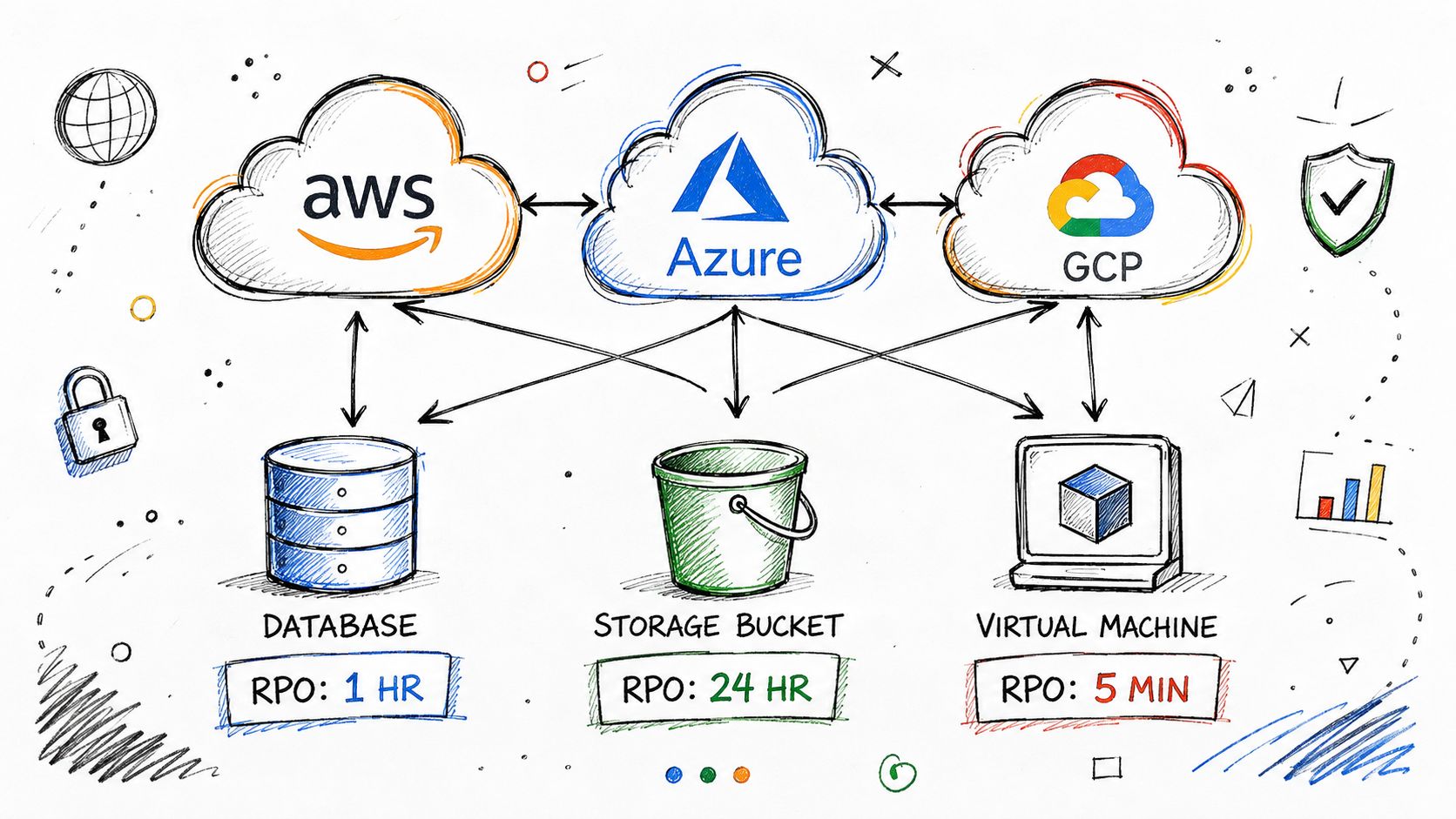
Put the objective before the control
Start with the workload register. Assign each system an RPO, identify the data dependencies, then choose the cloud control that can produce and restore the required recovery point. A small business cloud backup guide can help owners organize the broader cloud recovery discussion, but the business still needs to make the risk decisions.
A managed provider such as IT Cloud Global, LLC can operate the monitoring, backup administration, replication orchestration, and Microsoft 365 environment around those targets. That changes who performs the work, not what the target means. The provider must still show the last usable recovery point, explain exceptions, and test restoration across AWS, Azure, Google Cloud, on-premises systems, and hybrid dependencies.
Testing Your RPO So It Survives a Real Outage
An untested RPO is just a wish. A dashboard that says “successful” doesn't prove that the application can start, the database is consistent, the permissions work, or the recovered records include the changes the business expected to preserve.
Use a testing rhythm your team can maintain:
- Quarterly tabletop exercises: Walk through an outage scenario with business owners, IT staff, vendors, and decision-makers. Confirm who declares the incident, who approves recovery, and which systems come first.
- Semi-annual technical restores: Restore representative systems and inspect the result. Don't stop at file visibility. Open the application, authenticate users, check dependencies, and compare the recovery-point age with the target.
- Annual full recovery test: For tier-one systems, perform a complete failover or recovery into the planned environment. Verify that staff can conduct real operating tasks, not just that servers start.
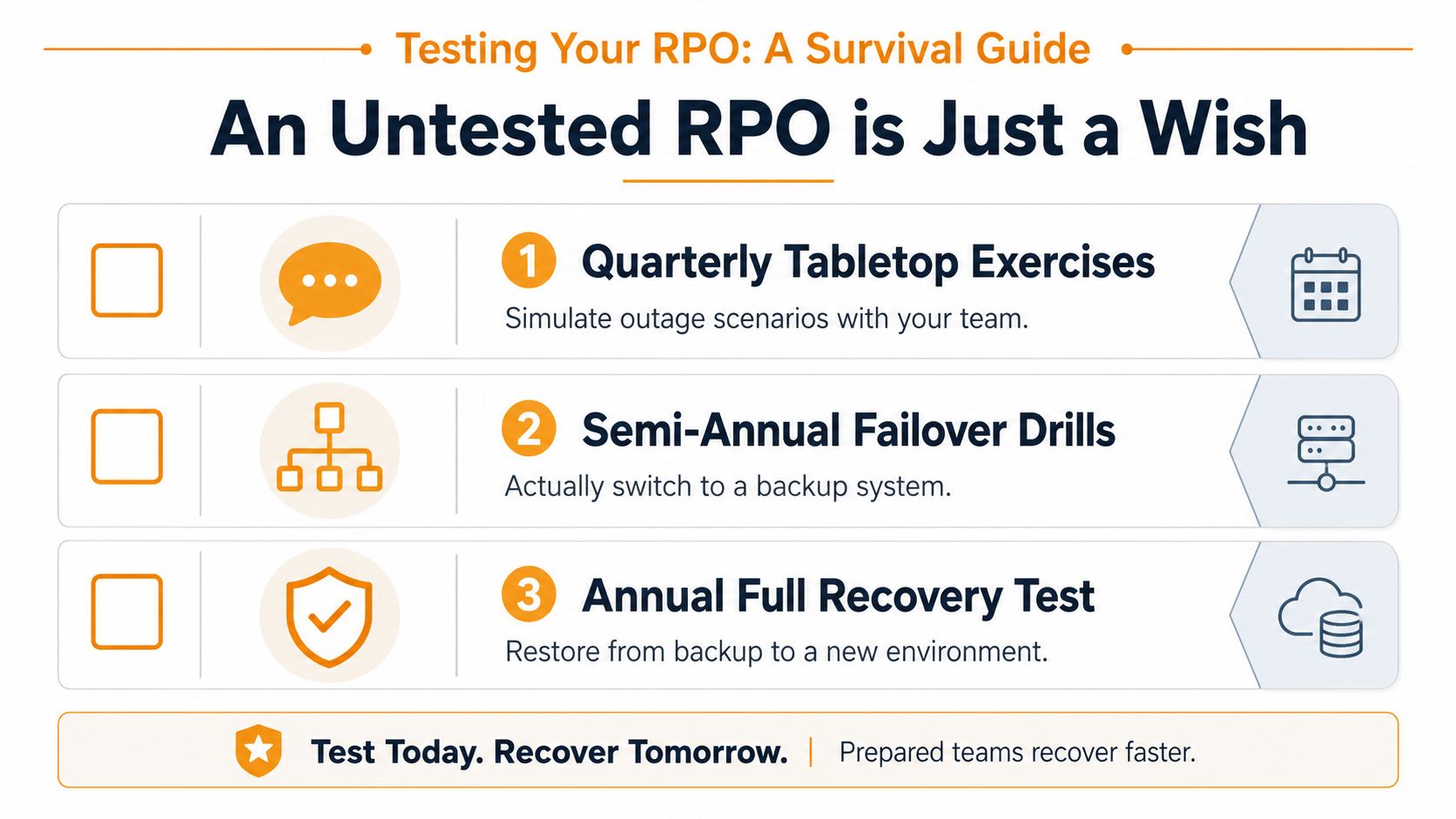
Check the recovery point, not just the job status
During each test, record:
- Completion timestamps: Confirm when protection finished.
- Recovery-point age: Compare the usable point with the agreed RPO.
- Restore duration: Capture how long the system took to become functional, which supports the separate RTO decision.
- Data integrity: Reconcile records, files, permissions, and recent transactions.
- Application consistency: Verify that connected services recover together rather than producing an unusable collection of isolated copies.
Silent replication lag can widen the loss window. Snapshot chains may depend on an earlier full copy. Excluded folders, unsupported databases, and unprotected SaaS data can violate the agreement even while the backup console remains green.
The 2026 disaster recovery testing checklist can help organize the exercise. A short video can also give nontechnical staff a clearer picture of why recovery testing matters.
Write this in your runbook: The RPO is the age of the last usable recovery point at failure time, not the age of the last backup that ran.
Putting It Together and Choosing the Right Partner
Set RPOs by workload, classify the business impact, translate each tolerance into a protection cadence, and prove the result with real restores. Keep quarterly tabletop exercises, semi-annual technical restores, and an annual full recovery test for the most critical systems. Don't buy the most expensive backup bundle by default, and don't accept a daily policy for every application without asking what one lost day would do.
Most Houston SMBs don't need to design and operate this alone. A partner listed among disaster recovery companies can map targets across Microsoft 365, AWS, Azure, Google Cloud, and on-premises workloads, then monitor and test the environment.
IT Cloud Global, LLC provides managed backup, disaster recovery, cloud administration, and recovery testing for Houston businesses that need a defined recovery point objective across mixed environments. Visit IT Cloud Global, LLC to request a free estimate and discuss which workloads need tighter protection, which can accept a wider window, and how to validate both in practice.
- Your 2026 Disaster Recovery Testing Checklist
- Your 2026 Disaster Recovery Plan Checklist
- The Importance of BCP: Business Survival in 2026
- Data Breach Response Plan: Essential SMB Guide 2026
- Cloud Backup Solutions for Small Business: A 2026 Guide
- Disaster Recovery Companies: An SMB Survival Guide
- Disaster Recovery Plan for Small Business: Your 2026 Guide