


Top Managed Services Provider Houston: Your 2026 Guide
If you're looking for a managed services provider in Houston, you're probably already feeling the cost of weak IT support. Maybe tickets sit too long. Maybe your office Wi-Fi drops at the worst time. Maybe your current vendor promised an “all-inclusive” plan, then started billing extra for after-hours work, cloud cleanup, or projects that somehow weren't included.
That's the core problem for most Houston small businesses. It's not just finding someone who can fix computers. It's finding an IT partner that can keep operations stable, explain what you're paying for, and not trap you in a pricing model that looks simple on the front end but gets expensive once your environment gets more complicated.
A lot of owners wait too long to make a change because switching feels risky. In practice, staying with the wrong provider is usually riskier. Downtime, recurring security gaps, and surprise invoices cost more than a well-run support agreement ever will.
Table of Contents
- Why Houston Businesses Can No Longer Ignore Managed IT
- Defining Your Core IT Service Needs
- Your Vendor Evaluation Checklist and Questions to Ask
- Decoding Houston MSP Pricing and Service Level Agreements
- The Onboarding Roadmap What to Expect When You Switch
- Why Houston SMBs Choose IT Cloud Global
Why Houston Businesses Can No Longer Ignore Managed IT
A Houston business can limp along with reactive IT support for a while. Then a busy week hits. A file share stops syncing, Microsoft 365 access gets disrupted, remote staff can't connect, and your internal point person is stuck juggling vendors instead of fixing the actual issue. That's usually the moment owners realize break-fix support isn't a strategy. It's a delay.
Houston companies don't operate in a slow market. Logistics, healthcare, professional services, retail, and field-based operations all depend on systems being available when staff need them. If your support model only activates after something breaks, the business is always behind.
The local shift is already obvious. Over 47 percent of small and mid-sized businesses in Houston now use managed IT services, up from 31 percent five years ago, according to Houston managed IT market data. That isn't just an IT trend. It shows how business owners are treating uptime, security, and support coverage as operating requirements instead of optional add-ons.
Why break-fix stops working
Reactive support tends to fail in the same ways:
- Problems repeat: The same printer issue, Wi-Fi complaint, or login failure keeps coming back because nobody is addressing root causes.
- Responsibility gets blurred: Your internet provider blames your firewall. Your software vendor blames your workstation. Your IT person blames both.
- Costs become irregular: One quiet month is followed by a large invoice when several things fail at once.
- Security falls behind: Patching, endpoint monitoring, backup review, and access control drift when nobody owns them day to day.
Practical rule: If your IT only gets attention when users complain, you don't have managed support. You have expensive waiting.
A solid managed services provider in Houston should reduce operational friction before it turns into downtime. That means monitoring, maintenance, user support, vendor coordination, and clear accountability. It also means understanding local business realities, especially for teams with multiple sites, warehouse connectivity issues, compliance pressure, or hybrid workers.
If that sounds familiar, this breakdown of Houston IT challenges and how managed support solves them is worth reading. It lines up with what many owners are already dealing with on the ground.
What business owners should take from this
You don't need a giant company to justify managed IT. You need enough dependence on technology that disruptions hurt revenue, customer service, or staff productivity. For most small businesses, that threshold was crossed a long time ago.
The decision now isn't whether you need outside support. It's whether your provider can prevent problems, price work clearly, and support the way your business runs.
Defining Your Core IT Service Needs
Most bad MSP decisions start with a vague requirement like “we need IT support.” That's too broad. Before you compare providers, define what your business needs them to own.
A real managed relationship should cover more than helpdesk tickets. According to Meriplex's Houston MSP guidance, a full-service MSP methodology spans 15+ critical domains and should reduce average incident resolution time to under 45 minutes. That benchmark matters because it separates true operational coverage from a vendor that mainly answers calls and escalates the hard work elsewhere.
What a complete provider should actually cover
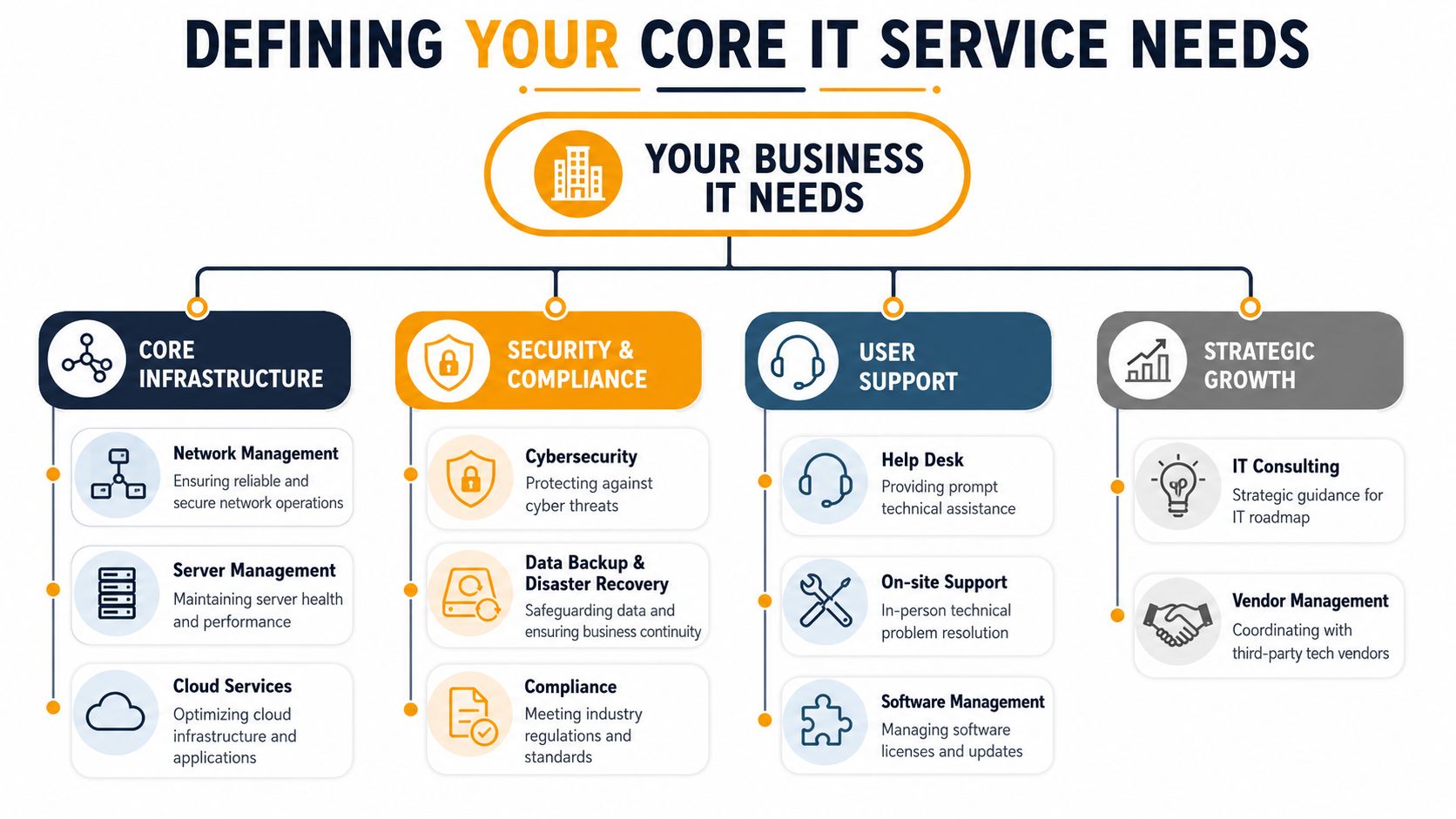
For a Houston SMB, these are the core buckets that matter most:
- Helpdesk and user support: Staff need a clear place to go when email breaks, a laptop won't connect, or a line-of-business app behaves strangely. Good helpdesk support is responsive, documented, and able to solve common issues without bouncing users around.
- Monitoring and maintenance: Servers, workstations, backups, firewalls, and cloud systems need ongoing attention. “Proactive” should mean the provider is watching for failed backups, unhealthy hardware, patch gaps, and service degradation before users open tickets.
- Cybersecurity operations: This includes endpoint protection, patching, access controls, email security, and response procedures. It should also include practical guidance on reducing employee-driven risk.
- Backup and disaster recovery: Backups aren't useful if nobody verifies they can restore. A provider should explain where backups live, how recovery works, and what happens if Microsoft 365 data, file shares, or a server become unavailable.
- Cloud administration: If you use Microsoft 365, Azure, AWS, or Google Cloud, someone needs to manage identity, licensing, permissions, storage, and drift over time.
- Network and vendor management: Your internet circuit, firewall, switches, wireless setup, phone system, and third-party apps all interact. Someone should own coordination when they don't.
What to look for inside each service area
Don't just ask, “Do you offer this?” Ask how they deliver it.
A few examples:
| Service area | What to ask |
|---|---|
| Helpdesk | How do users open tickets, and who answers after hours? |
| Security | What layers do you manage beyond antivirus? |
| Backup | How often do you test restores, and what gets excluded? |
| Cloud | Who handles Microsoft 365 administration, user lifecycle, and license changes? |
| Network | Do you support firewalls, switches, Wi-Fi tuning, and ISP coordination? |
| Projects | What's included in support versus billed separately? |
That last question matters more than many owners realize. Support agreements often sound broad until you ask about onboarding new sites, replacing aging equipment, cleaning up Microsoft 365 permissions, or handling a cloud migration.
A provider that can't define what's included usually creates billing disputes later.
For software-heavy businesses, security testing also deserves direct attention. If your company relies on web apps or SaaS platforms, Affordable Pentesting's expert guide gives a useful breakdown of how application security reviews fit into a broader risk program. It's a good complement to the infrastructure-focused services most MSPs discuss.
One provider may be strong on support but weak on cloud governance. Another may manage endpoints well but outsource networking or compliance work. That's why “full service” should be tested, not assumed.
Your Vendor Evaluation Checklist and Questions to Ask
Most MSP sales calls sound polished. The problem is that polished answers often hide weak delivery. You need questions that force specifics.
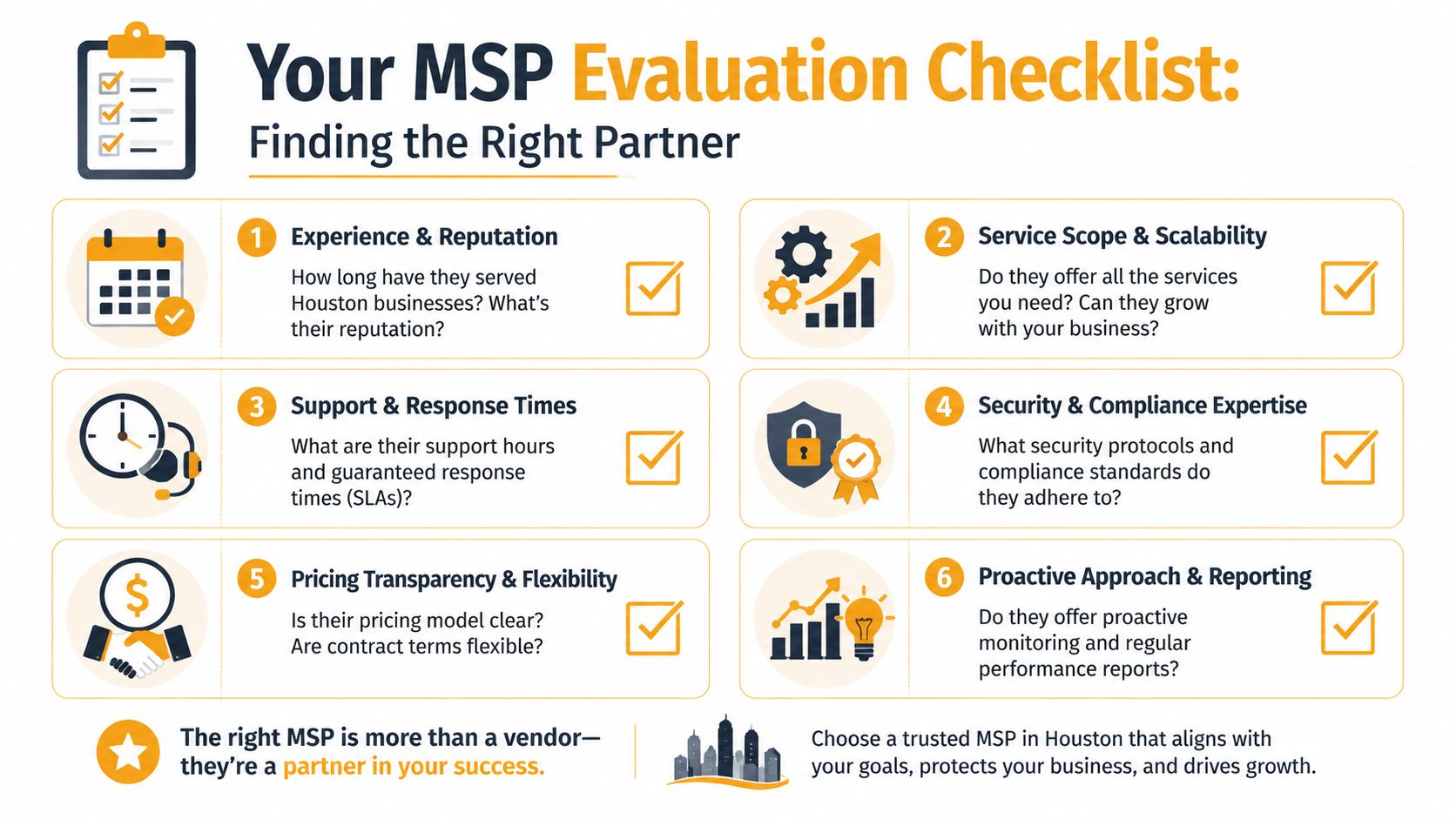
Start with this visual checklist, then use the follow-up questions below to drive the conversation.
Questions that expose weak providers fast
Ask these in plain language, not technical jargon.
Who supports my users day to day?
You want to know whether the provider has a real helpdesk, dedicated engineers, and local field support, or whether everything gets routed through a generic queue.What does onboarding look like from contract to go-live?
Good providers have a defined process for discovery, documentation, tool deployment, security review, and staff communication.What happens during a critical outage?
Ask how they triage, who gets involved, how they communicate status, and whether they coordinate directly with your vendors.
Before the next set of questions, it helps to see how other businesses frame provider selection. This guide on how to choose a managed service provider covers many of the same decision points from the buyer side.
The security discussion should get very specific. According to Cloudtango's Houston MSP overview, success rates for SMBs adopting a layered security plus cloud-native disaster recovery strategy exceed 88%. That's why you should ask your MSP candidate exactly how they handle endpoint protection, patch management, backup design, and proactive network optimization. If they stay vague, that's your answer.
Here's a useful video if you want a quick frame for the conversation:
Answers that should make you cautious
Some responses sound fine until you've seen what they lead to.
- “We do everything.” That usually means they haven't defined scope well.
- “Our tools handle most of it automatically.” Tools help, but they don't replace engineering judgment, review, and follow-through.
- “Security is included.” Ask what that means. Endpoint protection? Email filtering? Backup monitoring? Access reviews? Incident response guidance?
- “We can support compliance.” Ask which frameworks or regulatory environments they work with in practice.
If an MSP can't explain their security stack in business terms, they probably can't support it well under pressure.
One more question gets overlooked: Do you provide onsite support in Houston when remote support isn't enough? Some providers can remote into a laptop quickly but struggle when a switch fails, a cabling problem affects a suite, or a conference room deployment needs hands on site.
The strongest MSP conversations feel clear, not impressive. You should leave understanding who does the work, how they respond, what they own, and where costs begin.
Decoding Houston MSP Pricing and Service Level Agreements
Small businesses often get burned.
A quote says “flat fee” or “all inclusive,” and the owner assumes that means no billing surprises. Then a new office opens, a cloud migration gets scoped separately, after-hours work appears as an exception, or network remediation turns into a project. The issue isn't that providers charge for additional work. The issue is that many don't explain the boundaries well enough up front.
Why flat-fee pricing often gets misunderstood
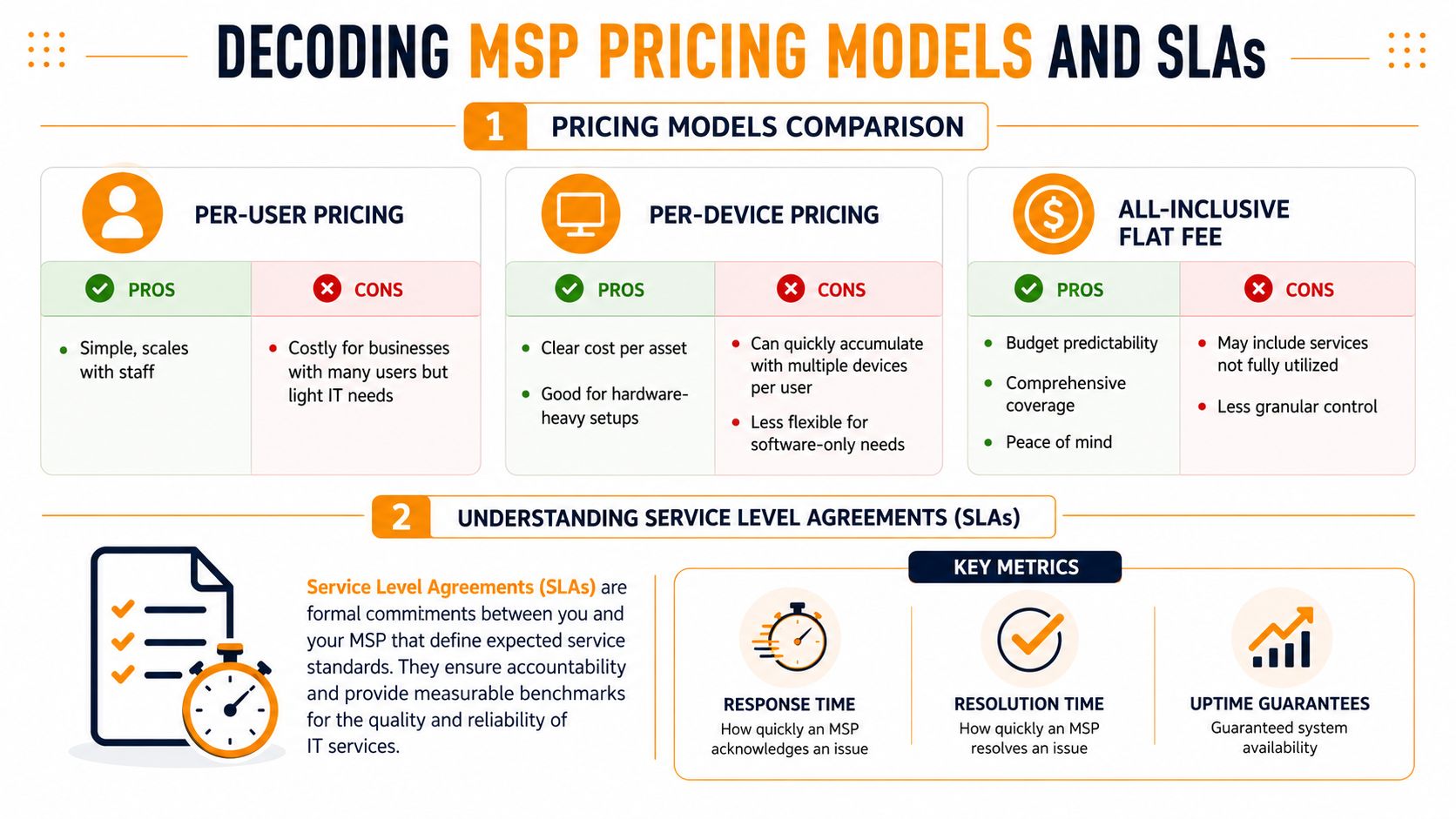
Houston buyers usually run into three pricing models:
| Model | Usually works well for | Common friction points |
|---|---|---|
| Per-user | Office teams with predictable support needs | Shared devices, specialty systems, and non-user assets may sit outside scope |
| Per-device | Hardware-heavy environments | Businesses with many devices per employee can see costs stack up fast |
| Flat fee | Owners who want budget predictability | Scope disputes happen when “included” wasn't defined clearly |
The biggest trap is assuming flat fee means unlimited labor for any technical problem. It rarely does. According to the Cortavo guide on managed IT services in Houston, 40% of SMBs in major markets face unexpected costs when their flat-fee plan doesn't scale with technical complexity. That usually shows up around cloud migrations, specialty security tooling, after-hours work, vendor escalations, low-voltage cabling, or cleanup after years of deferred maintenance.
Ask every provider these questions before signing:
- What counts as support versus project work?
- What happens if we add a location, application, or server?
- Are after-hours changes included?
- Are security tools, Microsoft 365 administration, and vendor coordination bundled or separate?
- What work related to Wi-Fi, switching, or cabling is excluded?
If your office also needs phone system changes, carrier coordination, or hardware disposition planning, outside infrastructure costs can overlap with the MSP agreement. For that side of the equation, this guide to telecom services in Houston for business is a useful reference because it highlights services many owners assume their IT contract already covers.
What a usable SLA should tell you
An SLA is only useful if it tells you what happens when things go wrong.
Focus on these points:
- Response time: How fast the provider acknowledges an issue.
- Resolution target: How fast they aim to solve it, or at least move it meaningfully forward.
- Escalation path: Who gets involved when first-line support can't resolve the issue.
- Coverage window: Business hours only, or real after-hours support.
- Communication standard: How often you'll get updates during an outage.
A good SLA should be easy to read. If it's packed with exclusions and soft language, it's protecting the provider more than the client.
“Unlimited support” means nothing if the contract excludes the work your business actually needs.
If you want a buyer-friendly way to think through support costs, this article on factors that determine managed IT support service costs gives a practical lens for comparing quotes without getting distracted by the cheapest monthly number.
The Onboarding Roadmap What to Expect When You Switch
Switching providers feels disruptive until you understand the sequence. In a well-run transition, the change happens as a project, not a scramble.
That's one reason the broader market matters. The Infrascale managed services industry outlook projects the global managed services industry will reach $69.55 billion by 2025, which is a projection that reflects how mature onboarding and service delivery processes have become. A competent MSP shouldn't be inventing your transition as they go.
What happens before go-live
The first phase is discovery. The incoming provider reviews users, devices, Microsoft 365, backups, firewall access, wireless setup, line-of-business apps, and vendor relationships. They should also identify obvious risk areas, especially old accounts, unmanaged endpoints, weak backup coverage, and undocumented systems.
Next comes planning. Timing is critical at this stage. Good MSPs schedule agent deployment, security changes, backup transitions, and policy updates in a sequence that reduces user disruption. If there's a handoff from a previous provider, they also push for admin access, documentation, and license clarity before making promises about speed.
A clean transition plan usually includes:
- Documentation capture: Admin credentials, asset inventory, vendor contacts, and network map
- Tool deployment: Monitoring agents, endpoint protection, remote support tools, and backup checks
- Communication plan: What employees should expect, where to submit tickets, and who to contact
- Risk staging: Which systems get changed first, and which should wait for after-hours windows
What the first weeks should feel like
Migration and go-live should feel controlled from the user side. Staff should know how to get support. New alerts and security tools should already be in place. Open issues from the previous provider should be tracked instead of forgotten.
There will usually be cleanup work. Every inherited environment has it. Old devices remain in directories, shared mailboxes have odd permissions, network closets contain mystery gear, or backups were configured but never reviewed. That doesn't mean the transition failed. It means the new provider is finding what the old one left behind.
The first month with a new MSP should produce more visibility, not more confusion.
After go-live, the provider should shift into optimization. That means tightening policies, addressing recurring ticket patterns, documenting standards, and prioritizing deferred projects. If onboarding ends the moment the tools are installed, the MSP is acting like a software reseller, not a service partner.
Why Houston SMBs Choose IT Cloud Global
A Houston business usually notices the difference between MSPs when a simple ticket turns into three vendors blaming each other. The printer issue turns out to be a network problem. The network problem traces back to bad switching or cabling. Meanwhile, your staff is waiting, and you are still paying a flat monthly fee that was supposed to cover "everything."
That is why many small and midsize businesses choose a provider with real operational depth. Remote helpdesk alone is not enough. Growing companies need support that covers user issues, Microsoft 365 administration, cloud platforms, security tools, and the physical network inside the office.
Why local operational depth matters

Houston companies often need one provider that can handle several areas without handing the problem off:
- User support and monitoring: Day-to-day helpdesk, remote assistance, and system oversight
- Cloud management: AWS, Azure, Google Cloud, and Microsoft 365 administration
- Security tooling: Layered endpoint and network protection using products such as SentinelOne and Arista Networks
- Infrastructure work: Wi-Fi remediation, switching, server support, and low-voltage cabling
- Repair capability: Fast turnaround for PCs, laptops, Macs, printers, virus removal, and data recovery
That combination allows a local provider to save a business money. The savings usually do not come from a lower sticker price. They come from fewer handoffs, faster root-cause diagnosis, and less downtime spent sorting out who owns the problem.
This matters even more when you compare flat-fee MSP pricing with value-based pricing in the real world. A cheap all-in-one plan can look clean on paper, then fall apart once wireless redesign, mailbox migrations, cabling fixes, or security hardening show up as "out of scope." Business owners in Houston get frustrated for a reason. The monthly fee sounded simple, but the actual bill kept growing.
What a practical Houston MSP relationship looks like
IT Cloud Global, LLC is one example of a Houston provider built for that broader support model. The company offers managed IT services, 24/7 support, cloud administration across AWS, Google Cloud, and Microsoft Azure/O365, Microsoft 365 management, virtualization support, in-house repair services, and low-voltage cabling for offices that need both IT support and physical network work under one roof.
That breadth has a direct financial effect. If your wireless performance is poor, you need a provider who can check the access points, switching, cabling, and configuration together. If your team depends on Microsoft 365, you need more than password resets. You need support for Exchange, Intune, SharePoint, Teams, and hybrid environments without every meaningful change getting pushed into a separate consulting quote.
Good MSP relationships also depend on clear boundaries. If something is a project, they should say so. If a security or reliability risk exists in your environment, they should document it. If your company has outgrown a low-cost flat-fee arrangement, they should explain what changed, what is included, and what will cost extra before billing turns into a monthly argument.
A Houston SMB rarely benefits from choosing the cheapest MSP. It benefits from choosing a provider that keeps people productive, fixes the underlying problem, and prices services in a way that still makes financial sense after the first few months.
- Remote Desktop IT Support Guide 2026
- How to Choose a Texas Outsource IT Service
- Houston IT Support: A 2026 Guide for SMBs
- Computer Service Near Me: A Houston Buyer’s Guide
- Top 7 Managed IT Services Houston TX Reviews 2026
- 7 Best Managed IT Services Houston TX Reviews (2026)
- IT Security Services Houston TX: Essential for Your SMB In