


How to Implement Zero Trust Security: A Phased Plan
You probably already have a firewall, antivirus, Microsoft 365, and a VPN. On paper, that sounds solid. In practice, one stolen password, one unmanaged laptop, or one employee connecting a risky cloud app can bypass the old idea that anything “inside” the network is safe.
That's why small and midsize businesses keep asking how to implement Zero Trust security without turning the office into a compliance project that nobody can use. The good news is that Zero Trust isn't a giant rip-and-replace effort. It's a phased way to verify every user, device, and request before access is allowed, then limit what any compromise can touch.
For SMBs, the smartest path is usually operational, not theoretical. Start with identities, clean up access, validate device health, isolate critical systems, and keep watching what happens across cloud and on-prem environments. That's also why managed services make sense here. Most smaller IT teams don't have spare hours to tune policies, chase false positives, train users, and monitor logs around the clock.
Table of Contents
- Moving Beyond the Castle Wall Why Old Security Fails
- Phase 1 Assess and Plan Your Zero Trust Foundation
- Phase 2 Secure Identities and Enforce Access Controls
- Phase 3 Harden Devices and Segment Your Network
- Phase 4 Protect Cloud Workloads and Monitor Everything
- Your Rollout Plan KPIs and Avoiding Common Pitfalls
Moving Beyond the Castle Wall Why Old Security Fails
At 8:15 on a Monday, a staff member approves a fake Microsoft 365 prompt on a personal phone before the coffee is finished brewing. The attacker does not need your office firewall after that. They sign in through the same cloud app your employee uses every day, read email, reset passwords, and start looking for finance data or vendor payment details.
That is the core problem with older security models. They were built around a clear boundary between trusted internal systems and untrusted external ones. That worked better when people sat in one office, used company desktops, and accessed a small set of on-premises applications. Most SMBs do not operate that way now.
The perimeter no longer matches the business
Employees work from home, use SaaS platforms, connect from phones, and rely on vendors that need limited remote access. Business data lives in Microsoft 365, cloud file storage, CRM platforms, accounting systems, and line-of-business apps outside the server room. A firewall still matters, but it is no longer the main decision point.
Zero Trust changes the decision model. Access is evaluated per user, per device, per application, and per session. The practical question is simple. Should this person, on this device, have access to this resource under these conditions?
NIST formalized that approach in SP 800-207. If you are also preparing for customer security reviews or compliance pressure, this guide to SOC 2 assessment helps connect access control decisions to audit expectations.
Practical rule: If access is granted mainly because someone is already “inside,” implicit trust is still doing the work.
A common misconception among business owners is that Zero Trust requires buying a new security appliance. That usually sends the project off course. Zero Trust is an operating model. You apply it by tightening identity controls, limiting access, checking device health, segmenting key systems, and reviewing activity across the environment.
For SMBs, the main challenge is not understanding the idea. It is implementing it without disrupting payroll, customer support, and day-to-day operations. That is where a phased rollout matters, and where a managed services partner usually saves time and expensive mistakes. An MSP can map the highest-risk workflows first, use the tools you already own where possible, and avoid turning a solid security plan into a pile of overlapping products.
What actually changes for an SMB
For a smaller company, Zero Trust usually shows up in a few practical ways:
- Logins face stronger checks. Business-critical systems stop relying on passwords alone.
- Access is narrowed to the job. Users keep the permissions they need, and inherited access gets cleaned up.
- Device condition affects access. A patched, managed laptop gets different treatment than an unknown personal device.
- Key systems are separated. One compromised endpoint should not open a path to every file share, server, or admin tool.
- Security review becomes continuous. Identity logs, endpoint alerts, and cloud activity are checked together so suspicious behavior is caught earlier.
If you already believe in security in layers for modern businesses, Zero Trust gives those layers a clear operating rule. Each request has to qualify for access. For budget-conscious SMBs, that is good news. You do not need to rebuild everything at once. You need a roadmap, a clear order of operations, and a partner who can execute it without dragging your team away from the business.
Phase 1 Assess and Plan Your Zero Trust Foundation
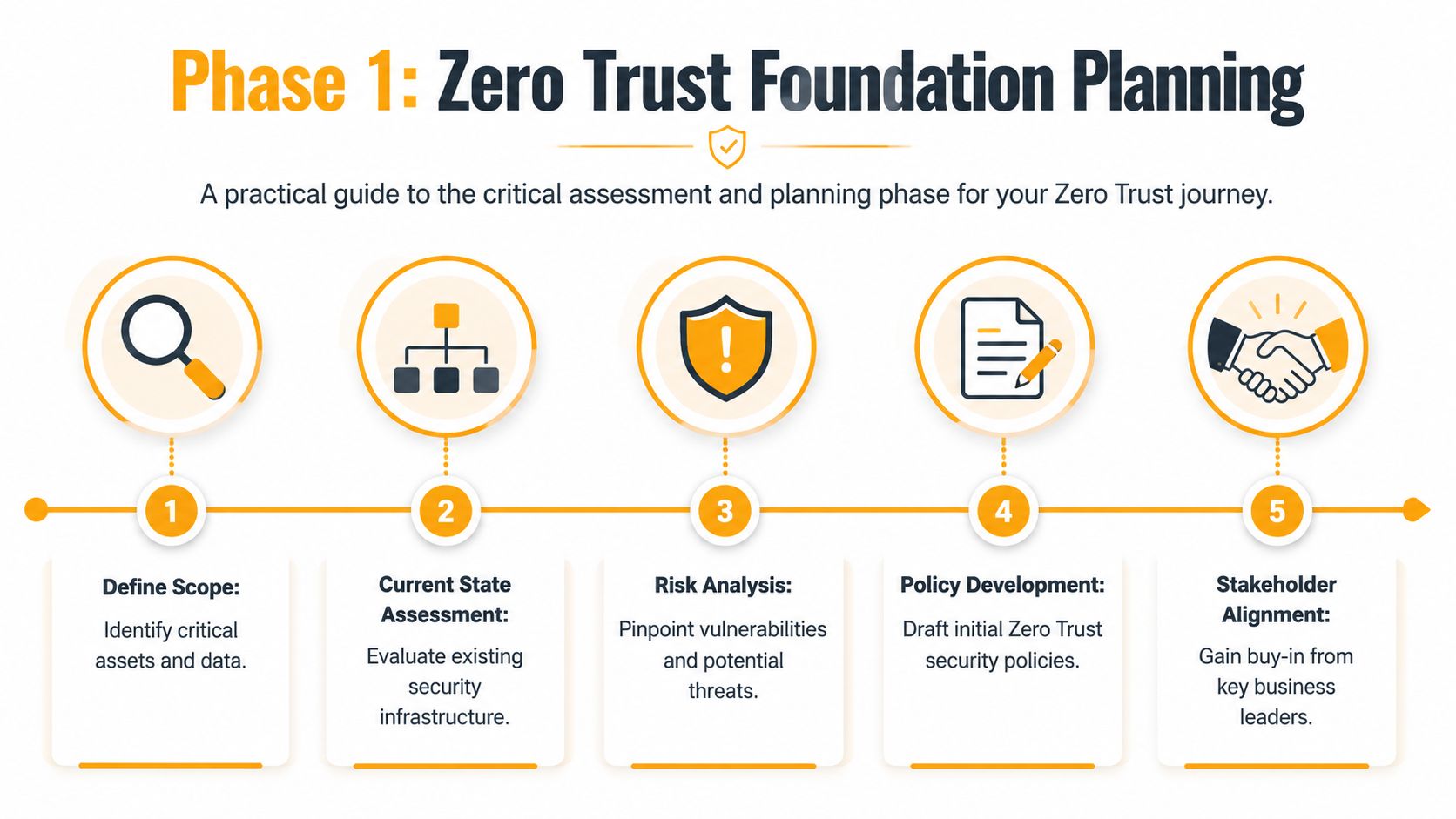
A 25-person company can buy MFA, endpoint protection, and a new firewall, then still end up with the same real problem. Too many people have broad access, old accounts are still active, shared folders hold sensitive files, and nobody has mapped which systems the business cannot afford to lose for even one day. Industry analysis on Zero Trust rollouts consistently points to planning gaps, unclear ownership, and poor scoping as common failure points, not a technical inability to turn on basic controls.
Start with business risk, not products
The first phase is about deciding what needs protection first and what can wait. That keeps costs under control. It also prevents the common SMB mistake of buying enterprise-style tools before anyone has defined the priority systems, users, and workflows those tools are supposed to protect.
Start by listing the assets that would cause the most financial, legal, or operational pain if they were exposed, locked, or altered. For many SMBs, that means Microsoft 365 email, finance platforms, file shares, CRM records, payroll data, backups, remote access tools, and administrator accounts.
Then map how people use those assets. Keep the exercise practical:
- Who needs access? Employees, contractors, vendors, service accounts.
- From what devices? Managed laptops, personal phones, shared workstations, shop-floor PCs.
- To which systems or data? Exchange Online, SharePoint, QuickBooks, cloud servers, line-of-business apps.
- Under what conditions? Office use, remote work, after-hours support, vendor maintenance windows.
That short exercise usually reveals existing gaps. A bookkeeper logging in from a managed laptop is one case. A former contractor account still tied to a cloud app is another. Those are planning findings, not tool problems.
A simple tiering model helps. Mark assets as critical, important, or standard. Critical systems get the first policies, the closest review, and the most testing before rollout. Everything else follows in phases. For small businesses trying to control spend, that approach works far better than trying to apply the same policy to every app on day one. It also aligns well with other cybersecurity best practices for small businesses that depend on knowing which systems matter most.
Teams that buy tools before they define standards usually spend the next six months writing exceptions.
A compliance lens can help even if no audit is planned. If leadership needs a structured way to document control gaps, access boundaries, and evidence, this guide to SOC 2 assessment is a practical companion during planning.
Use NIST to keep the first phase manageable
NIST SP 800-207 is useful here because it gives structure without forcing an SMB to redesign everything at once. The practical takeaway is straightforward. Verify requests based on context, reduce unnecessary access, and build visibility before adding more policy.
That planning discipline prevents three expensive mistakes:
| Mistake | What it looks like | Better move |
|---|---|---|
| Treating every asset the same | Applying the same controls to guest Wi-Fi and payroll data | Protect high-impact systems first |
| Writing policy from org charts | Access rules based on job titles instead of daily work | Base policy on real workflows and approved devices |
| Ignoring technical dependencies | Adding controls without checking service accounts, legacy apps, or vendor access | Test business-critical dependencies early |
A practical Phase 1 checklist looks like this:
- Inventory identities and devices. Include stale accounts, admin roles, shared mailboxes, local admin users, and cloud integrations.
- Map sensitive data flows. Identify where customer, financial, HR, and internal data is stored and how it moves.
- Define minimum access by role. Set a baseline for what finance, operations, sales, and IT need.
- Pick one pilot area. Admin accounts, finance systems, or remote access are usually good starting points.
- Document exceptions early. Legacy apps, vendor accounts, and shared workstations need a plan before enforcement starts.
- Assign ownership. Someone has to approve access changes, review exceptions, and keep the roadmap current.
An MSP usually proves its value. Internal staff know their own systems, but smaller teams rarely have time to connect identity risk, endpoint health, cloud permissions, backup exposure, and vendor access into one plan. An MSP can run the assessment, narrow the first phase to something affordable, and build a rollout order that improves security without disrupting payroll, customer service, or daily operations.
Phase 2 Secure Identities and Enforce Access Controls
Identity is where most Zero Trust programs should start. If attackers can sign in as a real user, they don't need to “hack in” the old-fashioned way. They just use your own systems the way an employee would.
Identity is the first control point
The first priorities are straightforward: turn on MFA everywhere that matters, reduce standing privileges, and review who has access to what. In pilot deployments, universal rollout of MFA alongside least-privilege scoping correlates with a 50% decrease in credential-based breaches according to Palo Alto Networks' overview of Zero Trust architecture and identity controls.
That doesn't mean sending one email that says “MFA is now required” and hoping users comply. Effective rollout usually includes:
- Admin accounts first. Protect the identities that can change settings, disable tools, or access broad data.
- High-risk apps next. Email, file storage, VPN, remote desktop, finance platforms, and cloud admin portals.
- Clear enrollment support. Show employees how to register Microsoft Authenticator, hardware tokens, or approved passkeys.
- Access reviews. Remove dormant accounts, shared credentials, and old contractor access.
A lot of SMBs also need to clean up Microsoft 365 permissions. That means checking global admins, mailbox delegation, SharePoint sharing, guest access, and legacy authentication settings. If your staff still have broad access because “that's how we set it up years ago,” Zero Trust starts by undoing that convenience.
For a broader foundation, this checklist of cybersecurity best practices for small businesses pairs well with identity cleanup.
Build access rules around risk not convenience
Least privilege isn't only about stripping permissions. It's about making access conditional. A user may be allowed into Microsoft 365 from a compliant company laptop but blocked from the same app on an unknown device. A finance manager may be able to approve payments during normal business travel but trigger extra checks from a new country or unusual sign-in pattern.
That's where conditional access earns its keep. Good policies typically consider:
- User role
- Device health
- Location
- Application sensitivity
- Session risk
If you need a practical way to think through those decisions, Accelerate IT Services Inc. has a helpful risk management framework for conditional access that aligns well with real-world SMB policy design.
A short walkthrough helps teams visualize how these controls fit together:
Don't make every user jump through every control for every app. Match friction to risk.
What doesn't work is rolling out harsh policies all at once. Blocking unmanaged phones, forcing MFA enrollment, and cutting old access paths on the same day creates helpdesk chaos. Managed service teams usually handle this better because they can stage policies, monitor lockouts, maintain rollback options, and support users during the first weeks when most friction shows up.
Phase 3 Harden Devices and Segment Your Network
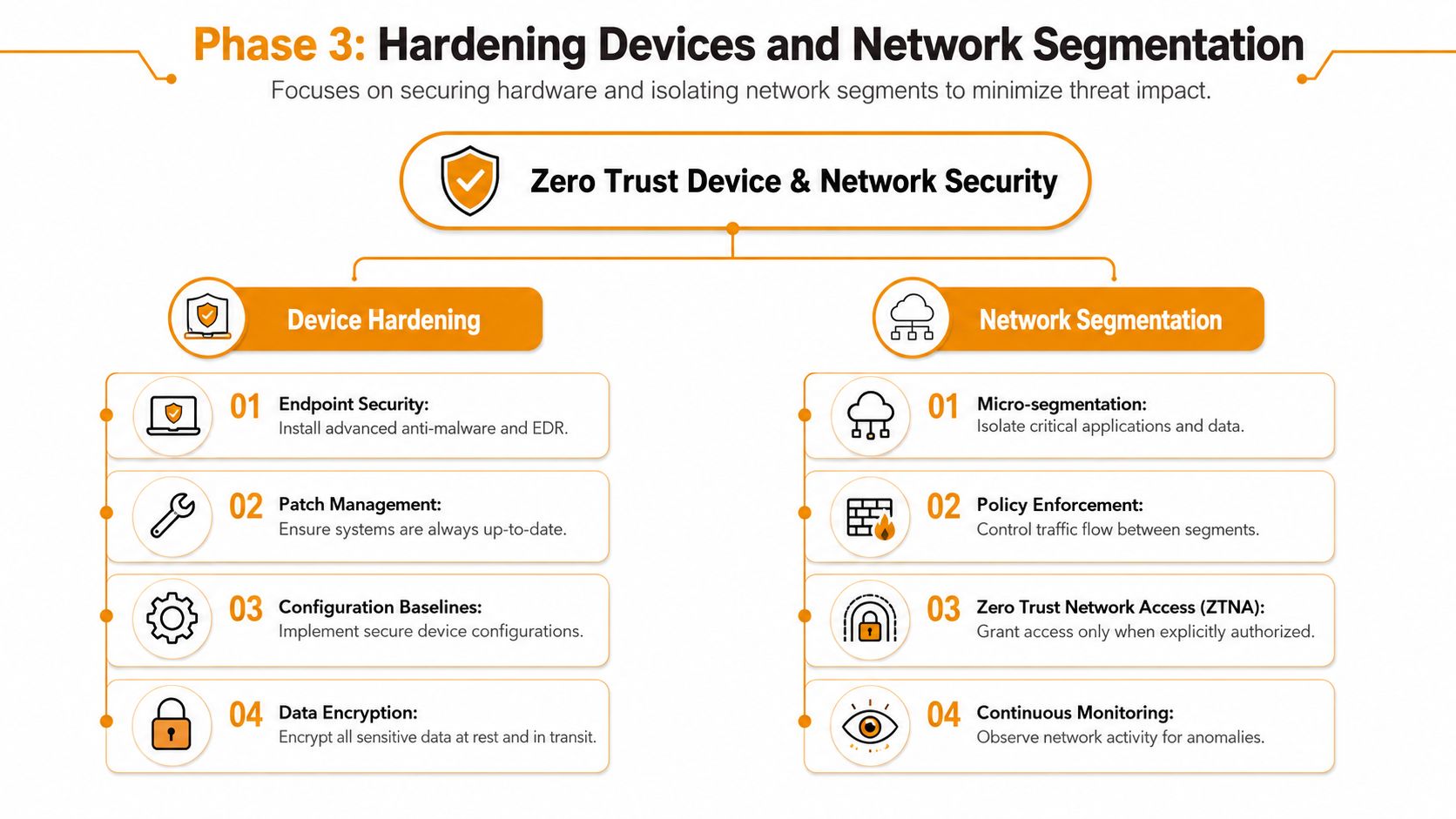
A verified user on an unsafe device is still a problem. If that laptop is missing patches, running without endpoint protection, or already infected, the attacker may inherit the user's trusted session. Zero Trust has to evaluate the endpoint, not just the login.
A healthy identity on an unhealthy device is still risky
Start by defining a minimum device posture for access to business systems. For most SMBs, that baseline includes current OS updates, full-disk encryption, active firewall, endpoint detection and response, and the absence of known risky configurations.
A practical policy set often looks like this:
- Standard office users can access email and collaboration apps only from compliant devices.
- Privileged users need stronger controls, such as dedicated admin workstations or tighter restrictions on remote access.
- Personal devices get limited browser-based access or are excluded from sensitive apps entirely.
- Unenrolled devices can reach only a remediation path, not production systems.
Tools like Microsoft Intune, Microsoft Defender for Endpoint, SentinelOne, and similar endpoint platforms become useful. The specific vendor matters less than consistency. If the business can't prove device state, it shouldn't grant broad trust.
Microsegmentation for SMBs means smaller blast zones
Microsegmentation sounds enterprise-heavy, but the SMB version is simple. Stop running a flat network where user PCs, servers, printers, VoIP phones, and backup systems can all talk freely. Put important systems into separate zones and control what can communicate between them.
Examples of sensible separation include:
| Segment | Keep inside it | Restrict from |
|---|---|---|
| User workstation network | Employee laptops and desktops | Direct server-to-server admin paths |
| Server segment | File server, line-of-business apps, directory services | General browsing and unnecessary peer access |
| Backup segment | Backup appliances and repositories | Everyday user traffic |
| Guest or unmanaged network | Visitor devices, non-corporate hardware | Internal applications and sensitive data |
When microsegmentation and continuous authentication are fully deployed, successful Zero Trust implementations achieve an average 65% reduction in lateral movement incidents, according to the verified benchmark provided for this article. That's the business case in plain terms. If something gets in, it can't spread as easily.
A small business doesn't need a perfect segmentation design on day one. It needs one that keeps ordinary workstations away from critical systems.
What tends to fail is overengineering. Too many VLANs, too many exceptions, and too much undocumented traffic can stall the project. A managed provider can usually spot which communications are essential, stage segmentation gradually, and avoid breaking line-of-business apps that rely on old assumptions.
Phase 4 Protect Cloud Workloads and Monitor Everything
Many businesses have already moved their most important work out of the office, whether they planned to or not. Email is in Microsoft 365. Files are in SharePoint or Google Drive. Customer data may sit in a CRM, an ERP platform, or a cloud database. If your Zero Trust plan stops at the local firewall, it doesn't cover where the business operates.
Cloud access needs the same discipline as local access
Cloud workloads need the same basics as internal systems: strong identity checks, limited permissions, device-aware access, and data protections that follow the workload. That means classifying sensitive data, tightening administrator roles, reviewing external sharing, and applying encryption and session controls where the platform supports them.
The business demand for this has become too large to ignore. The global zero-trust security market reached an estimated $38.37 billion in 2025 and is projected to reach $86.57 billion by 2030, according to Expert Insights' zero-trust market analysis. That growth reflects a real shift in how organizations secure remote work and multi-cloud environments, not just a vendor trend cycle.
For SMBs, the practical cloud questions are usually these:
- Which users can download sensitive files locally?
- Which admins can create risky app integrations?
- Which guest accounts still have access?
- Which workloads generate logs suitable for review?
- Which backups are isolated from everyday credentials?
If you rely on outside support for cloud operations, a cloud security managed service is often the cleanest way to keep cloud configurations, access reviews, monitoring, and incident response aligned.
Monitoring is what makes Zero Trust real
A policy that isn't observed becomes stale fast. Employees change roles. Devices fall out of compliance. Vendors connect in unexpected ways. Attackers test access paths discreetly before they do anything obvious.
That's why telemetry matters. You need logs and signals from identity providers, endpoints, firewalls, SaaS platforms, and cloud workloads in one reviewable stream. Then someone has to look at them, tune alerts, and respond when the activity doesn't fit the normal pattern.
Without monitoring, Zero Trust becomes a one-time configuration exercise. With monitoring, it becomes an operating model.
Look for visibility into events such as:
- Sign-ins from unusual locations
- Repeated MFA failures
- Privilege changes
- New device enrollments
- Unusual file access patterns
- Unexpected east-west traffic between internal systems
Most SMBs don't have the staff to watch all of that consistently. That's one of the strongest arguments for managed security services. The value isn't only tooling. It's having people who can correlate alerts across identity, device, and cloud activity and decide what needs action now.
Your Rollout Plan KPIs and Avoiding Common Pitfalls
Zero Trust works best as a staged rollout, not a company-wide switch. Start with a pilot group, confirm that policies match real work, fix the inevitable exceptions, then expand. That approach costs less, causes less disruption, and gives leadership evidence that the process is improving security instead of just adding friction.
Pilot first then expand
Pick a group with high visibility and manageable scope. IT admins are a common first pilot because they hold privileged permissions and can tolerate change better than most departments. Finance is another candidate if you need tighter control over sensitive data and payment workflows.
Use the pilot to test:
- MFA enrollment and recovery
- Conditional access decisions
- Device compliance rules
- App compatibility
- Support processes for lockouts and exceptions
- Rollback procedures
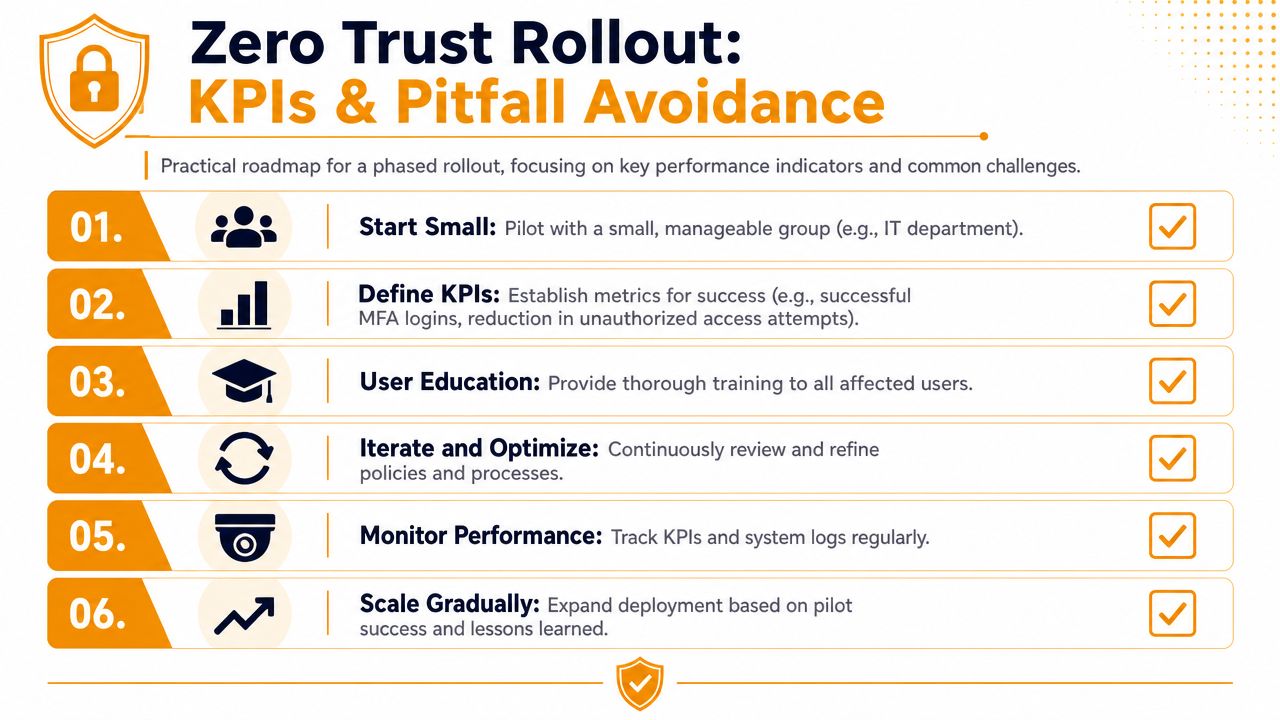
A good pilot doesn't just validate technology. It validates operations. Who approves exceptions? How fast can access be restored when a compliant employee is blocked incorrectly? Who updates training when people get confused?
Measure adoption and friction together
Security teams often track only technical outcomes. That misses half the picture. If users fight the controls, they'll look for workarounds, delay projects, or flood support channels.
The people side matters a lot. According to Info-Tech Research Group, 78% of organizations that fail to operationalize Zero Trust initiatives cite lack of training and poor change management as primary reasons for failure, as summarized by Red River in its guidance on implementing Zero Trust in phases.
Track a mix of security and operational KPIs, such as:
| KPI | Why it matters |
|---|---|
| Successful MFA enrollment rate | Shows whether identity controls are actually adopted |
| Number of privileged accounts | Indicates whether least privilege is improving |
| Device compliance rate | Reveals how many endpoints can meet policy |
| Access-related support tickets | Exposes rollout friction and training gaps |
| Time to resolve access issues | Measures whether the business can keep working |
| Unauthorized access attempts blocked | Confirms policies are enforcing decisions |
Security that staff constantly bypass isn't mature security. It's an unresolved workflow problem.
What works is communication in plain language. Tell users what is changing, why it matters, what they'll need to do, and how to get help. What doesn't work is dumping technical policy changes on employees and assuming they'll adapt.
A managed partner often makes the biggest difference. Not because the controls are impossible to deploy, but because policy tuning, user support, exception handling, reporting, and ongoing review are continuous work. Zero Trust sticks when someone owns the day-two operations.
If you want a practical Zero Trust rollout without overbuilding it, IT Cloud Global, LLC can help you map critical assets, secure Microsoft 365 and cloud access, harden endpoints, segment networks, and support users through the rollout. For Houston SMBs, managed services are often the fastest way to turn Zero Trust from a buzzword into a working security model that fits your budget and your staff.