


Find an IT Managed Services Provider Near Me: A Checklist
Your search usually starts on a bad day. A staff member can't log in. The internet drops in the middle of customer transactions. Microsoft 365 starts acting strange. Or your current IT person goes quiet right when you need help.
So you type IT managed services provider near me into Google and get a wall of near-identical promises. Every provider says they offer proactive support, cybersecurity, cloud help, and fast response. That sounds good until you realize those claims don't tell you who will answer the phone, who owns your ticket, how after-hours issues are handled, or whether anyone will show up onsite when a switch dies.
That gap is where most buying mistakes happen. Businesses compare service lists when they should be comparing operating discipline. If you want a useful outside perspective on choosing a managed services provider, start there, then use the checklist below to verify what a provider can prove, not just what they advertise.
Table of Contents
- Why Your Search for a Local IT Provider Needs a Plan
- Audit Your Needs Before You Audit Providers
- Evaluate Their Security and Compliance Posture
- Decode SLAs and Pricing Models
- Verify Local Presence and Proven Performance
- Your Next Step to Predictable Houston IT Support
Why Your Search for a Local IT Provider Needs a Plan
Most owners don't start this search because they're curious. They start because something already hurts. A server reboot turned into downtime. A security alert raised questions nobody in-house could answer. Or the old break-fix setup stopped working once remote users, cloud apps, and security needs got more complicated.
The problem is that local MSPs often look the same on paper. The practical gap shows up later. As one local market analysis notes, many businesses struggle to compare providers on response speed, onsite coverage, and ticket ownership, while providers tend to publish broad claims instead of measurable service details that predict real performance (The RITE Group on local MSP comparison gaps).
Practical rule: If two providers sound identical in a sales meeting, compare how they run tickets, escalations, reporting, and after-hours support. That's where the difference is.
A good evaluation plan keeps you from buying based on personality, proximity, or a polished proposal. It forces useful questions. Who answers after 5 PM? What happens when a password reset turns into a firewall issue? Does the provider close tickets quickly because they're efficient, or because they bounce hard problems into "project work" and bill separately?
Use a simple filter when reviewing any provider:
- Ownership: Who owns an issue from first report to final resolution?
- Visibility: Can you see ticket status, reporting, and recurring issues?
- Escalation: What happens when front-line support can't fix it?
- Coverage: What support is remote, what is onsite, and when?
- Proof: Can they show operational metrics instead of repeating marketing lines?
That approach changes the whole search. You're no longer asking, "Who does managed IT near me?" You're asking, "Which provider can demonstrate reliable operations under pressure?"
Audit Your Needs Before You Audit Providers
Before you compare MSPs, get clear on what you're asking them to own. Many businesses skip this step and end up with fuzzy contracts, bad expectations, and monthly invoices that become arguments.
JumpCloud reports that almost 90% of SMBs either use an MSP or are considering one, with 60% naming cybersecurity as the top challenge and 48% pointing to device management and remote-work support as areas MSPs handle better than traditional IT (JumpCloud MSP statistics and trends). That lines up with what small business owners run into every week. The pressure usually isn't one thing. It's security, users, devices, cloud apps, and day-to-day support all mixed together.
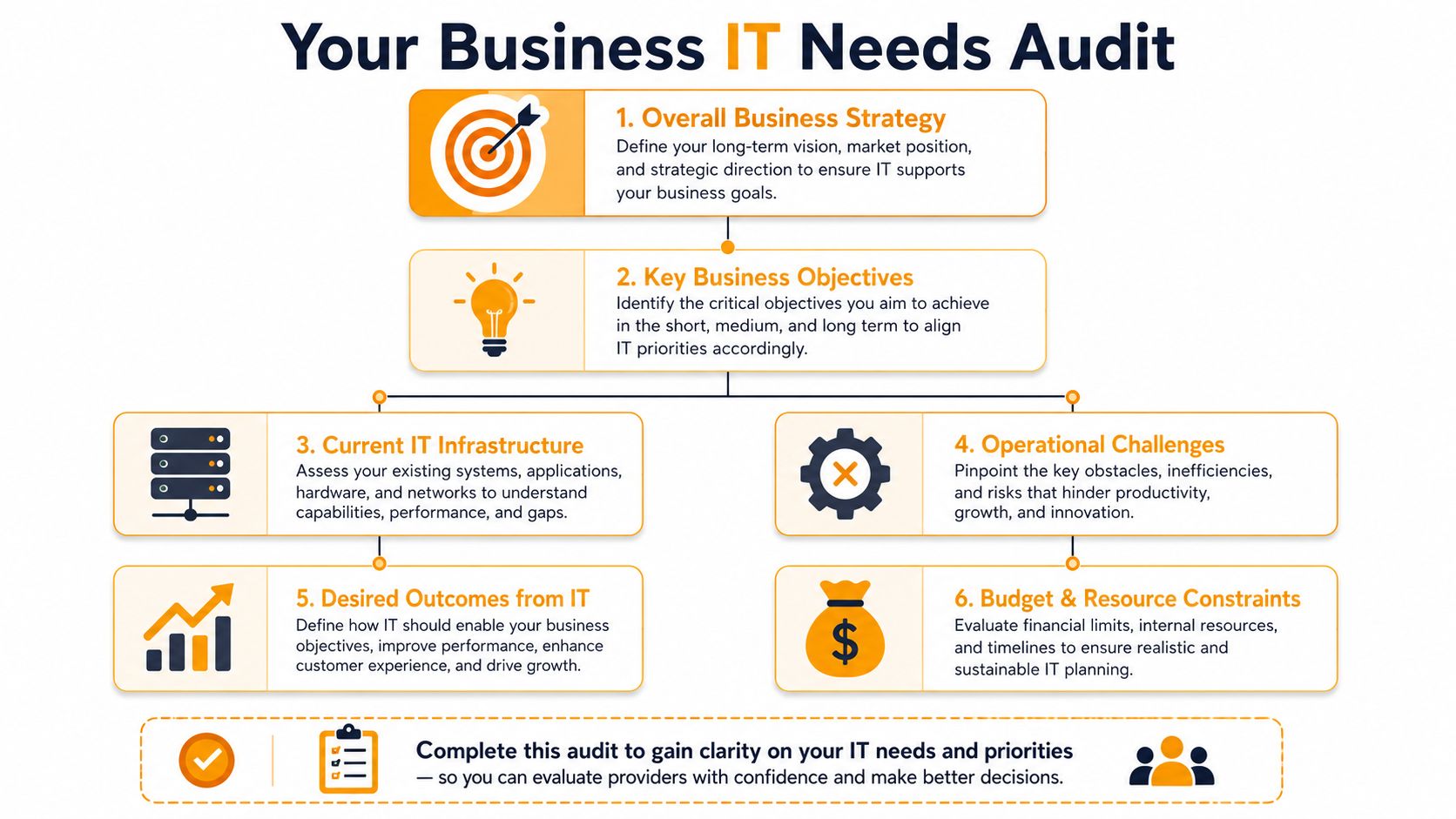
A basic internal review helps. If you haven't documented your environment in a while, a formal process for auditing IT systems is a good starting point because it turns vague complaints into a usable scope.
Map technology to business risk
Don't begin with a giant list of tools. Begin with the work your business cannot afford to interrupt.
A law firm may care most about document access, email continuity, secure remote work, and user permissions. A retail operation may put point-of-sale reliability, Wi-Fi stability, camera systems, and vendor connectivity at the top. A medical office may focus on uptime, secure communications, backups, and workstation consistency.
Use questions like these:
- What stops revenue fastest? Internet outages, checkout failures, line-of-business software issues, or email downtime.
- What creates the biggest operational drag? Password resets, new user setup, printer problems, laptop issues, or Teams and SharePoint confusion.
- What would hurt most if compromised? Customer records, shared files, accounting systems, executive email, or cloud admin accounts.
- What still depends on a local visit? Network gear, cabling, printers, desktops, and physical office moves.
If you can't explain your IT needs in business terms, you'll get a technical proposal that sounds complete but leaves important gaps.
Build your must-have list
Once you know what matters most, split needs into three buckets.
| Priority bucket | What belongs there | Why it matters |
|---|---|---|
| Non-negotiable | Helpdesk coverage, endpoint management, Microsoft 365 administration, backups, security monitoring | These keep daily operations running |
| Important but not urgent | Cloud optimization, Wi-Fi redesign, server cleanup, policy documentation | These improve reliability and reduce recurring pain |
| Project-based | Office moves, cabling, hardware refreshes, migrations, telecom changes | These need planning and often separate budgeting |
Then write down specifics instead of labels.
Instead of "cloud support"
Write "Microsoft 365 user management, Exchange issues, Intune device policies, SharePoint permissions."Instead of "network help"
Write "switch troubleshooting, firewall changes, Wi-Fi dead zones, guest network management."Instead of "cybersecurity"
Write "endpoint protection, patching, email filtering, backup verification, incident response."
This makes provider conversations sharper. It also exposes weak fits quickly. If a provider is strong at helpdesk but weak on cloud identity, or good remotely but thin onsite, you'll spot it before signing.
Evaluate Their Security and Compliance Posture
Security isn't a side service anymore. If an MSP treats it like an optional add-on, keep looking. The managed services market was valued at $278.9 billion in 2022 and is projected to reach $834.7 billion by 2032, according to one industry forecast, reflecting how outsourced IT has expanded into a major segment where cybersecurity and cloud operations are core expectations (managed services market forecast).
That matters to your business because "basic IT support" no longer describes the job. A provider now needs to manage users, devices, cloud settings, updates, backup health, and security response as one connected system.

If you need a practical benchmark for cloud security and compliance, use that lens during every MSP conversation. The key question isn't whether they "offer security." The question is how they operate it every day.
Layered security should be visible
Layered security is simple in principle. One tool doesn't protect the business. You need several controls working together so a single failure doesn't become a company-wide outage.
Ask providers to walk you through these layers in plain English:
- Endpoints: How are laptops and desktops protected and monitored?
- Patching: Who makes sure operating systems and applications get updated?
- Email: What filters malicious mail, spoofing attempts, and dangerous attachments?
- Identity: How are Microsoft 365 accounts, admin privileges, and sign-in risks managed?
- Backup: How is backup success checked, and who reviews failures?
- Network: Who watches firewalls, switches, access points, and office connectivity?
A mature provider can explain this without hiding behind acronyms. They should also be comfortable naming platforms they use, whether that's Microsoft 365 security tooling, SentinelOne, firewall management, backup platforms, or remote monitoring systems.
Ask how they handle the ugly day
Most MSPs sound competent when discussing routine support. The better test is what happens when things go sideways at 3 AM.
Ask direct questions:
- What is your documented response process for ransomware or a major outage?
- Who makes the first call to our company?
- Who isolates affected systems?
- How do you verify backups before recovery starts?
- What gets documented during and after the incident?
A provider isn't showing maturity when they list products. They show maturity when they can describe decisions, ownership, and recovery steps under pressure.
Even if you're not in a heavily regulated industry, compliance-readiness still matters. Good documentation, consistent access control, backup verification, and clean reporting reduce chaos during insurance reviews, customer questionnaires, and security incidents. They also make staff turnover less painful because critical knowledge isn't trapped in one technician's head.
Decode SLAs and Pricing Models
The SLA is the part most buyers skim and regret later. Sales language can be warm and reassuring. The SLA tells you what the provider is actually obligated to do.
Buyer guidance for MSP selection recommends verifying ticket tracking, 24/7 monitoring, SLAs, and escalation procedures before signing, and asking for data such as first-call resolution rate and backup success rates instead of relying on sales claims (how to choose an MSP for managed IT services). That's the right standard because operations beat promises.
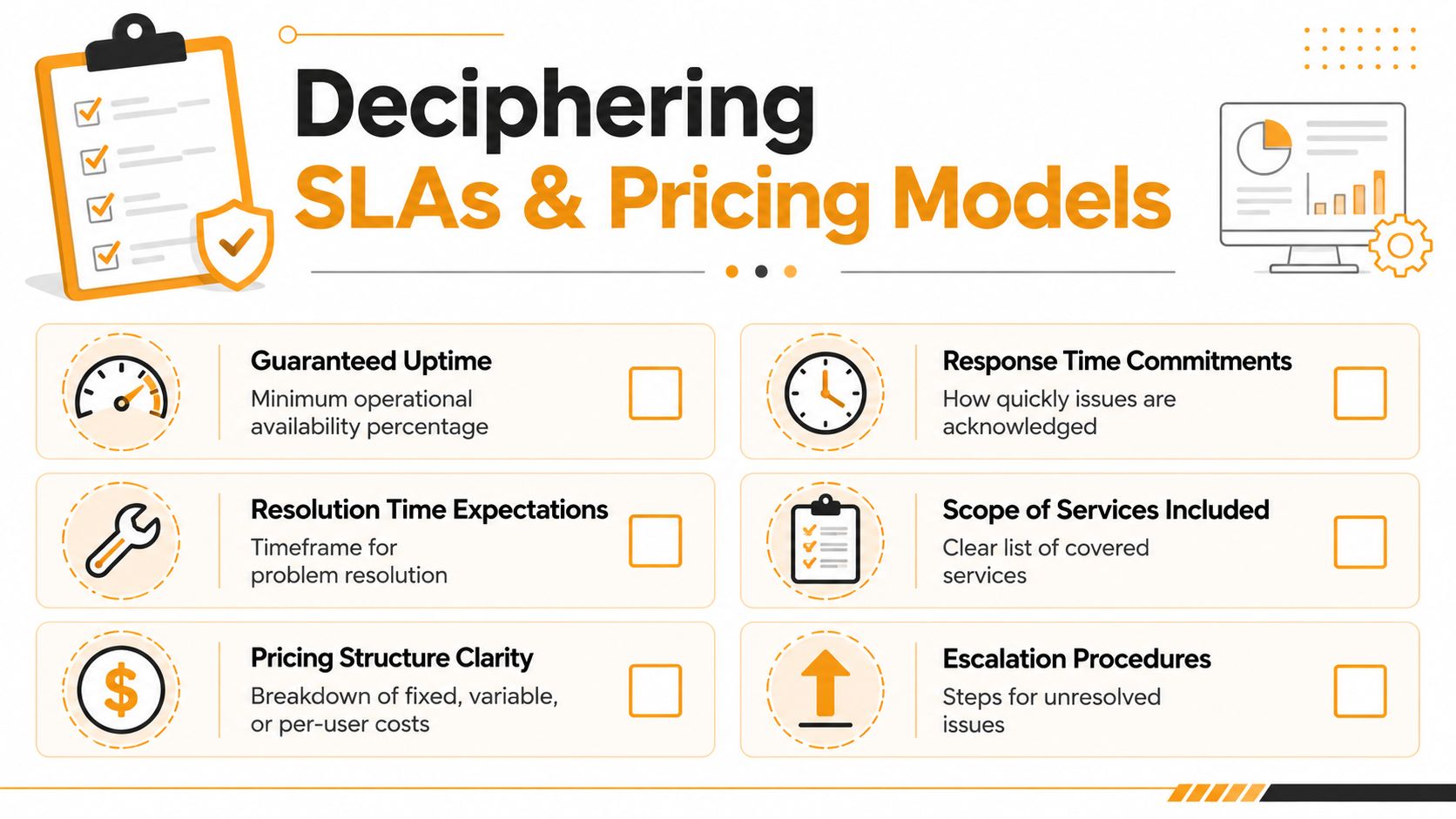
If you're comparing cost structures, a guide on factors determining managed IT support service costs helps frame why two monthly quotes can look similar while covering very different levels of responsibility.
Read the SLA like an operations document
Don't settle for "fast response" or "priority support." Those phrases mean nothing without measurable definitions.
Look for these items in writing:
- Response time by severity: Critical outage issues should not be handled under the same timeline as a printer ticket.
- Escalation path: If Tier 1 can't solve it, who takes over next?
- After-hours handling: Is overnight support included, on-call, or best effort?
- Monitoring scope: What systems are watched continuously, and what isn't?
- Reporting cadence: Do you receive regular summaries, recurring issue trends, and backup status?
- Ownership rules: Does one team own the issue through closure, or does it get tossed around?
A short comparison table helps when reviewing proposals:
| What to compare | Weak answer | Strong answer |
|---|---|---|
| Response commitment | "We respond quickly" | Defined response times by priority |
| Escalation | "Our engineers handle that" | Documented escalation chain with named roles |
| Monitoring | "We monitor your systems" | Clear list of monitored assets and alerts |
| Backup reporting | "Backups are included" | Regular backup-success reporting and exception review |
| Ticket visibility | "Email us if you need an update" | Shared ticketing with status and history |
Buyer check: Ask to see a sample monthly report, a sample ticket trail, and a sample escalation workflow. If they can't produce those quickly, the process may be thin.
Pricing gets expensive when scope is fuzzy
MSP pricing usually follows one of three models: per-user, per-device, or tiered service bundles. None is automatically better. The right model depends on your environment.
Per-user pricing often fits offices with many cloud services and predictable staff support needs. Per-device pricing can work for sites with shared workstations, specialized endpoints, or lighter user support. Tiered bundles can be fine if the scope is explicit.
What causes trouble isn't the model. It's hidden exclusions.
Watch for these common contract traps:
- Projects split out: Routine operational work gets labeled a project and billed separately.
- Onsite fees: The monthly rate covers remote support, but field visits cost extra.
- Security add-ons: Core protections are missing from the base package.
- Vendor pass-through confusion: Licensing, backup storage, and telecom costs aren't clearly separated.
- Coverage limits: Nights, weekends, or holiday response exist, but only at extra rates.
A practical way to compare proposals is to ask each provider the same scenario-based questions.
- A user can't access email Monday at 8 AM. Is that included?
- A switch fails during business hours. Is onsite response included?
- A backup fails repeatedly for three days. Who notices and who fixes it?
- A ransomware event starts overnight. Who responds first, and what cost is outside contract scope?
Providers with solid operations usually answer these cleanly. Providers with fuzzy scope often talk in circles.
Verify Local Presence and Proven Performance
"Near me" matters, but not in the way most buyers assume. The closest office is not always the best fit. A provider thirty minutes away with weak escalation and poor documentation can still leave you stranded. A provider farther away with disciplined remote operations and dependable field coverage may serve you better.
Guidance on managed services contracts points buyers toward clear reporting, quarterly business reviews, non-predatory exit terms, and 30- or 60-day termination notice, along with scalable service tiers and a documented incident-response playbook for serious events (Dataprise managed services guide). Those are signs of a provider that expects to earn the relationship month after month.
Local should mean accountable
Define what local means for your business before you ask providers to prove it.
For one company, local means a technician can be onsite for a network outage. For another, it means the provider understands multi-location operations, local vendors, and office support logistics. For a cloud-heavy firm, local may matter less than the provider's ability to resolve identity, email, and security issues remotely without delay.
Test local capability with direct questions:
- Which issues usually require an onsite visit?
- Who decides when a remote ticket becomes a field dispatch?
- What areas do your technicians regularly cover?
- Do you use your own engineers onsite, subcontractors, or both?
- Who stays accountable if an onsite issue spans networking, cabling, and cloud access?
Use references to test the sales pitch
Don't just ask for references. Ask for the right references.
You want clients similar to your business in size, complexity, and urgency. A five-person office and a busy retail site have very different support realities. When you speak with references, ask about patterns, not praise.
- Ask about responsiveness: "When something urgent happens, who takes ownership?"
- Ask about follow-through: "Do open issues get revisited without chasing them?"
- Ask about reporting: "Do you receive useful summaries or just invoices?"
- Ask about change management: "How well do they handle new locations, new staff, or software rollouts?"
A general customer experience framework can help shape those conversations. These actionable steps for customer satisfaction are useful because they focus on consistency, communication, and expectation-setting, which are exactly what you want to validate in an MSP relationship.
One more point matters: make sure the contract lets you leave without a hostage situation. If a provider resists reasonable exit terms, vague ownership rules, or transparent reporting, that's a warning sign before onboarding even starts.
Your Next Step to Predictable Houston IT Support
A good MSP decision doesn't come from picking the provider with the longest service menu. It comes from verifying operations. You want proof of response handling, escalation ownership, reporting discipline, backup oversight, and clear contract terms.
For Houston businesses, that also means matching the provider to the environment you run. A retail site may need fast onsite support and stable networking. A professional office may need stronger Microsoft 365 administration, cloud support, and user security controls. A growing company may need one team that can handle helpdesk, cabling, Wi-Fi, virtualization, and cloud changes without splitting accountability.
One practical option in that conversation is IT Cloud Global, LLC, a Houston-based provider that handles managed IT support, cloud administration, cybersecurity, networking, low-voltage cabling, and onsite or remote assistance for local businesses. That kind of broad operational scope matters when your issue doesn't fit neatly into one box.
Before signing with any provider, ask them to show three things:
- A real ticket workflow with status visibility and escalation ownership
- A reporting sample that shows what gets monitored and reviewed
- An incident process for a serious outage or security event
Those three items tell you more than a polished proposal ever will.
If you want a quick look at what a modern provider relationship should feel like in practice, this short video is worth reviewing.
The right next step isn't to collect more brochures. It's to put one provider through a real checklist and see whether they can answer operational questions without guessing.
If you're looking for a practical conversation about managed IT, cloud, security, onsite support, or network infrastructure in Houston, IT Cloud Global, LLC offers free, no-obligation estimates so you can evaluate fit before making a commitment.
- Remote Desktop IT Support Guide 2026
- How to Choose a Texas Outsource IT Service
- Houston IT Support: A 2026 Guide for SMBs
- Computer Service Near Me: A Houston Buyer’s Guide
- 7 Best Managed IT Services Houston TX Reviews (2026)
- Best IT Services Houston TX: Your 2026 Partner
- Managed IT Services Houston TX: 2026 Guide for SMBs