


Best IT Managed Services Houston: 2026 Guide
Your staff is already working around IT problems. They just may not call them IT problems.
It looks like this. Someone restarts a laptop twice before a client call. Your office Wi-Fi drags in the middle of payroll. Microsoft 365 access gets weird for one employee and nobody knows if it's a password issue, a sync issue, or something worse. Then a vendor invoice email lands in accounting and your gut says, "That doesn't look right." By lunch, you've burned half a day on tech friction instead of running your business.
That's why more Houston companies are done with one-off repair tickets and "call us when it breaks" support. They want systems watched, secured, documented, and improved before a problem becomes an outage. If that sounds like where you are, you're looking at the fundamental reason businesses buy managed services. Not because it's trendy. Because reactive IT keeps stealing time from owners, managers, and frontline staff.
Table of Contents
- Your Houston Business Runs on Tech Does Your IT Support Keep Up
- From Firefighting to Future-Proofing What an MSP Really Does
- The Complete Managed IT Services Stack for Houston Businesses
- The True ROI Beyond Just Fixing Computers
- Decoding Houston MSP Pricing and Service Level Agreements
- How to Choose the Right IT Managed Services Partner in Houston
- Putting It All Together Houston SMB Success Stories
- Your Next Step and Frequently Asked Questions
Your Houston Business Runs on Tech Does Your IT Support Keep Up
A lot of Houston owners stay in the same cycle for too long. A printer stops talking to the network. A machine gets cleaned up after malware. Someone remote can't connect. You pay the invoice, the issue gets patched, and everyone moves on until the next mess. That's not an IT strategy. That's survival mode.
The break-fix approach feels cheaper right up until it starts interrupting sales, service, accounting, and customer trust. A managed model changes the relationship. Instead of paying someone to show up after damage is done, you're paying for ongoing oversight, maintenance, and accountability. If you want a grounded local explanation of that shift, this breakdown of proactive IT support for Houston businesses is worth your time.
This isn't some brand-new category, either. By 2019, about 59% of IT services had already moved to a managed services model, in a market valued at $193 billion, and some Houston providers say they've been delivering managed IT services since 1988 according to this Houston managed services overview. That matters for one reason. IT managed services in Houston is a mature buying decision, not a gamble on an unproven model.
You shouldn't still be buying IT support the same way you buy emergency plumbing.
If your business depends on cloud apps, shared files, email, phones, Wi-Fi, vendor portals, accounting systems, or line-of-business software, then IT is part of operations. Treating it like an occasional repair job is what keeps small problems expensive.
From Firefighting to Future-Proofing What an MSP Really Does
Most owners hear "managed services" and think "outsourced help desk." That's too small. A real MSP is closer to a property manager for your entire technology environment.
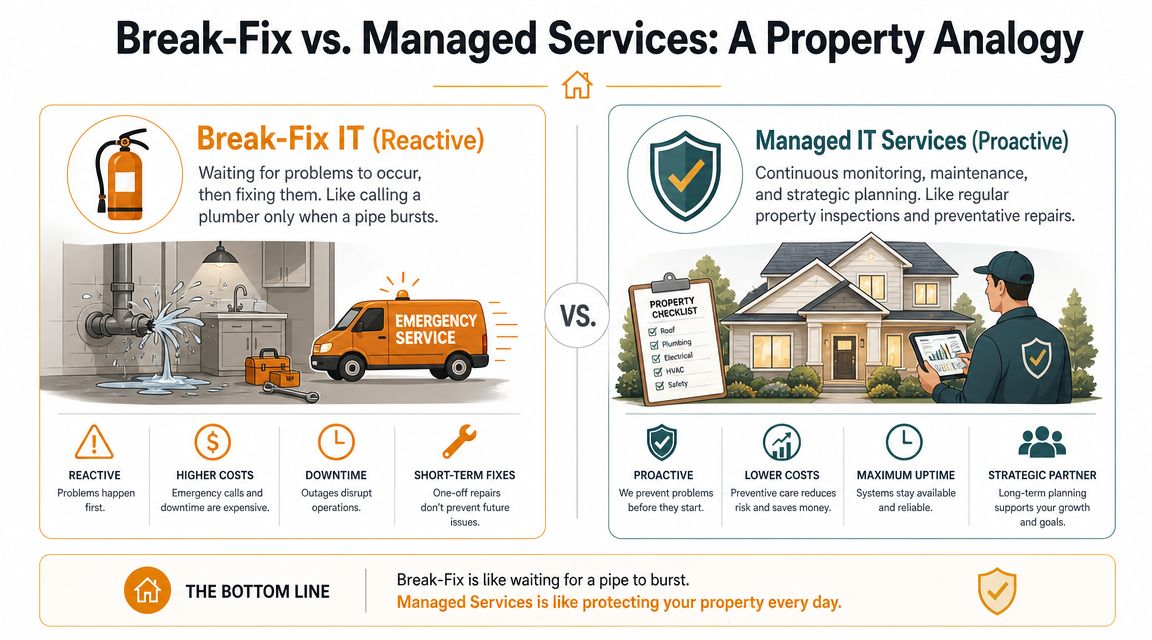
If you owned a commercial building, you wouldn't wait for the roof to cave in, the pipes to burst, and the access system to fail before hiring help. You'd want routine inspections, scheduled maintenance, vendor coordination, incident response, and one accountable party who knows the property. That's what managed IT is supposed to feel like.
Break-fix is a handyman model
Break-fix support is reactive by design. Something fails. You call. Someone responds when they're available. They fix the visible issue and move on.
That creates four problems fast:
- No continuity: The technician who touched your server last month may not be the one troubleshooting your laptops today.
- No prevention: Nobody gets paid to catch weak points early.
- No ownership: Vendors point at each other when email, internet, phones, and security overlap.
- No budget control: You don't know the true IT cost until something breaks.
A lot of businesses also need to simplify your business network management because network complexity is usually where reactive support starts to fall apart. Wi-Fi, switches, ISP issues, VPN access, cloud apps, and voice services all collide there.
A real MSP manages the whole environment
Managed service providers should handle more than tickets. They should monitor systems, standardize endpoints, manage updates, document your environment, coordinate with software vendors, and help you make decisions before renewals and hardware failures force your hand. If you want a practical breakdown, review what managed IT services are and their benefits.
A solid MSP usually becomes the point of coordination for things like:
- User support when staff can't work
- System health monitoring so hidden issues get flagged early
- Security controls across devices, identities, email, and cloud tools
- Vendor management for internet, phones, software, and hardware providers
- Technology planning so upgrades happen on your schedule, not in a panic
Later in the buying process, ask one simple question: who owns the problem when Microsoft 365, your firewall, your office internet, and a user device all touch the same outage? If the answer is fuzzy, keep looking.
A short video can help if you want the managed model explained visually.
Practical rule: If your current IT provider only appears after users complain, you don't have managed services. You have a nicer version of break-fix.
The Complete Managed IT Services Stack for Houston Businesses
When owners search for IT managed services Houston, they usually get vague promises. "Proactive support." "Cybersecurity." "Cloud expertise." That's not enough. You need to know what's in the stack and how each piece protects operations.
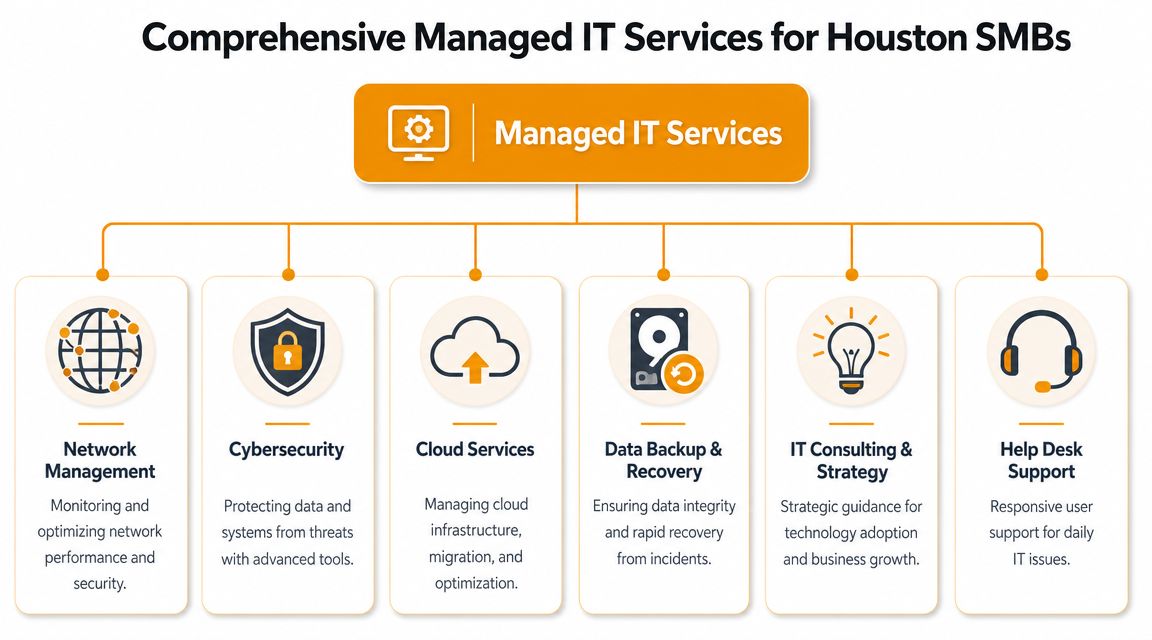
Help desk and user support
Your people need fast answers when login issues, printing failures, app errors, and device problems stop work. Good help desk support isn't just "open a ticket." It means a provider can remote in, resolve common issues cleanly, escalate correctly, and keep users informed.
You also want support that understands your actual business tools. Microsoft 365, Teams, Outlook, SharePoint, QuickBooks, browser-based platforms, scanners, label printers, and line-of-business apps all create daily friction when nobody owns support. One local option, IT Cloud Global's Houston small business support services, reflects the kind of end-to-end coverage many SMBs need, including help desk, infrastructure support, cloud, and continuity planning.
Monitoring maintenance and patching
A quiet network is usually a well-managed network. Devices get patched. Storage issues are caught early. Aging hardware gets flagged before failure. Security updates don't sit untouched because everyone's busy.
This is one of the least visible services and one of the most valuable. Users don't notice proactive maintenance because nothing dramatic happens. That's the point.
Cybersecurity that goes past antivirus
Here, most buyer mistakes happen.
A provider saying "we offer cybersecurity" tells you almost nothing. Most firms can install endpoint tools and basic protections. That doesn't mean they can defend a business against modern account compromise, phishing-driven access abuse, or cloud mistakes that expose data.
According to this Houston managed IT analysis focused on current security expectations, buyers need to ask deeper questions about faster detection, resilient identity controls, and unified recovery workflows across Microsoft 365, AWS, and Google Cloud, especially as AI-driven attacks become more important. That's the right lens in 2026.
Ask direct questions like these:
- Identity protection: How do you secure Microsoft 365 accounts, admin access, and conditional access policies?
- Detection workflow: Who reviews alerts, how are incidents triaged, and what happens after suspicious sign-in activity?
- Cloud recovery: Can you recover data and access cleanly across Microsoft 365, AWS, and Google Cloud, not just local servers?
- Email defense: What happens when a user clicks a bad link or an account gets hijacked?
- Privilege control: Who has privileged access in your environment, and how is that reviewed?
If the answers stay stuck at "we install antivirus and a firewall," that's not enough anymore.
Security should start with identity. If attackers get into accounts, they often bypass the protections owners think they're paying for.
Cloud migration and cloud operations
Cloud work isn't just moving files somewhere else. It includes planning, permissions, user access, licensing, mailbox changes, file structure, policy setup, device enrollment, and cost control. A weak migration creates years of cleanup.
Houston SMBs commonly need support around Microsoft 365, Azure, AWS, and Google Cloud. The best MSPs don't just migrate you. They manage the environment afterward so permissions stay clean, backups stay reliable, and sprawl doesn't get out of hand.
Backup disaster recovery and business continuity
A backup that hasn't been tested is a theory.
You need recoverability, not just stored copies. That means knowing how files, user accounts, shared data, and systems are restored after deletion, ransomware, human error, failed updates, or cloud misconfiguration. It also means somebody has already mapped the order of recovery. Accounting first? Phones? Shared drives? Point-of-sale? Every business has a different sequence.
Networks Wi-Fi and on-site support
Houston companies still have physical environments to support. Offices move. Suites expand. Warehouses need stronger Wi-Fi coverage. Conference rooms need stable connectivity. Retail counters need reliable network drops and payment system access.
A good MSP should be able to handle the unglamorous but essential work too:
- Network setup: Switching, firewall configuration, segmentation, and clean documentation
- Wi-Fi design: Coverage planning for offices, clinics, retail, or light industrial spaces
- On-site support: Hardware swaps, desk moves, troubleshooting, and new user setup
- Repair coordination: Laptops, desktops, Macs, printers, and related device issues
Managed services should cover the whole working environment, not just a remote support portal.
The True ROI Beyond Just Fixing Computers
Most small businesses don't need more technology. They need fewer interruptions, cleaner decisions, and less risk.

If you judge managed services only by the monthly invoice, you'll miss the return. The payoff shows up in smoother operations, fewer emergency purchases, less owner involvement in tech chaos, and a stronger security position.
What you actually gain
The first gain is predictability. You stop getting surprised by every laptop issue, spam event, license mess, and after-hours failure. A recurring service model turns IT from random expense into planned operating cost.
The second is less downtime. Not theoretical downtime. Real-world downtime. People waiting on password resets, rebooting machines, tethering to phones because Wi-Fi is unstable, or delaying invoices because a shared folder won't sync. Those small interruptions stack up across your whole team.
Third is risk reduction. Most owners don't buy security because they love security. They buy it because a compromised mailbox, exposed file share, or failed restore can ripple into finance, legal exposure, customer trust, and plain old operational pain.
Fourth is access to broader expertise. Few SMBs can justify hiring separate specialists for cloud administration, endpoint security, networking, Microsoft 365, backups, and vendor management. A capable MSP gives you shared access to those skills without turning payroll upside down.
The best ROI from managed IT is owner attention. You get your day back.
There's also a competitive angle. Companies with stable systems respond faster, onboard staff with less friction, support remote work better, and make fewer avoidable mistakes. That's not an IT trophy. That's operational advantage.
Decoding Houston MSP Pricing and Service Level Agreements
MSP pricing confuses owners because providers package similar work in very different ways. That's why the cheapest quote is usually the least useful comparison point.
How pricing models usually work
Most Houston providers use one of three basic pricing approaches.
| Model | How It Works | Best For |
|---|---|---|
| Per-User | You pay based on each employee supported, usually bundling that person's devices and core services | Offices where staff use multiple devices and need consistent support |
| Per-Device | You pay for each workstation, server, firewall, printer, or other managed asset | Environments with shared devices, kiosks, or limited user support needs |
| Tiered Package | The provider groups services into levels, such as basic support, security-focused support, or fully managed coverage | Businesses that want a defined scope and clear upgrade path |
Per-user pricing is usually easier to budget when your team grows. Per-device can work if you have few users but lots of fixed assets. Tiered plans can be fine, but only if the scope is spelled out cleanly. "Managed security included" means nothing unless they define what tools and processes are included.
What to look for in an SLA
A Service Level Agreement, or SLA, matters more than the sticker price because it defines how service is delivered.
Read it with a buyer's eye, not a technical eye. Focus on these points:
- Response time: How quickly they acknowledge an issue
- Resolution path: How they prioritize and escalate the issue after it is acknowledged
- Coverage window: Business hours only, extended support, or true around-the-clock response
- Included work: What counts as in-scope support versus project work or billable extras
- Communication standard: How updates are shared while the issue is open
A common trap is confusing response time with resolution time. A provider can answer a ticket quickly and still leave your team stuck for too long if escalation is weak.
Ask for examples. If email is down for the whole office, what happens? If one user can't access SharePoint, what happens? If a firewall fails after hours, what happens? Good providers answer with process, not marketing.
Don't sign an agreement you can't explain back in plain English.
How to Choose the Right IT Managed Services Partner in Houston
Houston isn't a shallow market. One provider guide highlights eight managed IT service providers selected for performance, and another industry directory ranks a Houston top 20 group with firms founded as early as 2005, 2011, and earlier, which points to a dense local field according to this Houston provider landscape guide. That means you have options. It also means weak vendors can hide behind polished websites.
One useful benchmark from that same Houston market guide is this: some local firms publicly report a 98% retention rate, and some note that short-term contracts may cost up to 20% more than long-term agreements. Those details matter because they tell you what serious providers optimize for. Continuity, service quality, and long-term client relationships.
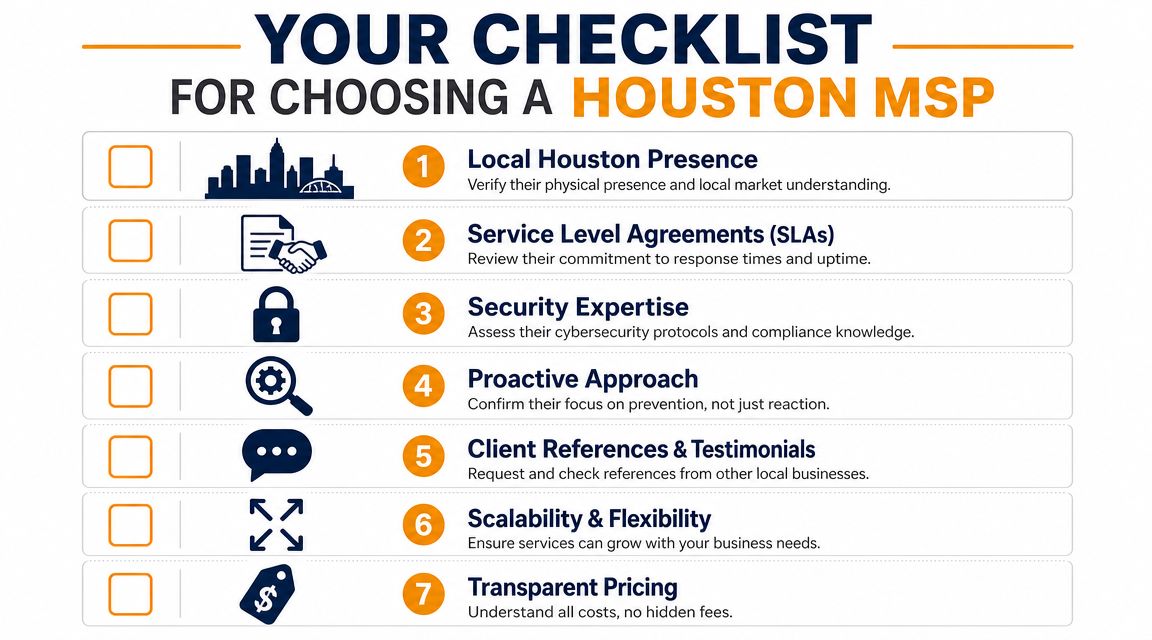
A practical Houston vetting checklist
Use this scorecard when you interview providers:
- Local presence: Can they support on-site needs in Houston, not just remote tickets from somewhere else?
- Security depth: Can they explain identity security, cloud recovery, and how incidents are handled?
- Onboarding process: Do they have a real transition plan, documentation process, and baseline assessment?
- Retention proof: Will they share client retention data or at least speak clearly about client tenure?
- Contract clarity: Do they explain what changes between month-to-month and longer agreements?
- Industry fit: Do they understand the software, workflows, and compliance pressures in your sector?
- Communication quality: Do they answer questions directly, or hide behind jargon?
If missed calls are a concern during support-heavy periods, some firms also review tools like SkipCalls solutions for IT professionals to tighten client communication around inbound service requests. That's not the core of managed services, but it does tell you whether a provider thinks seriously about responsiveness.
Questions worth asking in the first meeting
Don't ask, "What services do you offer?" Every provider has a list.
Ask these instead:
What do you do in the first month after takeover?
You want discovery, documentation, access review, backup validation, and risk cleanup.How do you handle identity security for Microsoft 365 and cloud admins?
If they dodge this, move on.What happens after a phishing incident?
You're looking for containment, user response, account review, and recovery workflow.What work is included versus billed separately?
This cuts through vague proposals fast.When do you come on-site?
Some issues need hands on keyboards and eyes on cables.
A provider interview should feel like operational planning, not a sales pitch.
Putting It All Together Houston SMB Success Stories
A Houston accounting firm had a familiar problem. Staff were handling sensitive client data, using Microsoft 365 heavily, and worrying about whether backups and access controls would hold up under scrutiny. The fix wasn't a single tool. It was tightening account security, cleaning up permissions, and building a recovery plan the office could actually rely on. The result was confidence. Fewer gray areas, fewer manual workarounds, and less stress around audits and client file access.
A multi-location retail business had another issue. The internet was technically "up," but stores still struggled with unstable Wi-Fi, inconsistent device connectivity, and support delays when front-line staff couldn't process work smoothly. Once the network was redesigned, documented, and centrally managed, day-to-day operations got simpler. Transactions moved faster and store managers stopped acting as part-time IT coordinators.
A legal office needed secure remote work without turning every home login into a support event. The right move was a structured cloud setup with cleaner Microsoft 365 administration, secure collaboration, and device policies that matched how attorneys and staff worked. After that, remote access stopped feeling fragile.
These aren't miracle stories. They're what happens when a business stops patching symptoms and starts managing systems.
Your Next Step and Frequently Asked Questions
If your current setup depends on luck, staff patience, and whoever picks up the phone when something fails, it's time to change the model. Good managed services don't just repair issues. They reduce noise, tighten security, and give you a stable way to run a growing business.
Frequently asked questions
Is my business too small for managed IT services?
Probably not. Smaller companies usually benefit the most because they can't afford dedicated in-house specialists for support, cloud, networking, and security. Managed services scale better than trying to hire a full internal team too early.
What happens if I switch from my current IT provider?
A competent MSP should handle the transition methodically. That includes documentation, admin access review, backup checks, tool deployment, and user onboarding. If a provider makes switching sound chaotic, that's a warning sign.
Can an MSP support our industry software?
Yes, if they're organized. A good provider coordinates with your software vendors, maps dependencies, and supports the environment around those applications so they run reliably.
Do I really need advanced security if I'm a smaller company?
You need the right security, not theater. In 2026, that means paying attention to identity, cloud access, phishing response, and recovery. Smaller businesses are still exposed when staff use Microsoft 365, shared cloud files, and remote access every day.
Should I choose the cheapest quote?
No. Choose the clearest scope, the strongest accountability, and the most credible operational process. Cheap IT usually gets expensive when something important breaks.
If you want a practical review of your current setup, IT Cloud Global, LLC provides Houston businesses with managed IT support, help desk, cloud administration, cybersecurity, backup and disaster recovery, networking, and on-site service. A short consultation can show you where your risks, gaps, and support bottlenecks lie before you commit to anything.
- Houston IT Support: A 2026 Guide for SMBs
- Computer Service Near Me: A Houston Buyer’s Guide
- Top 7 Managed IT Services Houston TX Reviews 2026
- 7 Best Managed IT Services Houston TX Reviews (2026)
- Best IT Services Houston TX: Your 2026 Partner
- Managed IT Services Houston TX: 2026 Guide for SMBs
- IT Managed Services Houston TX: 2026 Guide