


Small Business IT Support Houston: Expert Guide
Your team is working, customers are waiting, and then something small takes the whole day sideways. The office internet drops. Microsoft 365 stops syncing. A staff member clicks a bad email. Your point-of-sale system lags at the worst possible time. Nobody on your team knows whether to reboot, wait, or call someone.
That's the moment most Houston owners start searching for small business it support houston.
The underlying issue usually isn't one broken laptop or one bad password reset. It's that the business has outgrown ad hoc tech decisions. When technology is tied to sales, scheduling, billing, communication, and compliance, support has to be more than “call somebody when it breaks.” In Houston, that gets even more important because weather risk, travel time across the metro, and industry-specific requirements all raise the cost of delays.
Table of Contents
- Why Smart Houston Businesses Invest in IT Support
- Decoding Your IT Support Options
- The Business Benefits of Proactive IT Support
- Understanding Pricing Models and Service Level Agreements
- Essential Questions to Vet Houston IT Providers
- Houston-Specific IT Considerations You Cannot Ignore
- FAQ Answering Your Top IT Support Questions
Why Smart Houston Businesses Invest in IT Support
Monday starts with a login issue at the front desk. By 10 a.m., the shared drive is slow, one employee cannot print invoices, and a manager is using a personal hotspot because the office connection keeps dropping. Nothing is fully down, but the business is no longer running cleanly. That is when owners realize IT support is not a tech purchase. It is an operations decision.
Small businesses buy support to protect working hours, revenue, and momentum. If email stalls, phones cut out, or files become unreliable, staff cannot respond to customers on time. If security controls are weak, one bad click can turn into legal costs, recovery work, and days of distraction.
For Houston companies, the stakes are even more practical. A provider has to account for storm disruption, remote offices spread across a large metro area, compliance pressure in fields like healthcare and finance, and the fact that some problems still need a technician on-site fast. Generic advice does not help much when a flooded office, failed internet circuit, or dead firewall is stopping payroll or customer service.
IT support is really an operations decision
Technology touches nearly every part of the day:
- Customer response: Missed calls, delayed email, and unstable CRM access slow sales and service.
- Staff productivity: Repeated password resets, lagging PCs, and file access issues waste paid time.
- Security exposure: One poorly managed laptop or weak Microsoft 365 setup can create a serious business risk.
- Owner attention: Every hour spent chasing vendors or troubleshooting Wi-Fi is an hour not spent on staffing, sales, or cash flow.
Good support reduces that friction. A capable IT partner keeps systems maintained, documents how the environment is built, standardizes equipment, and closes common gaps before they turn into outages.
Practical rule: If the same issue keeps coming back, the problem is rarely the user. The problem is the system behind the user.
Reactive support stalls growth
Reactive support can look cheaper on paper because the invoice only shows up after something breaks. The hidden cost is instability. Old machines stay in service too long. Backup alerts get ignored. Cloud apps get added without ownership, security review, or offboarding procedures. The business keeps operating, but with more risk than leadership can see.
That trade-off gets worse as the company grows. More employees, more devices, and more software create more points of failure. At that stage, support is not just about fixing tickets. It is about setting standards, controlling risk, and keeping costs predictable enough to plan around.
Security also changes the math. Many owners first look for IT help after an outage, a phishing incident, or a compliance request. A better approach is to treat support and security together from the start. This practical guide to small business cybersecurity explains what that looks like in a real small business environment.
Decoding Your IT Support Options
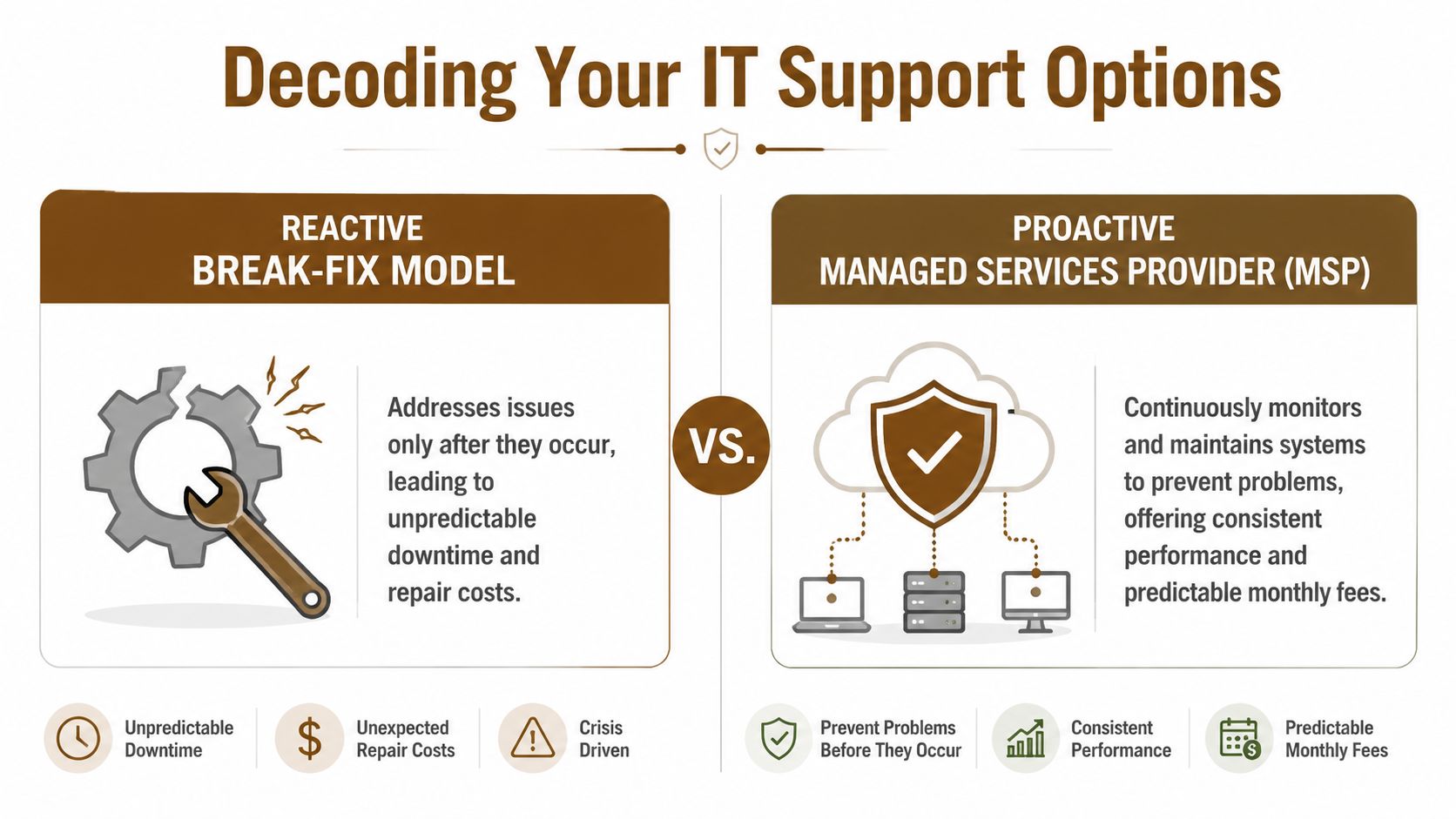
Some support models are built to repair damage. Others are built to reduce the chance of damage in the first place. That distinction drives cost, risk, and day-to-day stress more than most owners expect.
Break-fix versus managed support
Break-fix support is like calling a mechanic only after your car dies on the freeway. You pay for the repair, but you also absorb the delay, the disruption, and the uncertainty. If your server fails, your firewall is misconfigured, or a user opens malware, the meter starts when the problem is already hurting the business.
Managed support works more like an ongoing maintenance program. The provider monitors devices and systems, applies patches, reviews backups, responds to tickets, and keeps the environment more predictable. The goal isn't just fixing issues fast. It's preventing a large share of them from becoming business interruptions.
Houston businesses often need to decide between those models while juggling cloud tools, office networks, remote staff, and cybersecurity pressure. If security is part of that decision, this practical guide to small business cybersecurity gives a useful plain-English overview of where managed security fits alongside broader IT support.
What the main service categories actually do
A complete support setup usually combines several service types. Not every company needs every piece on day one, but most growing businesses need clarity on what each one solves.
| Service area | What it handles | When it matters most |
|---|---|---|
| Helpdesk support | Password resets, device issues, email problems, software troubleshooting | When staff needs fast answers during the workday |
| Cybersecurity | Endpoint protection, monitoring, patching, phishing defense, access control | When you store client data, process payments, or rely on cloud apps |
| Cloud support | Microsoft 365 administration, Azure, AWS, Google Cloud, migrations, permissions | When teams work remotely or depend on shared cloud systems |
| On-prem infrastructure | Servers, firewalls, switches, Wi-Fi, virtualization, local storage | When office uptime depends on physical hardware |
| VoIP and cabling | Phones, structured cabling, network drops, wireless coverage | When the office layout or retail floor affects connectivity |
| Repair and recovery | PC repair, Mac repair, printer troubleshooting, data recovery | When a single device failure blocks key work |
A lot of owners oversimplify this and assume “IT support” means someone who can remote into a laptop. That's only one slice of the job.
For example, cloud support isn't just moving files into Microsoft 365 or Google Workspace. It includes user provisioning, access reviews, device policy management, SharePoint permissions, Teams administration, and making sure former employees no longer have access to business data. Likewise, cybersecurity isn't just antivirus. It includes patch management, monitoring, alert handling, and backup practices that reduce the blast radius of an incident.
Good support is layered. Helpdesk without security leaves gaps. Security without backup planning leaves risk. Remote support without onsite capability leaves you stuck when hardware fails.
Some Houston providers cover these areas directly. For instance, IT Cloud Global, LLC handles managed support, cloud platforms such as AWS, Azure, and Google Cloud, Microsoft 365 administration, low-voltage cabling, VoIP, and in-house repair services, which is the kind of service mix many small businesses need as environments become less simple.
The Business Benefits of Proactive IT Support
Technology support only matters if it improves business performance. Owners don't need another dashboard. They need fewer interruptions, clearer costs, and fewer moments where staff sits idle waiting for somebody to fix access, devices, or connectivity.
Less downtime and less fire-drill work
When support is proactive, small issues get handled before they turn into public problems. That includes patching neglected systems, replacing failing hardware on a schedule, reviewing backups, and watching for warning signs instead of waiting for a full outage.
That changes the daily rhythm of the business. Staff spends less time improvising around broken tools. Managers stop acting as part-time IT coordinators. Owners stop getting pulled into avoidable disruptions.
A stable environment also protects customer experience. If your phones, email, scheduling software, or line-of-business apps work consistently, customers see a business that looks organized and responsive.
Better planning across operations and sales
One of the underrated benefits of proactive support is that it improves planning. If you know what's covered each month, which systems are aging out, and where your biggest technical risks sit, you can make cleaner budget decisions.
That carries into front-office systems too. If your operation depends on appointments, call handling, or customer follow-up, your CRM and communication stack have to work together. This article on boosting bookings with CRM integration is a good example of how connected phone and CRM workflows can remove friction for businesses that depend on fast follow-up.
A proactive support model also gives you a framework for longer-term improvements. Instead of buying random tools, you can sequence changes around business priorities like remote work, security hardening, or cloud consolidation. That's the operational mindset behind proactive IT support.
The best IT support relationship doesn't feel dramatic. Your team signs in, opens the tools they need, and gets on with work.
Understanding Pricing Models and Service Level Agreements
A Houston owner often finds out what their IT contract means at the worst possible time. Internet is down at one location, Microsoft 365 logins are failing, and staff are waiting for answers while the clock keeps running. That is why pricing and SLA terms deserve the same attention as the monthly fee.

How providers price support
Houston businesses tend to see three common pricing models.
Per-user pricing fits companies where each employee relies on a similar mix of devices, cloud apps, email, and security tools. It is easier to budget for, but the details matter. A low per-user fee can still lead to surprise charges if onboarding, after-hours support, or security work sit outside the base agreement.
Per-device pricing makes more sense in environments with shared workstations, warehouse terminals, kiosks, printers, or specialty equipment. The trade-off is simple. It may look cheaper on paper, but it can miss the support load created when many employees depend on a few critical systems.
Tiered packages group services into levels such as basic monitoring, helpdesk, cybersecurity, and strategy. These packages can work well if the provider defines the line between support and project work, and if you know what gets excluded from each tier.
Do not compare quotes line by line until you understand the billing model behind them. A contract that looks affordable can become expensive once you add onsite visits, vendor coordination, backup recovery, firewall changes, after-hours work, or new employee setup.
For a more practical budgeting lens, review this guide on managing IT costs for small businesses in Houston. It does a good job of framing IT spend around reduced downtime, lower risk, and fewer billing surprises.
Houston adds its own wrinkle here. If your business has multiple sites across the metro area, or if hurricane season raises the odds of an office outage, ask whether travel time, emergency onsite response, and disaster recovery work are included or billed separately. A provider based far from your office may still offer solid remote support, but distance matters when a network closet, firewall, or internet circuit needs hands on site.
What a strong SLA should say
A Service Level Agreement, or SLA, defines how support works when something breaks. It should state what counts as critical, who owns the issue, when escalation starts, and what service window applies.
Response time is only one part of the picture.
A provider can reply to a ticket in fifteen minutes and still leave your team stuck for hours. Owners should press on the full chain of responsibility, from acknowledgment to resolution to follow-up.
Look for these terms in writing:
- Response time by severity: Critical outage, security incident, locked-out user, and routine request should each have different targets.
- Resolution ownership: Someone should stay accountable until the issue is fixed or there is a clear workaround.
- Escalation path: The agreement should explain when senior engineers step in and how that handoff happens.
- Support coverage: Business-hours support and 24/7 coverage are different services. The contract should say which one you are buying.
- Onsite response: If remote support fails, the provider should define when they dispatch someone and what that visit costs.
- Backup and recovery scope: The SLA should clarify whether the provider only monitors backups or also restores data and tests recovery.
- Compliance responsibilities: If you operate in healthcare, legal, energy, or finance, the contract should separate general IT support from compliance-specific work.
Owner's test: If a storm knocks out your primary office, a file server fails, or a staff member reports suspicious login activity, the SLA should tell you who responds, how fast they respond, and what happens first.
Vague SLAs create room for disputes during an outage. Clear SLAs reduce confusion, set expectations early, and make it easier to judge whether a provider is built for your business, your risk level, and Houston's operating realities.
Essential Questions to Vet Houston IT Providers
The sales conversation matters less than the answers you get when you push into specifics. Most providers can describe their services well. Fewer can explain how they'll handle your exact environment, your industry pressure, and your worst day.

Questions about technical depth
Start with questions that expose whether the provider works in real small-business environments or mostly talks in generalities.
Ask things like:
- What does your onboarding process look like? You want to hear about documentation, device inventory, admin access review, backup checks, and network discovery.
- How do you handle escalation? If helpdesk can't fix an issue, there should be a clean path to more senior engineers.
- Do you support Microsoft 365, Azure, AWS, or Google Cloud directly? If your business relies on those platforms, outsourced guesswork becomes expensive.
- What happens when hardware fails and remote support isn't enough? Houston businesses often need onsite hands, not just remote sessions.
- How do you approach backup verification and recovery testing? Backups that haven't been validated are a false sense of security.
A provider should answer those without jargon overload. Clear answers usually indicate mature process. Evasive answers usually mean the work is less standardized than it should be.
Questions about business fit and communication
Technical ability matters, but support relationships fail just as often because communication is poor or the provider doesn't understand how the business runs.
Use questions like these:
- What types of businesses do you work with that are similar to ours?
- How do you report on open issues, recurring problems, and system risks?
- Who is our point of contact when there's a serious issue?
- How do you handle user communication during outages or security incidents?
- What do you need from us to make this partnership work well?
That last question is useful because good providers know support is shared work. They'll talk about decision makers, policy enforcement, hardware standards, employee onboarding and offboarding, and timely approvals.
A practical hiring checklist helps here. This list of questions to ask when looking for IT support is worth reviewing before meetings so you can compare providers on the same criteria instead of relying on whichever salesperson sounded most polished.
If a provider can't explain how they communicate during pressure, assume communication will get worse when you're under pressure.
Houston-Specific IT Considerations You Cannot Ignore
Support strategy changes when the business operates in Houston. Geography, storm exposure, and industry mix all shape what “good support” looks like here.

Disaster recovery has to match Gulf Coast reality
A generic backup plan isn't enough in this market. Houston businesses need disaster recovery planning that assumes severe weather, power disruption, office inaccessibility, and temporary dependence on remote work.
That means asking practical questions, not abstract ones. Can staff work if the office is closed? Are backups stored in a way that supports actual recovery? Who has authority to trigger failover decisions? Are critical credentials documented securely and accessible to the right people during an emergency?
Healthcare, manufacturing, energy-adjacent firms, and professional services offices also have different compliance and uptime concerns. A support provider has to understand the mix of technical controls and process discipline those environments require.
Local support matters more than many owners expect
Houston is spread out. Travel time isn't a minor detail when a firewall dies, a switch fails, or office Wi-Fi goes down before a busy day. Remote support solves a lot, but not everything.
The local market is also active. Houston's tech ecosystem is projected to employ 158,176 tech professionals in 2026, a 2.1% increase from the prior year, and Texas small businesses added 1.2 million jobs from openings and expansions, according to this Houston managed IT market overview. The same source points to local needs like disaster recovery and onsite support as core decision factors for small businesses.
For owners, the takeaway is simple:
- Choose a provider that can get onsite when needed
- Make hurricane-season continuity part of the contract discussion
- Ask for industry-relevant compliance experience
- Treat backup and communications planning as operating requirements, not IT extras
A provider that only fits a generic national template may still miss what Houston businesses need when conditions get rough.
FAQ Answering Your Top IT Support Questions
What's the difference between an IT consultant and a managed services provider
An IT consultant usually helps with planning, projects, assessments, or specific technical decisions. A managed services provider handles ongoing support, monitoring, maintenance, and day-to-day operational responsibility. Some businesses need both, but if your staff regularly opens tickets and depends on someone to keep systems running, managed support is usually the core need.
Is my business too small to need professional IT support
Usually no. Small teams often feel disruptions more sharply because one failed laptop or one locked account affects a larger share of the workforce. Even a small office benefits from standardized setup, security controls, backup oversight, and a reliable helpdesk path.
How long does it take to switch IT providers
It depends on how documented your current environment is. A smooth transition usually starts with admin access review, inventory, backup validation, vendor account transfer, and user communication. Clean transitions are less about speed and more about preparation.
Can remote-only support work for a Houston business
Sometimes, but not always. Remote support is efficient for many daily issues. It falls short when you have hardware failures, office network problems, cabling issues, or an outage that needs hands onsite.
What should I prepare before talking to providers
Bring a device count, employee count, list of major software platforms, known pain points, compliance requirements, and any recent outages or security concerns. The clearer the picture, the better the proposal.
If you're evaluating providers and want a local team that covers managed IT, cloud platforms, cybersecurity, helpdesk, backup, disaster recovery, onsite support, cabling, VoIP, and repair services, IT Cloud Global, LLC is one Houston-based option to consider. The best next step is a practical conversation about your current setup, where interruptions are happening, and what kind of support model fits your business without adding unnecessary complexity.
- Remote Desktop IT Support Guide 2026
- Excellent IT Group Houston Downtown: A 2026 Buyer’s Guide
- How to Choose a Texas Outsource IT Service
- Houston IT Support: A 2026 Guide for SMBs
- Computer Service Near Me: A Houston Buyer’s Guide
- Top 7 Managed IT Services Houston TX Reviews 2026
- 7 Best Managed IT Services Houston TX Reviews (2026)