


Security in Layers: Protect Your Business from Cyber Threats
If you're running a small business in Houston, there's a good chance your security stack started with one obvious purchase. Maybe it was antivirus on office PCs. Maybe it was a firewall from the last IT upgrade. Maybe it was Microsoft 365 with basic protections turned on. That feels responsible, and it is a start.
The problem is that attackers don't test one door and give up. They look for the weak side entrance, the unsecured window, the employee who reuses passwords, the laptop that missed updates, or the cloud app nobody approved. A business can feel protected and still be exposed because one tool only covers one part of the problem.
Security in layers fixes that mindset. Instead of asking, “What product should we buy?” the better question is, “How do we make it hard for an attacker at every step?”
Table of Contents
- Why a Single Lock Is Never Enough for Your Business
- Understanding Defense-in-Depth as a Strategy
- The 7 Layers of Cybersecurity Explained
- Where Houston SMBs Should Focus First
- An Actionable Roadmap to Layered Security
- How IT Cloud Global Delivers Layered Security
- Securing Your Business Starts with a Plan
Why a Single Lock Is Never Enough for Your Business
A single lock works for a storage closet. It doesn't work for a business that holds customer data, payroll records, cloud accounts, vendor logins, and employee devices that leave the office every day.
The better analogy is a building or a castle. A real security plan doesn't rely on one wall. It uses gates, lighting, badges, cameras, internal doors, and a place to retreat if something gets through. Cybersecurity works the same way. One layer slows an attacker down. The next layer blocks, flags, or contains them.
That approach matches the core principle behind layered security. No single security tool can stop all threats independently, and layered defense has become standard because it lowers the likelihood of a successful attack compared with relying on one point solution, as explained in this layered network security overview. For SMBs, that's especially important because smaller companies are frequently targeted.
A common SMB mistake
Owners often say, “We already have antivirus,” as if that settles the issue. It doesn't. Antivirus may help on the endpoint, but it won't fix weak passwords, risky Microsoft 365 logins, poor Wi-Fi segmentation, or staff clicking a convincing phishing email.
That's why businesses that look “covered” on paper still get hit. The failure isn't always the tool. It's the assumption that one tool is enough.
Practical rule: If one failed control can expose your entire business, you don't have security in layers yet.
A more durable approach starts by accepting that something will eventually be missed, misconfigured, or bypassed. From there, you build backup protections around the most likely failure points. If you want a clear example of why small firms get singled out in the first place, this breakdown of why small businesses are easy targets for hackers and how IT support helps is worth reading.
Understanding Defense-in-Depth as a Strategy
A Houston business can have a firewall, antivirus, and backups and still lose a week of operations from one compromised Microsoft 365 account. That is the problem defense-in-depth solves. It treats security as a series of barriers and checks that limit damage when one control fails.

For SMBs, this is not an enterprise-only concept. It is a budgeting and risk decision. The goal is to put the right protections at the points where attacks usually start, then add visibility and response so a small issue stays small. That matters even more for companies with remote staff, cloud apps, shared vendor access, and small internal IT teams.
For a concise outside perspective, this explanation of essential defense in depth for pentesters is useful because it shows how testers and attackers look for weak links between tools, policies, and user behavior.
The Function of Defense-in-Depth
Defense-in-depth assumes breach is possible. That changes how security gets built. Instead of spending the whole budget on the front door, smart businesses add controls inside the environment too. If a phishing email gets a password, MFA should slow the attacker down. If an endpoint is compromised, EDR should catch unusual behavior. If something still slips through, segmented networks, restricted privileges, and tested backups should keep the incident from spreading across the company.
That is the practical difference. The strategy is less about building a perfect wall and more about limiting blast radius, improving visibility, and giving your team time to respond.
For Houston SMBs, affordability comes from prioritization. Start with the controls that reduce the most common business risk first, then add depth where the impact of downtime, data loss, or compliance issues would hurt most. In managed environments, that often means combining endpoint protection, identity controls, network segmentation, monitoring, and recovery planning under one operating model instead of buying disconnected tools and hoping they work together.
The three jobs every layer should do
Every layer should support one or more of these functions. Across the full stack, all three need to be covered.
Prevent
Reduce obvious attack paths with MFA, patching, hardened endpoints, secure Wi-Fi, limited admin rights, and tighter access policies.Detect
Spot what gets through by monitoring endpoint activity, login behavior, firewall events, cloud apps, and suspicious changes across the environment.Respond
Contain the problem fast by isolating devices, disabling accounts, restoring clean data, and assigning clear ownership for each action.
A managed approach offers substantial real value for smaller companies. Tools such as SentinelOne on endpoints and Arista in the network are stronger when they are configured, monitored, and tied into a response process that fits the business. That is how layered security becomes practical instead of expensive shelfware.
The video below gives a quick visual on how layered cyber defense works in practice.
A good security stack helps block common threats, spot the ones that get through, and keep one bad event from turning into a company-wide outage.
The 7 Layers of Cybersecurity Explained
The standard seven-layer model gives SMB owners a practical way to see what complete coverage looks like. The framework includes Physical Security, Network Security, Endpoint Security, Application Security, Data Security, Identity & Access Management, and the Human Layer, with the human layer often seen as the most critical because user error can bypass strong technical controls, as outlined in this overview of the 7 layers of cybersecurity.
The seven layers at a glance
| Security Layer | Purpose | Example Controls |
|---|---|---|
| Physical Security | Protect hardware and on-site assets | Locked server rooms, door access controls, surveillance |
| Network Security | Control traffic moving across your environment | Firewalls, IDS/IPS, secure Wi-Fi, segmentation |
| Endpoint Security | Protect laptops, desktops, servers, and mobile devices | EDR, antivirus, patching, device control |
| Application Security | Reduce risk in business software and cloud apps | Secure configuration, access policies, WAF |
| Data Security | Protect sensitive information at rest and in transit | AES encryption, TLS, backups, tokenization |
| Identity & Access Management | Verify who gets access and under what conditions | MFA, least privilege, conditional access |
| Human Layer | Reduce mistakes and social engineering success | Awareness training, phishing drills, reporting culture |
Physical security
Cybersecurity starts with physical control. If someone can walk off with a laptop, plug into an open network closet, or access a server room without challenge, your digital protections lose value fast.
For SMBs, this layer usually means practical controls, not expensive hardware.
- Restrict high-value spaces with locks, badges, or controlled keys.
- Protect business devices with screen locks and secure storage.
- Control visitor access so guests don't wander near sensitive systems.
Small offices often ignore this layer because it feels old-school. It isn't. A stolen device or tampered network appliance can create a security incident before any firewall rule matters.
Network security
Your network layer handles a constant stream of traffic between users, devices, cloud apps, and outside services. That makes it a prime target. If this layer is weak, attackers can intercept, move, scan, or spread.
Core controls here are familiar for a reason.
- Firewalls filter allowed and blocked traffic.
- IDS/IPS helps spot or stop suspicious activity.
- Segmentation keeps guest Wi-Fi, office devices, servers, and critical systems from sitting in one flat network.
Many Houston SMBs still operate with little separation between office users, printers, cameras, and Wi-Fi guests. That creates easy pathways once one device is compromised. A deeper look at network security vulnerabilities your business must know and prepare for therefore becomes useful.
Endpoint security
Endpoints are where users work. Laptops, desktops, servers, tablets, and sometimes phones all count. They download files, open email, browse the web, and connect from home, airports, and client sites. That makes them one of the most active attack surfaces in any SMB.
A strong endpoint layer usually includes:
- EDR or next-gen endpoint protection to catch malicious behavior, not just known malware signatures.
- Patch management so operating systems and apps don't stay exposed.
- Policy controls such as USB restrictions, local admin limits, and device health checks.
This layer matters because users don't attack networks. They use endpoints. So do attackers.
Application security
Businesses now run on applications. Microsoft 365, accounting systems, CRM platforms, industry-specific SaaS tools, web portals, and internal apps all process business data. Each app has settings, permissions, integrations, and update requirements that can introduce risk.
Common application controls include:
- Secure configuration so default settings don't stay exposed.
- Web application firewalls for internet-facing services.
- Access reviews to remove stale permissions and risky third-party connections.
An app doesn't have to be custom-built to be dangerous. A poorly configured cloud app with broad file access can create just as much trouble as a vulnerable public website.
Data security
Data is usually the asset owners care about most. Customer records, contracts, HR files, email, payment information, and internal documents all need protection whether they're stored, shared, or backed up.
This layer includes several technical safeguards named in the seven-layer framework.
- AES encryption for stored data.
- TLS for data moving across networks.
- Data masking or tokenization where sensitive values need to be obscured.
Backups belong in this conversation too. Encryption helps protect confidentiality. Backups help restore operations after deletion, corruption, or ransomware.
Bottom line: If you can't say where sensitive data lives, who can reach it, and how it is protected, your data layer isn't mature yet.
Identity and access management
Identity is now a front-line control, especially in Microsoft 365 and cloud-heavy environments. If an attacker gets valid credentials, they don't need to “hack in” the way owners often imagine. They log in.
That makes IAM one of the highest-value layers for SMBs.
- MFA adds a second checkpoint beyond the password.
- Least privilege limits what each user can access.
- Conditional access can enforce rules based on device state, location, or risk signals.
This is also where service accounts, admin privileges, and shared logins need attention. Too many small businesses still have generic credentials known by half the office. That defeats accountability and raises risk.
The human layer
This is the layer many owners underestimate and attackers consistently test. Users click links, approve MFA prompts, reuse passwords, forward files to personal apps, and trust urgent-looking messages from “vendors” or “executives.”
The seven-layer model treats the human layer as especially important because human error can bypass advanced technology. In practice, that means training has to be specific and ongoing.
Useful controls here include:
- Security awareness training focused on phishing, password habits, and reporting.
- Simple escalation paths so employees know where to send suspicious emails or login prompts.
- Policy reinforcement around file sharing, personal devices, and unsanctioned apps.
Training alone won't stop every mistake. But without it, the rest of the stack carries avoidable risk.
Where Houston SMBs Should Focus First
A Houston business with 25 users does not need seven new security projects at once. It needs the first few controls that lower risk fast, fit the budget, and work together. That matters more than buying a pile of point tools that each solve one narrow problem and leave gaps between them.
For most SMBs, the best starting point is the places where a routine mistake turns into a business outage. In practice, that usually means endpoints, identity, and the network paths connecting everything. Those three areas affect email, file access, remote work, Microsoft 365, line-of-business apps, and day-to-day operations. If one of them is weak, a single compromised account or laptop can disrupt the rest of the office.
Start with the controls that reduce damage fast
Endpoint security deserves early budget because laptops, desktops, and servers are where staff work and where attackers often get their first foothold. Businesses need modern endpoint detection, consistent patching, and the ability to isolate a device quickly. Tools like SentinelOne matter here because they do more than alert. They help stop malicious behavior and contain a problem before it spreads.
Identity belongs in the first wave because cloud access is now the front door for many SMBs. If a user account is compromised, the attacker may not touch the firewall first. They log in to Microsoft 365, email, or a SaaS platform with valid credentials. Strong MFA, tighter admin controls, and regular access cleanup reduce that risk at a reasonable cost.
Network security comes next because it determines how far an incident can travel. If guest Wi-Fi, printers, cameras, phones, and business systems all share the same flat network, one weak device can become a path to more sensitive systems. Better switching, segmentation, and policy enforcement, including solutions from vendors like Arista, limit that blast radius without forcing an enterprise-sized rebuild.
First dollars should go to the controls that contain one bad click, one stolen password, or one infected device before it affects payroll, customer files, or operations.
Close the visibility gaps owners usually discover late
Many owners still picture security as a firewall at the edge. That view is incomplete for businesses running Microsoft 365, cloud apps, remote access, and office Wi-Fi. Once users, devices, and apps operate inside and outside the office, the key question is not just who gets in. It is what they can reach next.
One common gap is shadow IT. Employees use personal file-sharing apps, browser extensions tied to company email, or department-level SaaS tools that IT never approved. The exact percentage varies by study, so the useful point is practical. It happens often enough to plan for it, and it creates blind spots in logging, access control, and data handling.
Houston SMBs usually see that in familiar forms:
- Customer files copied into personal storage accounts
- Browser add-ons with access to business email or documents
- Small SaaS purchases made on a company card without IT review
- Old user accounts that stay active after job changes
- IoT devices and guest systems sharing space with business assets
The priority is not to secure everything at once. It is to build a sensible first layer of defense that gives visibility and control. For many Houston SMBs, that means managed endpoint protection, tighter identity controls, and a cleaner network design delivered as one coordinated service. That approach is more affordable, easier to operate, and far more effective than buying isolated tools one by one.
An Actionable Roadmap to Layered Security
Most owners don't need a perfect master plan on day one. They need a sequence they can execute. A four-phase roadmap keeps security in layers practical instead of overwhelming.
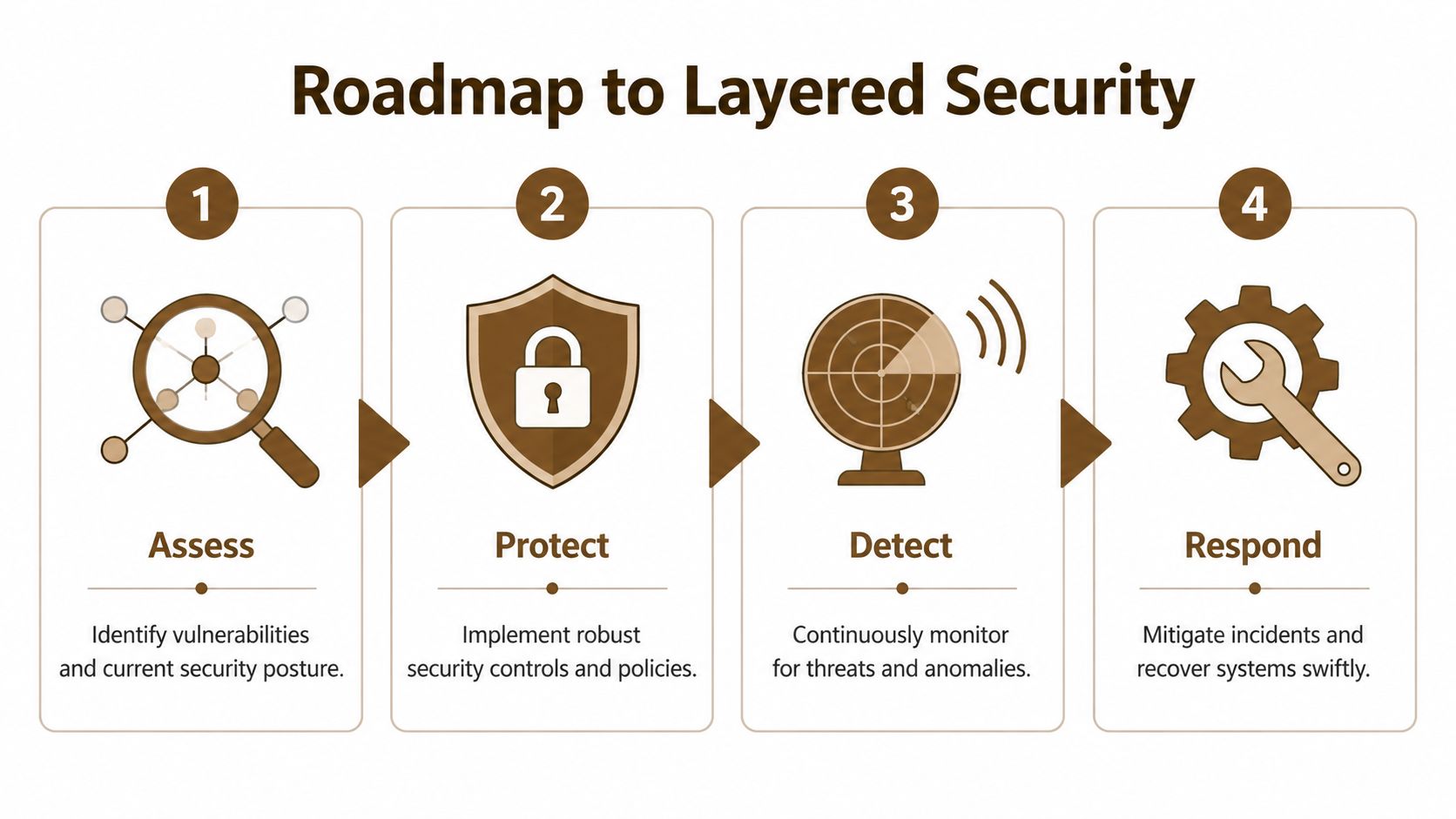
Phase 1 assess
Start with business reality, not tool catalogs. Identify what would hurt most if it were unavailable, exposed, or altered. That usually includes email, shared files, accounting systems, line-of-business apps, and the devices people use to access them.
During assessment, look for gaps such as:
- Critical assets that don't have clear ownership
- Old endpoints with inconsistent updates
- Admin accounts with broader access than needed
- Shadow IT and unapproved SaaS tools
- Flat networks that allow easy internal movement
A short asset and risk review often reveals obvious weaknesses fast. That's good news. Clear weaknesses are easier to fix than vague anxiety.
Phase 2 protect
Now choose controls based on risk and budget. It's common for many SMBs to overspend on niche tools and underinvest in basics. Start with the controls that reduce common failure points first.
That usually means a mix of technical controls and policy changes.
- Harden identity with MFA, role-based access, and removal of shared logins.
- Secure endpoints using EDR, patching, and device management.
- Tighten the network with firewall review, secure Wi-Fi, and segmentation.
- Protect data through encryption, backup discipline, and controlled sharing.
Not every phase requires a major purchase. Sometimes the most important improvement is changing how access is granted or how files are shared.
Phase 3 detect
Protection without visibility creates false confidence. Once controls are in place, the next job is to know when something unusual happens.
Useful detection points include:
- Endpoint alerts for suspicious behavior
- Login anomalies in Microsoft 365 and cloud apps
- Firewall and network events that suggest scanning or unexpected traffic
- User reports when something looks wrong
Detection needs context. A stack of alerts nobody reviews is noise, not security.
The best alert is the one tied to a clear action. Who checks it, who decides, and what happens next should already be defined.
Phase 4 respond
Incidents are stressful because businesses try to invent the process while the problem is unfolding. Response planning fixes that. Even a simple playbook is better than improvising.
A workable SMB response plan should answer:
- Who owns decisions if an account is compromised
- How devices are isolated if malware is suspected
- How clean data is restored if files are damaged
- How staff and customers are informed when necessary
Then refine the roadmap as the business changes. New staff, new SaaS tools, a second office, remote work, or a cloud migration all change the shape of your risk.
How IT Cloud Global Delivers Layered Security
Houston SMBs usually do not fail because they bought nothing. They run into trouble because they bought security one piece at a time, from different vendors, with nobody making sure it all works together. The result is familiar. The firewall is in place, laptops have protection, Microsoft 365 has basic settings, and no one has a clear view of what happens when something slips through.
IT Cloud Global addresses that problem by building and managing security as one operating model. For a small or midsize business, that matters as much as the tools themselves. Owners need protection they can afford, support their staff can use, and a plan that does not fall apart the moment the business adds remote users, another office, or more cloud apps.
Why integration matters more than tool count
Security works like securing a building. Good locks help. Cameras help. An alarm helps. But if each system is separate and nobody is watching the full picture, gaps stay open.
The same problem shows up in IT. One product may spot suspicious behavior on a laptop, another may control network traffic, and Microsoft 365 may hold the account activity that explains what really happened. If those signals are not connected to a support process, response slows down and small issues turn into expensive ones.
IT Cloud Global uses partner technologies with clear jobs in the stack, then manages them as a coordinated service.
- SentinelOne covers the endpoint layer with detection, response, and device-level visibility.
- Arista supports the network layer with switching, wireless, segmentation, and traffic control that fit office and multi-site environments.
- Microsoft 365 security administration ties identity, access, application controls, and data handling into daily cloud use.
That combination gives SMBs a practical middle ground. They get stronger coverage than a basic set of standalone tools, without the cost and management overhead of building an in-house security operation from scratch.
How the stack maps to real business risk
Business owners do not buy “layers.” They buy fewer disruptions, less account abuse, more reliable access, and a faster response when something goes wrong.
A Houston medical practice, distributor, law office, or construction firm may face different compliance pressures, but the day-to-day risks are similar. Staff click links. Passwords get reused. Guest Wi-Fi bleeds into internal traffic. Shared files end up too exposed. A former employee keeps access longer than they should.
A managed layered approach connects the control to the business problem.
| Business Need | Layered Security Response |
|---|---|
| Protect office laptops and servers | Managed endpoint protection with SentinelOne, patching, monitoring |
| Secure office connectivity and Wi-Fi | Arista-backed network design, segmentation, firewall alignment |
| Reduce Microsoft 365 account risk | MFA, identity review, access policies, cloud admin support |
| Protect data availability | Backup, recovery planning, controlled access, cloud governance |
| Limit support burden on staff | Centralized monitoring, helpdesk escalation, guided remediation |
The trade-off is straightforward. A unified service may look less flashy than adding another standalone security product, but it usually delivers better operational results for SMBs. Fewer blind spots. Fewer tools for staff to manage. Clearer ownership when an alert needs action.
That is the tangible value IT Cloud Global brings to layered security for Houston businesses. The service is built to fit existing budgets, personnel limits, and relevant business risk.
Securing Your Business Starts with a Plan
Perfect security doesn't exist. That's not a reason to settle for weak security. A business becomes far harder to compromise when it stops relying on one product and starts building security in layers across users, devices, networks, applications, data, and access.
The next move should be practical, not dramatic. Review what matters most, fix the biggest gaps first, and build a plan you can maintain. If you need a framework for turning those priorities into execution, this guide on how to create and implement an effective IT strategy for small businesses is a strong place to start.
If you want help turning layered security into a workable plan, contact IT Cloud Global, LLC. Their Houston-based team helps small and midsize businesses assess risk, secure endpoints and networks, strengthen Microsoft 365 and cloud environments, and build a defense strategy that fits real operations and real budgets.
- Top 7 Cybersecurity Companies in Houston for 2026
- Houston IT Support: A 2026 Guide for SMBs
- What Is Network Access Control: Why Your Business Needs It
- Hybrid Cloud Management: A Practical Guide for SMBs
- Computer Service Near Me: A Houston Buyer’s Guide
- Best IT Services Houston TX: Your 2026 Partner
- Your 2026 Disaster Recovery Testing Checklist