


Structured Cabling: A Practical Guide for Modern Businesses
You've signed the lease on a new Houston office. The space is empty, the drop ceiling is open, and someone needs to decide where the network outlets, wireless access points, cameras, phones, and printers will go before walls and finishes make every change expensive.
That decision affects far more than internet speed. A poorly planned cable plant can create dead zones, PoE instability, difficult troubleshooting, and disruptive rework when the office changes shape. A standards-based structured cabling system gives your switches and access points a dependable foundation, so the hardware can change without forcing you to rebuild the building.
Table of Contents
- Why Structured Cabling Matters for Growing Businesses
- What Structured Cabling Actually Is
- Copper or Fiber and How Far It Can Go
- Planning a Cabling Project That Holds Up
- Installation and Testing Best Practices
- Cost and ROI of a Well Built Cabling System
- Compliance, Upgrades, and the Labor Reality
- When to Bring in a Managed Cabling Partner
Why Structured Cabling Matters for Growing Businesses
A new tenant may start with a simple request: provide network service to each office and conference room. The actual requirements usually arrive quickly. Wireless access points need reliable uplinks and Power over Ethernet, VoIP handsets need dependable connections, security cameras need continuous service, and the workplace layout may change after the first round of hiring.
The permanent decisions are hidden above the ceiling and inside walls. Cable pathways, conduit, telecom-room locations, floor penetrations, outlet boxes, and firestopping are difficult to relocate after construction. Switches, access points, and phones are comparatively easy to replace or reposition.
Practical rule: Treat the cable plant as part of the building, not as disposable IT equipment.
The alternative is familiar. Point-to-point runs accumulate without a consistent patching strategy. Patch cords stretch across racks, undocumented cables follow baseboards, and a single damaged run may disconnect an entire group of desks. Technicians then spend time identifying cables instead of fixing the actual fault.
A structured system changes that operating model. Each outlet has a planned destination, each run follows an organized pathway, and the telecommunications room provides a controlled place to terminate, label, test, and modify connections. That structure helps the business handle office moves, hybrid-work changes, new cameras, and wireless upgrades without turning every change into a construction project.
The value becomes obvious during an outage. A labeled, tested link can be traced from the work-area outlet to the patch panel and switch port. An improvised installation leaves the technician guessing, often while employees wait for service to return.
Market research also reflects how important this infrastructure has become. One 2026 estimate values the global structured cabling market at USD 13.97 billion in 2024 and projects USD 36.20 billion by 2033, while another estimates USD 12.41 billion in 2024 and forecasts USD 26.30 billion by 2033. The estimates differ, but both point to sustained investment in enterprise networks, data centers, and broadband infrastructure (market estimates and industry analysis).
What Structured Cabling Actually Is
Think of structured cabling as a building's road system. The backbone connects major destinations, horizontal cabling reaches individual areas, and patch fields provide controlled intersections where technicians can redirect traffic without pulling new cable.
The design normally uses a hierarchical star topology. Work-area outlets connect back to a telecommunications room, telecommunications rooms connect through backbone cabling, and the backbone leads to the equipment room or main cross-connect. That organization is different from legacy point-to-point wiring, where devices are connected directly with little central planning.
The framework became recognizable as an industry standard in 1991, when the first telecommunications cabling specification, ANSI/TIA/EIA-568, was published. It used a hierarchical star topology and established transmission requirements for Category 3, Category 4, and Category 5 cabling. Follow-on updates appeared in 1995, alongside the first ISO/IEC 11801 international standard, while Europe's EN 50173 followed in 1996 (structured cabling standards history).
The six building blocks
- Entrance facility: The point where service-provider cabling enters the property, with protection, grounding, and demarcation equipment.
- Equipment room: The primary technical space for major network equipment, racks, servers, and the main patching structure.
- Backbone cabling: The vertical or interbuilding connections that carry traffic between rooms, floors, and buildings.
- Telecommunications room: The local distribution point where backbone and horizontal cables terminate.
- Horizontal cabling: The permanent runs from a telecommunications room to outlets and other service locations on the floor.
- Work area: The user-facing endpoint, including wall outlets, patch cords, phones, computers, printers, and wireless equipment.
A contractor turns those concepts into physical infrastructure: cable tray or J-hooks, conduit, racks, patch panels, grounding, firestopping, keystone jacks, labels, and test records. A useful overview of optimal network cabling for Wi-Fi can help business owners connect access-point planning with the broader cabling design.
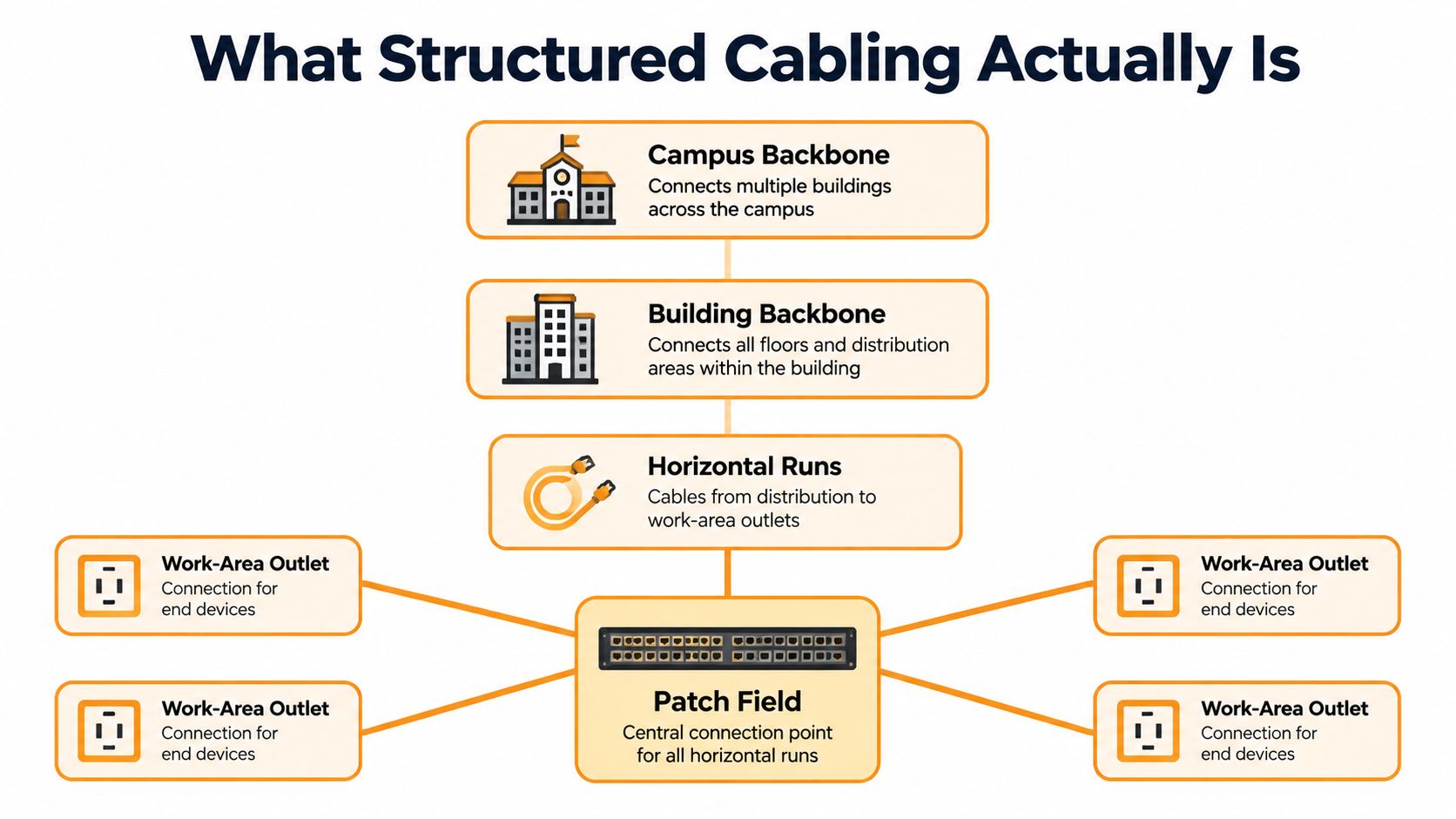
The cable itself isn't the entire solution. The operational value comes from a repeatable topology, consistent terminations, clear labeling, and documentation that lets a technician understand the system at any hour.
Copper or Fiber and How Far It Can Go
Copper remains practical for most work-area connections because it supports familiar Ethernet equipment and PoE-powered devices. Fiber becomes more compelling as distance, electromagnetic interference, backbone bandwidth, or future upgrade requirements increase.
The constraint that shapes office design is the 100-meter channel limit. Under TIA/EIA-568-B.1, the channel includes a 90-meter cable segment, up to 10 meters of patch, work-area, and equipment cords, and four connectors, evaluated at 20°C (TIA/EIA channel requirements). Exceeding that budget increases insertion loss and can make an otherwise compliant collection of components fail as a link.
For a new office, Cat6A is often the sensible copper choice when the design calls for demanding wireless access points, cameras, or high-throughput desk connections. It offers more headroom than older categories, but it isn't immune to installation conditions. Horizontal cable insertion loss must be corrected upward as temperatures rise, and stranded patch cords are derated compared with horizontal cable. TIA-derived guidance specifies a 20% derating for 24 AWG stranded patch cords and 50% for 26 AWG, with temperature corrections of 0.4% per °C from 20°C to 40°C and 0.6% per °C from 40°C to 60°C for Cat 5e, Cat 6, and Cat 6A UTP (channel and stranded-cable requirements).
That matters in dense Houston pathways, crowded closets, and areas carrying substantial PoE loads. You may need shorter patching, better thermal management, or a different medium to preserve certification margin.
| Scenario | Recommended Medium | Key Reason | Watch Out For |
|---|---|---|---|
| Desks, phones, printers, and standard office devices | Cat6A copper | Familiar termination and PoE support | Channel length, bundling, and thermal conditions |
| Wireless access-point locations | Cat6A copper, with capacity planned around the selected hardware | Supports demanding uplinks and power delivery | Confirm switch ports, PoE budget, and pathway density |
| Floor-to-floor backbone | Fiber | High bandwidth and electrical isolation | Connector cleanliness, bend control, and testing |
| Building-to-building connection | Fiber, often single-mode for longer campus paths | Distance and upgrade headroom | Pathway continuity, grounding strategy, and construction cost |
| Data-center or high-density backbone | Fiber | Supports expanding backbone capacity | Design, optics compatibility, and physical protection |
Current market coverage describes a shift toward Cat6A, Cat7, and fiber, with AI clusters and smart-building retrofits encouraging fiber-to-the-room designs (structured cabling market direction). That doesn't make fiber automatically better for every desk. Copper is still the practical answer where PoE and endpoint flexibility matter, while fiber earns its cost when distance, interference, power delivery, or backbone growth dominates the decision.
Physical protection matters too. A sound cable design should sit alongside a broader approach to protecting data center infrastructure, particularly where backbone pathways serve critical equipment.
Planning a Cabling Project That Holds Up
Good planning isn't a stack of independent checklists. The site survey determines the pathway design, the pathway design determines the material quantities and allowable routes, and endpoint density determines whether the telecom room and backbone can support the finished office.
Start in the building, not in a catalog. Record room dimensions, ceiling conditions, riser locations, existing trays, conduit capacity, electrical pathways, access restrictions, and areas that may require special handling. In Houston, confirm plenum requirements, heat exposure, flood or leak risks, and landlord rules before the installer prices the work.
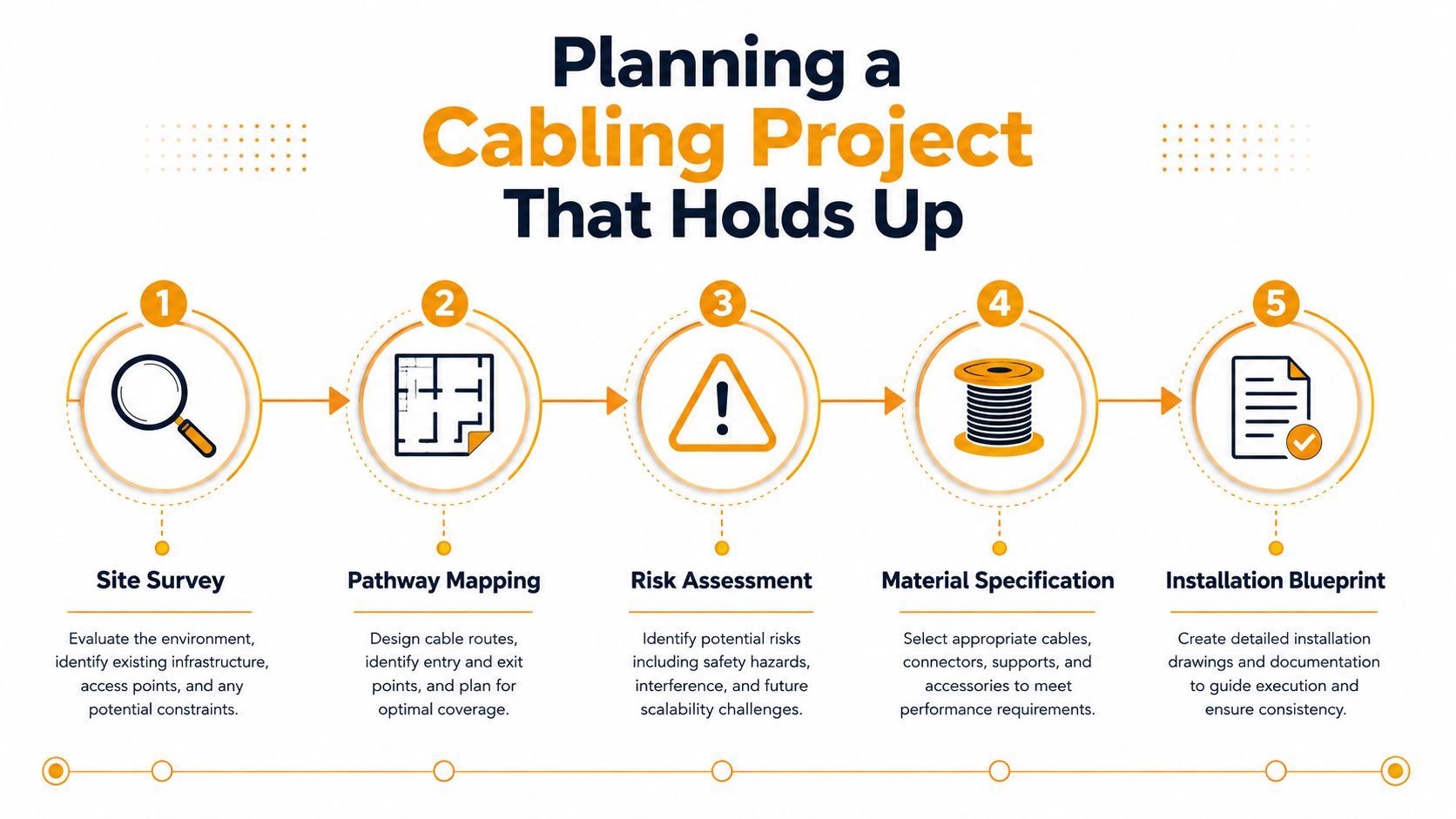
Build the design in the right order
- Survey the property. Mark outlets, access points, cameras, doors, conference-room equipment, printers, and likely future work areas on the floor plan.
- Map pathways. Decide where cable tray, J-hooks, conduit, sleeves, and service loops will go. Keep routes accessible and avoid creating a single point of failure for an entire work area.
- Assess risk. Check riser capacity, ceiling congestion, electrical separation, grounding, firestopping, and any condition that could force a route change.
- Specify materials. Match cable category, jacket rating, patch panels, jacks, racks, optics, and labeling components. Don't let a low-cost cable quote conceal incompatible hardware or missing pathway work.
- Create the installation blueprint. Issue a bill of materials, outlet schedule, rack elevations, patch-panel plan, cable IDs, and as-built requirements before pulling cable.
Wi-Fi planning deserves special attention. Access points may need multi-gigabit uplinks and substantial PoE, while dense coverage designs can require more than one cable at a location. Confirm the selected access point's uplink and power requirements with the switch design instead of assuming every wireless device can share the same port profile.
A relocation also exposes weak planning quickly. Coordinating pathways, rack shutdowns, labeling, and validation is central to minimizing downtime during office IT relocation.
The project should finish with records, not just a clean rack. Require labeled drawings, port schedules, test files, photographs of concealed pathways where appropriate, and a change process that keeps the documentation current.
Installation and Testing Best Practices
Installation quality determines whether the design survives contact with the building. A Cat6A cable pulled around a sharp obstruction, crushed beneath a ladder, or tightly cinched into a bundle can lose the margin that looked excellent on the specification sheet.
Respect the manufacturer's bend-radius guidance, especially near patch panels and access-point outlets. Keep bundles supported rather than compressed, separate data pathways from electrical interference where required, and leave usable service loops at distribution points. Labels should go on both ends as the cable lands, while the path and destination are still visible to the installer.
Make certification part of the installation
A visual inspection isn't certification. Every permanent link should be tested with a calibrated certifier, and the result should be tied to the cable identifier used in the patch-panel schedule.
For copper, the certification process should evaluate the wire map, length, insertion loss, crosstalk, return loss, and other applicable performance parameters. PoE-capable links may also require direct-current resistance unbalance checks. Test the installed channel, including the field termination and patch-panel connection, rather than testing only the horizontal cable on a bench.
Patch cords can consume more of the channel budget than many owners expect. Their stranded construction has higher attenuation than comparable horizontal cable, so a long or poorly selected patching arrangement can push a link beyond the allowable channel performance even when the permanent run looks acceptable.
| Test Type | What It Measures | Equipment Required |
|---|---|---|
| Tier-1 verification | Basic continuity, wire map, polarity, and approximate length | Qualification or verification tester |
| Tier-1 certification | Channel or permanent-link performance against the selected cabling standard | Calibrated cable certifier with current test limits |
| Tier-2 troubleshooting | Fault location and diagnostic information after a failure | Advanced certifier or troubleshooting instrument |
| Fiber certification | Optical loss and link performance for the installed fiber path | Fiber light source, power meter, and appropriate test accessories |
Keep the reports with the as-built package. A business that needs low-voltage wiring services should expect the installer to explain the test method, provide the results, and identify any remediated runs rather than just declaring the installation complete.
A passing test report is useful only when its cable label matches the outlet, patch-panel port, and drawing.
Cost and ROI of a Well Built Cabling System
Price structured cabling by the installed connection, not by square footage alone. The route, ceiling access, pathway construction, terminations, testing, labeling, rack work, and documentation often matter more than the raw cable price.
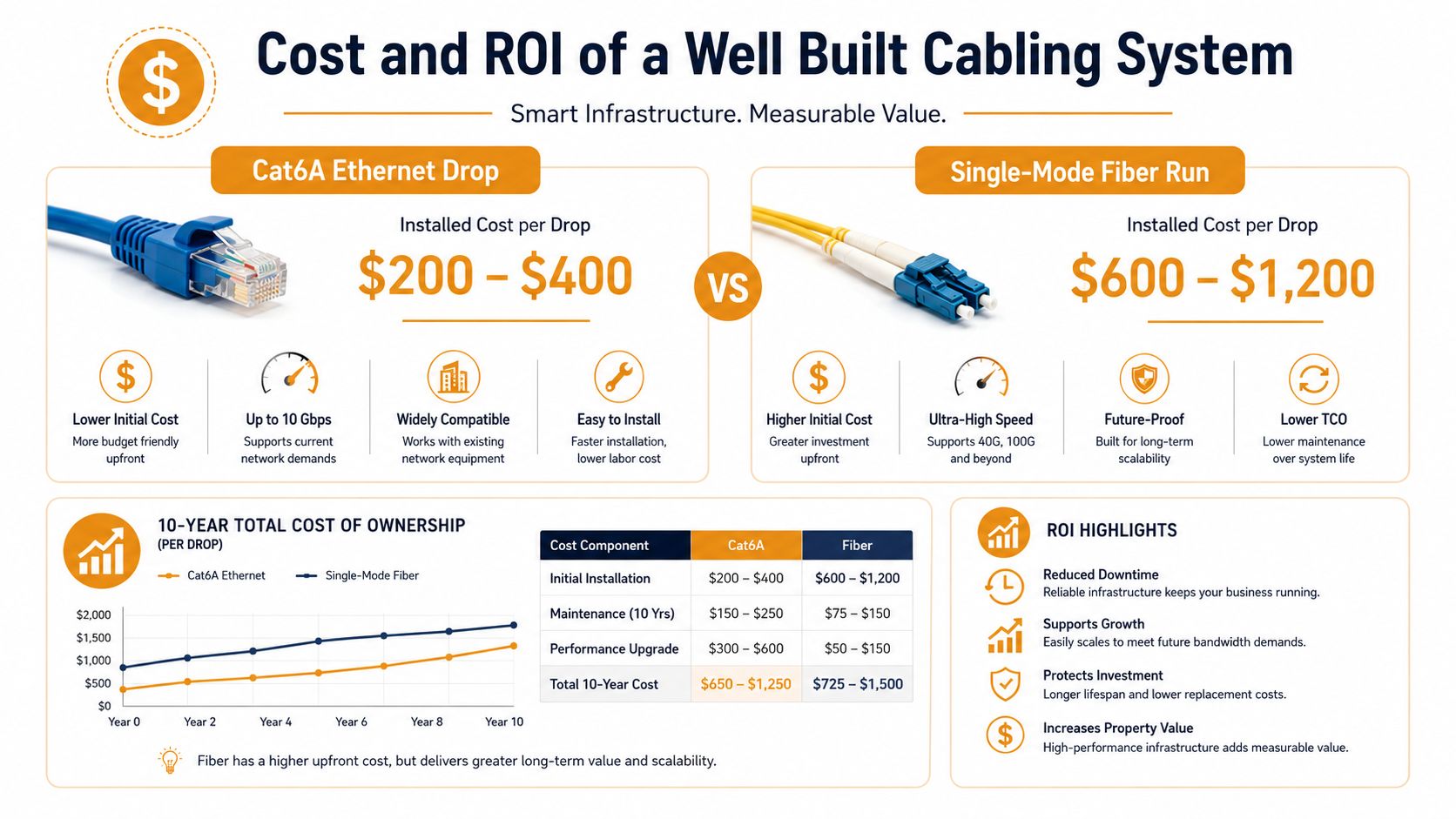
The planning brief for this project places a typical Cat6A commercial drop at $200 to $400 installed, while single-mode fiber generally costs more because termination and testing require specialized work. Those figures are planning ranges, not universal quotes. A Houston office with open access ceilings may price very differently from a finished space with difficult pathways, restricted work hours, or a long route between rooms.
Where low bids become expensive
A cheap proposal often removes work that isn't visible at handoff. The installer may minimize pathway improvements, use inconsistent termination practices, omit complete certification, or provide weak documentation. The network may appear functional on opening day, but the owner inherits failed tests, unstable PoE devices, hard-to-trace faults, and higher labor costs during the first move.
A more useful comparison asks what happens when the business changes:
- Office churn: Can a technician repatch an outlet without pulling a new run?
- Network upgrade: Can the existing cable support the planned switch and wireless design?
- Fault repair: Can the team identify the right cable without opening ceilings?
- Expansion: Is there pathway and rack capacity for new endpoints?
- Handover: Will another technician understand the system without interviewing the original installer?
Documentation has economic value because it reduces guesswork. A labeled patch panel, current floor plan, and complete certification record help the next change start with known information instead of discovery work. Guidance on Ethernet installation cost is useful when comparing proposals, provided you ask what the quoted price includes.
The return isn't just a faster network. It appears as fewer avoidable truck rolls, shorter troubleshooting windows, smoother office changes, and less likelihood that a new technology project becomes a cabling replacement project.
Compliance, Upgrades, and the Labor Reality
Cabling isn't finished when the last jack clicks into place. The plant must remain safe, documented, serviceable, and suitable for the equipment that will use it later.
Electrical and building requirements can affect the installation before cable is ordered. Review NEC Article 800, the applicable ANSI/TIA-568 revision, TIA-942 where data-center infrastructure is involved, and local authority-having-jurisdiction rules for plenum and riser-rated pathways. The right jacket, grounding method, firestopping approach, and support system depend on the building and the route.
The cable plant has a lifecycle
A business may expect the cabling to remain in service for many years, but the demands placed on it can change sooner. New PoE devices, higher-speed wireless backhaul, denser network rooms, and revised power-delivery guidance can expose weaknesses in an installation that once handled ordinary office endpoints comfortably.
That is why the design should reserve physical and operational flexibility. Use accessible pathways, leave usable rack capacity, document spare fibers or ports where the architecture calls for them, and avoid treating every unused space as waste.
The labor market adds another practical risk. A recent market source identifies skilled installation labor shortages in North America and Europe, along with volatility in copper and polymer raw-material costs (structured cabling market constraints). When qualified crews are difficult to schedule, an owner may be tempted to accept an installer with limited testing or documentation discipline.
That trade-off rarely stays confined to the construction budget. Unlabeled patch panels, missing test results, and undocumented changes make the next move slower and increase dependence on the original crew. Choose vendors that can show their labeling standards, certification workflow, closeout package, and technician qualifications before work begins.
Operations test: If a new technician can't identify a port from the records, the project isn't fully handed over.
When to Bring in a Managed Cabling Partner
DIY cabling stops making sense when the business is spending more time managing uncertainty than managing the network. The warning signs are operational, not cosmetic.
A move-add-change queue that never empties means internal IT is performing construction support instead of strategic work. Rack photographs that look like spaghetti indicate that future troubleshooting will depend on personal memory. Mystery ports, inconsistent labels, recurring link failures, and audit findings around grounding or documentation all point to a system that lacks reliable ownership.
Use clear triggers
Bring in a structured cabling partner when:
- The office is relocating or expanding. A move is the right time to redesign pathways, racks, outlets, and wireless locations rather than reproduce the old problems.
- A Wi-Fi or PoE upgrade is scheduled. New access points, cameras, and edge devices can expose channel, power, pathway, or closet-capacity limits.
- The change queue is persistent. Repeated adds, moves, and changes justify a documented process and defined service responsibility.
- An assessment finds gaps. Missing labels, absent test records, poor grounding, or unclear rack ownership should be corrected before a larger outage or audit.
- Internal IT is pulling cable after hours. Network strategy, security, vendor management, and user support are better uses of that team's time.
A managed partner should do more than send a technician with a spool of cable. Ask for a site survey, design package, material schedule, standards-based installation, certification records, updated drawings, and a way to request ongoing changes under defined service terms. The closeout package should remain with the customer, not trapped in a contractor's inbox.
For Houston businesses comparing structured cabling contractors, the key question is ownership. Who maintains the port map? Who handles a failed certification? Who updates records after a desk move? Who responds when a wireless deployment reveals a pathway or PoE problem?
A capable partner supports those answers while the in-house IT team sets priorities and protects the business.
IT Cloud Global, LLC offers site surveys, network cabling design, Cat5e, Cat6, Cat7, and fiber installation, testing, and ongoing network support for Houston businesses. Visit IT Cloud Global, LLC to discuss a structured cabling plan that supports your office move, wireless deployment, PoE requirements, and future changes.