


Azure Migration Services for Houston SMBs: A Practical Guide
The call comes in on a Thursday afternoon. A server in the back office is limping along, the datacenter lease is nearing its end, and somebody in accounting just asked whether the company can still work if that old box finally dies. That's the moment Houston SMB owners stop treating cloud as a nice-to-have and start looking hard at Azure migration services.
For a 40 to 250 person business, this is rarely about chasing the latest platform. It's about keeping payroll, email, line-of-business apps, and remote access alive without buying another round of aging hardware. It's also about avoiding the kind of migration mess that blows up budgets, drags on for months, and leaves everyone blaming IT when poor planning was the issue from day one.
Table of Contents
- Why Houston SMBs Are Moving to Azure Right Now
- What Azure Migration Services Include
- The Five-Phase Azure Migration Roadmap
- What Azure Migration Costs for an SMB
- Security and Compliance Considerations in Houston
- Common Pitfalls That Blow Up SMB Migrations
- How to Choose a Houston Azure Migration Partner
- Houston Case-Study Highlights and Your 30-Day Action Plan
Why Houston SMBs Are Moving to Azure Right Now
A Houston professional services firm I worked with had a familiar problem. The owner knew the old server room wasn't sustainable, the lease situation had gotten ugly, and a ransomware scare pushed the conversation from “later” to “this quarter.” That's a common pattern, because Azure migration services are no longer a strategic luxury. They've become the practical answer when uptime, security, and remote work all depend on infrastructure that can't keep living on borrowed time.
The pressure points are operational, not theoretical
Houston SMBs don't move because cloud marketing sounds good. They move because old hardware is a liability, and every month of delay keeps that liability in place. When a server goes down, there's no patience for a philosophical discussion about architecture. There's just lost work, stressed staff, and a very short path from inconvenience to outage.
The other pressure is that board-level expectations have changed. Cyber insurance, customer security questionnaires, and hybrid work all force a more disciplined approach to infrastructure. Azure gives you a platform, but azure migration services are what turn that platform into a workable plan for a small or midsize company.
Practical rule: if your current setup depends on one person remembering how to nurse an old server along, you're already paying too much in hidden risk.
Houston decision-makers need accountability, not cloud theater
A local owner cares about three things more than anything else, predictable cost, local accountability, and a plan that won't derail operations. That's why the Houston angle matters. You're not buying a science project. You're buying a controlled transition that protects business continuity while you modernize.
Microsoft's own migration guidance emphasizes workload inventory, dependency mapping, and performance baselining before moving production systems, which is a big clue that the process is now a formal program, not a one-click move into the cloud. Microsoft also says planning should collect CPU, memory, disk I/O, network throughput, transaction response times, and SLA metrics before migration, which reflects how mature migration work has become data-driven rather than guesswork-led (Microsoft migration assessment guidance).
If you're running a Houston SMB, that's the right mindset. Start with the business pressure, then use the tooling to remove risk. Don't do it backwards.
What Azure Migration Services Include
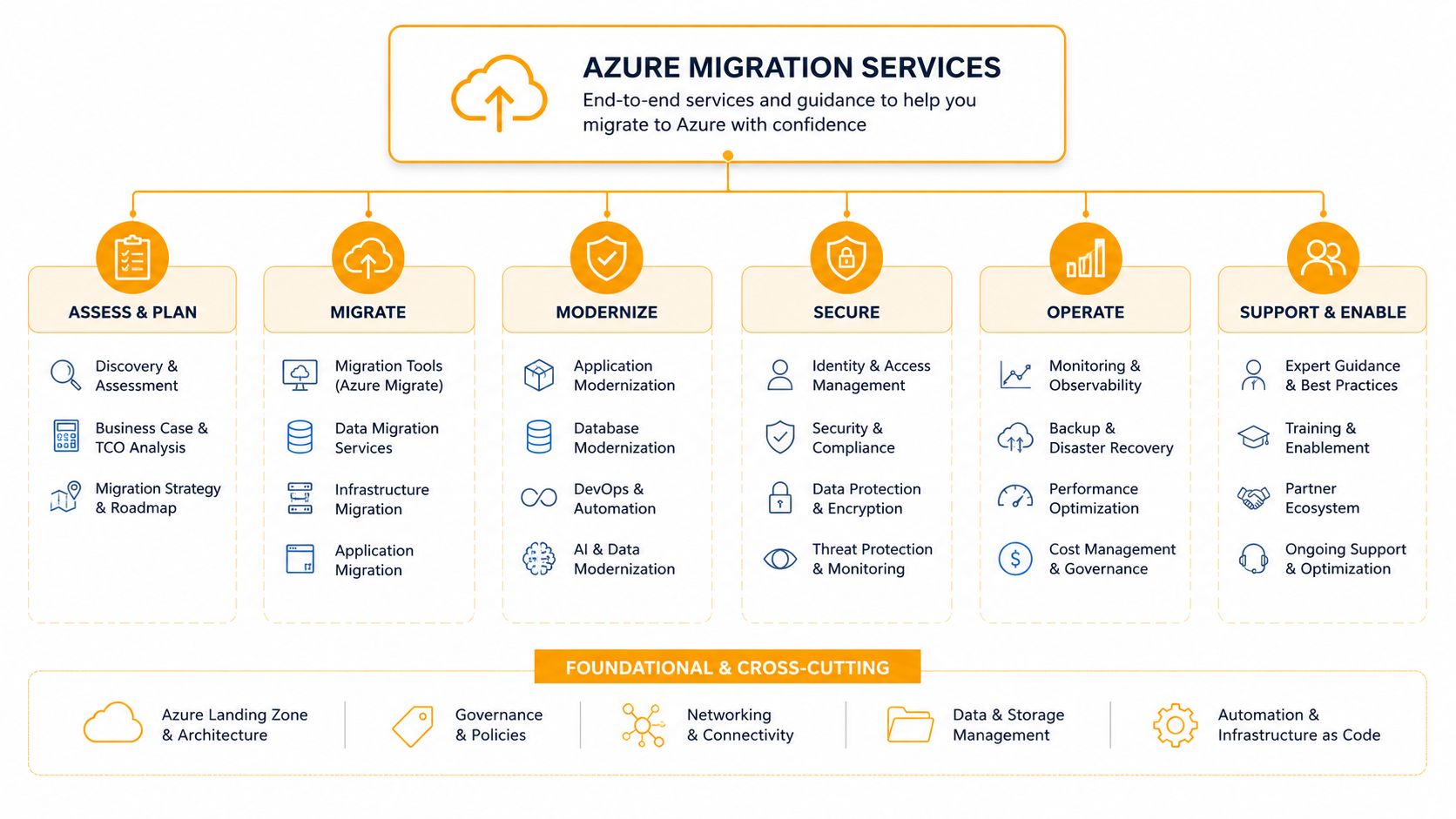
A lot of articles talk about Azure migration like it's a single product. It isn't. Many articles treat it that way because it is easier to sell, but in practice azure migration services are a stack of Microsoft tools, planning guidance, and partner execution that moves workloads out of an old environment and into Azure without breaking business operations on the way.
The Microsoft pieces do different jobs
Azure Migrate is the central hub. Microsoft documents it as the place to discover, assess, and migrate workloads into Azure, and it helps identify migration paths, estimate readiness, and move systems with minimal downtime and risk (Azure Migrate overview). For servers and infrastructure, this is the starting point.
For databases, Azure Database Migration Service, or Azure DMS, handles the move itself. Microsoft describes it as a fully managed service for database migration with minimal downtime in online scenarios. Microsoft also draws a line that matters, DMS is not an assessment tool, so you assess first and move second (Azure DMS overview).
The planning framework matters just as much. Microsoft's Cloud Adoption Framework gives you the assessment guidance, target-state planning, and baseline discipline that keeps a migration from turning into a pile of disconnected tasks. If you want a solid external comparison point for the consulting side of this work, the cloud migration strategy for legacy platforms page is useful.
DIY and partner-led are not the same thing
The do-it-yourself path means your team follows Microsoft documentation, deploys the Azure Migrate appliance, gathers data, and drives the cutover. That can work for simple estates. It also puts planning, testing, scheduling, and rollback on your staff, which is where many SMB migrations lose time and money.
The partner-led path wraps consulting around the Microsoft stack. That usually includes assessment workshops, dependency mapping, wave planning, pilot migrations, cutover weekend support, and post-migration cleanup. For Houston SMBs, that difference matters because the tool does not replace the judgment needed to avoid downtime, control surprises, and keep the business running while the move happens.
Azure gives you the machinery. A good partner gives you the choreography.
The Five-Phase Azure Migration Roadmap
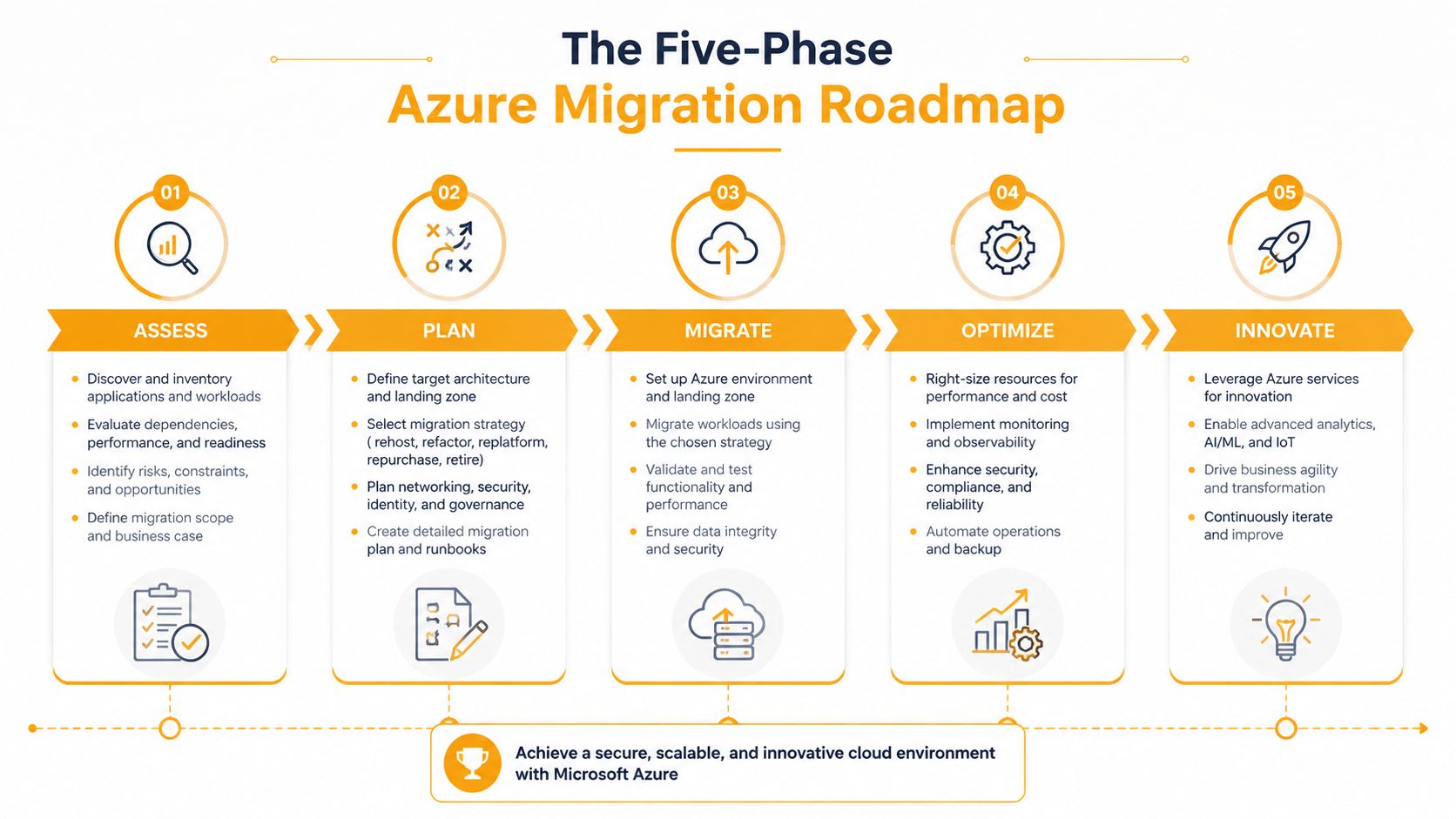
Houston SMBs that get migration right treat it like a managed program, not a one-time cutover weekend. The work moves through five phases, assessment, planning, pilot, migration, and optimization. Each phase needs a concrete deliverable that leadership can review, push back on, and approve before the next phase starts.
Assessment and planning are where the real work happens
Assessment is inventory, dependency mapping, and baselining. Microsoft calls for collecting CPU, memory, disk I/O, network throughput, transaction response times, and SLA metrics before migration (Microsoft migration assessment guidance). If a provider skips that step, they are guessing, and guesswork gets expensive fast.
Planning turns that raw data into a target architecture, a wave plan, and a budget model. The team decides which workloads move together, which ones wait, and which ones should be modernized instead of just lifted into Azure. The output should be clear enough for leadership to read in one sitting and specific enough for engineers to execute without hand-holding.
A bad plan usually fails in the same way. Teams assume every server deserves the same treatment, then they discover identity dependencies, licensing surprises, or application quirks after the schedule is already locked. Good planning removes those surprises early, while there is still time to change course without burning a weekend or a budget.
Pilot, migration, and optimization separate amateurs from pros
The pilot is a test move of a non-critical workload. It validates the runbook, network paths, identity configuration, and downtime expectations before anyone touches production. If the pilot exposes a problem, that is the point. Finding it there costs far less than finding it during cutover.
Migration is the wave-by-wave cutover. The rollback plan matters most here, because a failed weekend move can damage trust with the business quickly. Optimization comes after the dust settles, and many SMBs skip it because they are tired and want the project to be over. That shortcut leaves money on the table. In the optimization phase, you right-size VMs, tune Azure SQL, tighten identity controls, and clean up waste.
The firms that skip optimization usually keep paying for it month after month.
Key takeaway: skipping assessment or optimization is how small projects turn into expensive rescue operations.
What Azure Migration Costs for an SMB
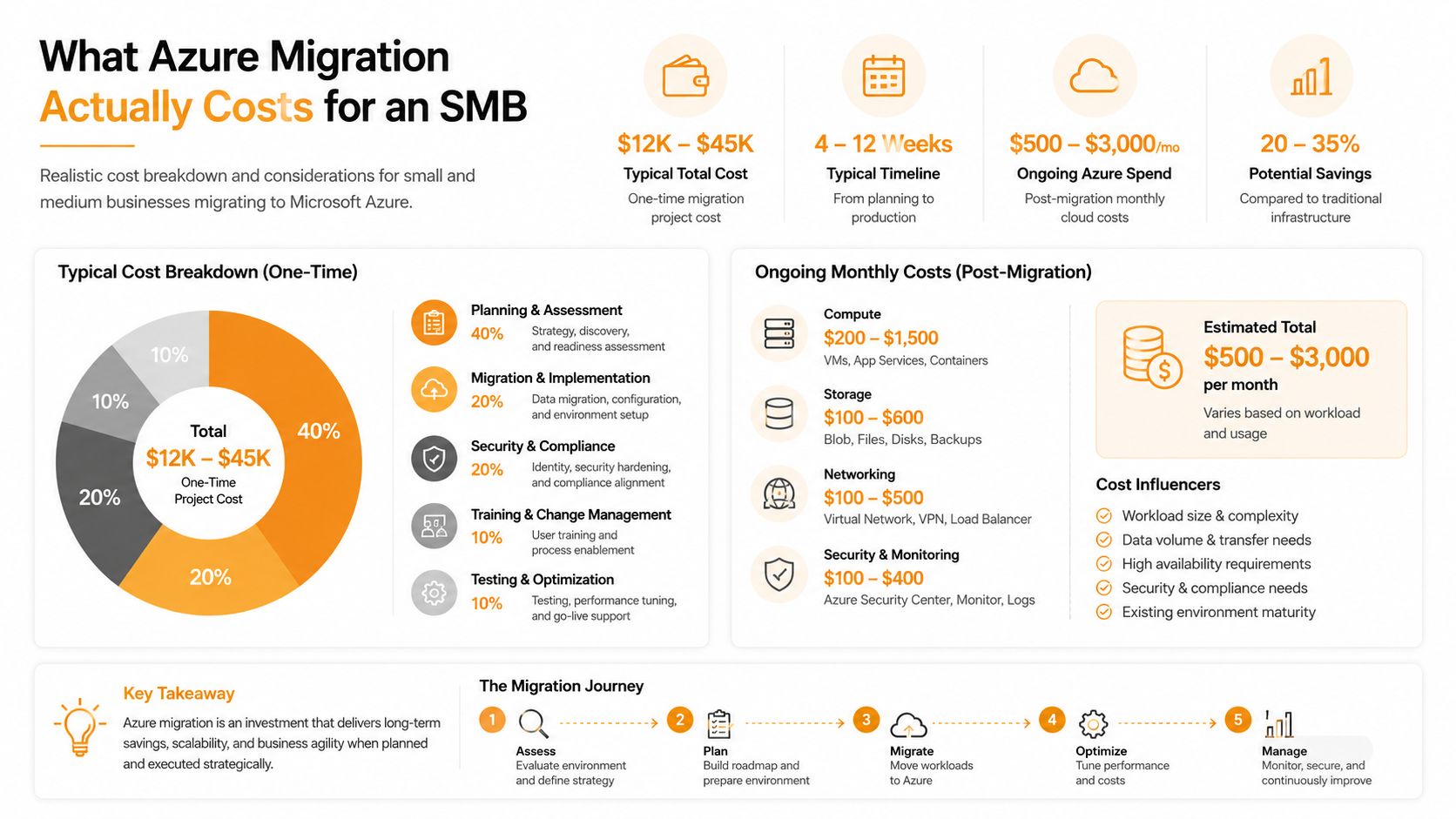
The first question executives ask is the right one, how much is this going to cost? The honest answer is that there is no clean one-line number. Microsoft's pricing pages and broader industry data do make the picture clearer than most sales decks want to admit.
The software may be cheap, the project usually isn't
Microsoft says Azure Migrate itself has no additional charge, but the free window for server migration only lasts for the first 180 days per machine. After that, Microsoft says a $25/month per replicated instance charge applies, and customers may still pay for storage, transactions, data transfer, and third-party ISV tools (Azure Migrate pricing).
That is the part a lot of SMBs miss. The migration tool can be inexpensive, but the surrounding work rarely is. Planning, validation, rollback prep, replication oversight, and after-hours cutover support are where the significant labor sits, and those are the line items that show up on the invoice.
Budget based on risk, not optimism
Independent industry figures project that for 2026, 38% of cloud migrations will exceed budget, with an average overrun of 23%, while 31% will miss the planned timeline. The same source says the average mid-market migration costs about $280,000, and enterprise migrations with 5,000+ users can run from $1.2 million to $4.5 million depending on complexity (cloud migration statistics 2026).
For a Houston SMB, the practical takeaway is simple. A smaller, cleaner environment should be budgeted as a controlled project with consulting, testing, and short-term replication costs. A messier environment with old SQL, multiple line-of-business apps, and after-hours cutovers needs a much larger cushion.
If you want a defensible number for a CFO, do not frame it as a software purchase. Frame it as a business transition with expected services, a reserve for post-cutover tuning, and room for replication and third-party costs that marketing pages leave out.
Security and Compliance Considerations in Houston
Houston SMBs don't get to treat security as a later phase. Medical practices, retail groups, SaaS firms, and energy-adjacent contractors all face different pressure, but the pattern is the same. If security is bolted on after the move, the migration gets more expensive and the audit trail gets uglier.
Build identity and monitoring into the migration plan
Azure migration work should include Microsoft Defender for Cloud, Microsoft Sentinel, Entra ID, and privileged access controls from the start, not after the first production workload lands. That's how you avoid building a new environment that inherits the same bad habits as the old one. A clean migration is a chance to reset identity, logging, and least-privilege rules while the architecture is still moving.
For Houston businesses that serve regulated customers, the compliance conversation comes up fast. That often includes HIPAA for healthcare, PCI-DSS for retail and restaurants, SOC 2 for B2B software, and CMMC-style requirements for businesses tied to defense or energy supply chains. A partner who already understands those frameworks can cut down the back-and-forth because they know which controls need documentation, which need technical enforcement, and which will get flagged in an audit.
Local context matters more than most vendors admit
A Houston-based team is also more likely to understand how to document the environment in a way auditors will accept. That matters because the paperwork isn't busywork, it's evidence that controls were designed intentionally. Azure gives you powerful tools, but the burden of proof still sits with the company.
Don't wait until after cutover to ask who owns access reviews, log retention, or break-glass access. By then, you're already behind.
For a practical compliance reference, the cloud security and compliance guidance from a Houston-focused provider is worth comparing against whatever your current MSP hands you. The point is not to copy their language. The point is to make sure your migration plan matches the controls your business needs.
Common Pitfalls That Blow Up SMB Migrations
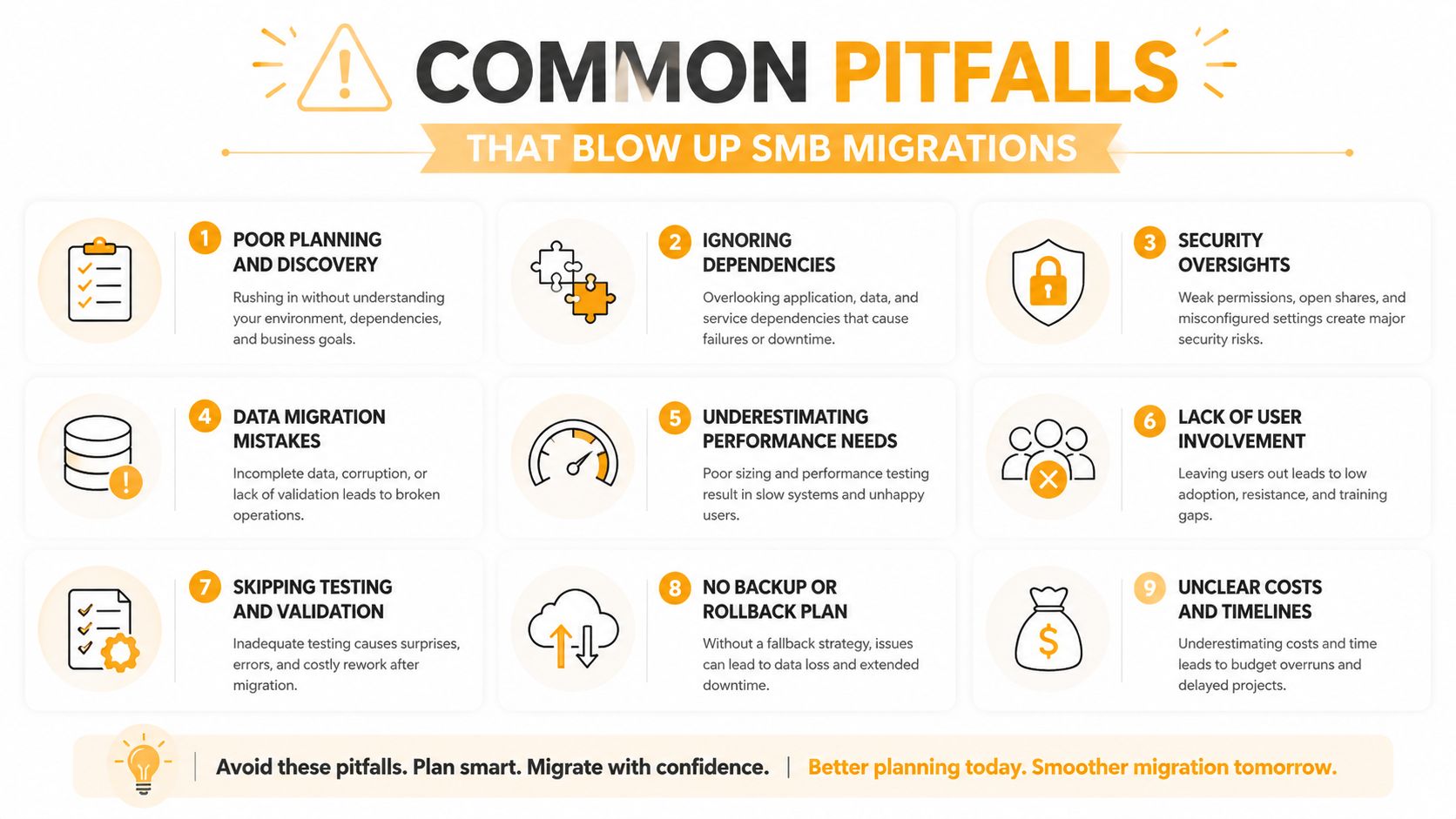
Most SMB migrations do not fail because Azure is hard. They fail because someone skipped a step, missed a dependency, or assumed the cloud would clean up bad planning. The mistakes are predictable, which is exactly why they waste so much time and money.
The five mistakes that hurt the most
-
Skipping dependency mapping: one server moves cleanly, then another app breaks later. The cause is hidden communication between systems that nobody documented. Map dependencies before you decide cutover order, not after the outage starts.
-
Under-sizing the discovery appliance: incomplete inventory collection and slow scans are the warning signs. If the appliance is not sized correctly for the environment, discovery turns into guesswork and the migration plan starts with bad data. Size it correctly and give it the network access it needs.
-
Treating Azure Migrate as free forever: the first bill can look friendly, then the ongoing replication and storage costs show up. Budget for the post-cutover period up front, because that is where SMBs get surprised. Azure Migrate is a tool, not a reason to stop watching spend.
-
Having no tested rollback plan: cutover weekend turns into a company-wide outage. Wishful thinking is not a recovery plan. Rehearse rollback before production ever changes.
-
Ignoring identity and licensing: the server may run, but users cannot authenticate cleanly or mail flow gets messy. Identity is part of the migration design, not cleanup work at the end. Configure Entra ID and licensing as part of the project, not after go-live.
Houston teams also run into avoidable process mistakes that have nothing to do with Azure itself. The mistakes-to-avoid guide is a solid reality check for that reason. Bad migrations are usually planning failures, not platform failures.
How to Choose a Houston Azure Migration Partner
Azure tools move workloads. A partner keeps the project from drifting into delays, surprise costs, and half-finished cleanup. That is the difference Houston SMBs feel in the world, especially when the app owner is under pressure and the cutover window is tight.
Look for proof, not polished talk tracks
Start with Microsoft competency you can verify, not a badge on a homepage. Then ask for local references, a fixed-fee or capped-fee model, named engineers on the project, and a written cutover runbook with rollback steps. If the provider cannot show you the runbook, they do not have one. Ask how they handle discovery, dependency mapping, and post-cutover stabilization, because that is where time gets burned.
You also need to know what happens after go-live. A real partner stays engaged for optimization and cleanup, instead of sending a goodbye email when the final invoice goes out. For Houston SMBs, the period after migration is where the environment gets tuned, the budget gets protected, and the rough edges get fixed before users complain.
If you want a cleaner way to judge the firm itself, use our guide to choosing a managed service provider before you sign anything. The same discipline applies here, because a weak provider will cost you more after cutover than during the sales process.
Questions that separate real providers from resellers
- Who will do the work? If the answer is vague, keep looking.
- What happens if the pilot exposes a dependency problem? Serious firms answer with a process, not a shrug.
- How do you handle the first weekend after cutover? That tells you whether they stay engaged or disappear.
- Can you show me a rollback plan from a recent project? If not, they are guessing.
- What do you do with identity, licensing, and post-migration cleanup? If they only talk about servers, they are incomplete.
A Houston-based partner with on-site dispatch, a working repair depot, and direct relationships with Microsoft account teams is more useful than a remote-only firm that treats your outage like a calendar event. When production breaks, you want people who can move, not just schedule.
Houston Case-Study Highlights and Your 30-Day Action Plan
A representative Houston professional services firm moved 18 servers and 4 SQL databases to Azure over two weekends. The project landed 12% under budget because compute capacity was reserved during planning, then the team used the optimization phase to cut another 18% by right-sizing VMs and turning on Defender for Cloud P2. That's the kind of result you get when the plan is disciplined and the cutover isn't treated like a gamble.
A simple 30-day path is enough to get moving
Week 1: run an Azure Migrate discovery scan on a read-only account so you know what you own.
Week 2: request a fixed-fee assessment from a local partner and compare it against your internal effort.
Week 3: review the dependency map and wave plan with the people who own the apps, not just the infrastructure.
Week 4: lock the cutover window and pilot one non-critical workload before you touch production.
That sequence keeps the project honest. It also gives leadership something concrete to approve instead of a vague cloud initiative with no finish line.
If you want a next step that doesn't waste time, ask for a free Azure migration assessment from IT Cloud Global at https://itcloudglobal.com. Get the inventory, the dependency map, and the cost picture before you commit to a migration window. That's the cleanest way to find out whether your move to Azure is a controlled upgrade or a budget problem waiting to happen.
If you're ready to move beyond guesswork, IT Cloud Global, LLC can help you assess, plan, and execute an Azure migration without the usual confusion. They work with Houston businesses that need straightforward answers, local accountability, and a cutover plan that holds up on a live weekend.