


Benefits of Managed IT Services for Your Business
You probably know the pattern already. A printer stops working before a client meeting. Microsoft 365 login issues slow down the front office. Someone clicks a bad email, and now everybody is asking whether customer data is safe. None of these problems feel strategic, but they steal time from sales, service, and operations all the same.
That’s why the benefits of managed IT services matter so much for Houston businesses. Good IT support doesn’t just fix devices. It protects cash flow, keeps employees productive, lowers risk, and gives you a practical way to grow without turning technology into a constant distraction.
For a small or midsize business, that shift is often the difference between running the business and constantly reacting to it.
Table of Contents
- What Are Managed IT Services and Why Do They Matter
- From Volatile Expenses to Predictable IT Investment
- Keeping Your Business Running with Proactive Support
- Protecting Your Data with Advanced Cybersecurity
- Ensuring Resilience with Backup and Disaster Recovery
- Scaling Your Technology as Your Business Grows
- Finding the Right Managed IT Partner in Houston
What Are Managed IT Services and Why Do They Matter
Managed IT services are ongoing technology support delivered by a third-party provider that acts like an outsourced IT department. Instead of waiting for something to break, the provider handles monitoring, maintenance, security, user support, and planning on a continuing basis.
That’s a major change from the old break-fix model. In break-fix, you call for help after the damage is done. The server is already down. The email account is already compromised. The office Wi-Fi is already affecting customer service.
For business owners, the difference is practical. Break-fix feels cheaper until the interruptions start piling up. Managed IT gives you a system for keeping work moving.
Why this matters to a business owner
Most companies don’t struggle because they lack software. They struggle because nobody owns the full technology picture. One person resets passwords. Someone else talks to the internet provider. Another employee buys laptops when people complain loudly enough. That approach works only until the business gets busy.
A managed services provider brings structure to that chaos. Support tickets go somewhere. Devices get tracked. Security tools get managed. Backups are checked. Cloud platforms like Microsoft 365, Azure, AWS, or Google Cloud stop being separate islands.
Practical rule: If your team is losing time to recurring tech issues, you don’t have an occasional IT problem. You have an operations problem.
In a market like Houston, that matters even more. Companies here compete on responsiveness, reliability, and trust. If your systems are unreliable, customers notice before you do.
Managed IT services matter because they turn technology from a source of surprise into something the business can depend on.
From Volatile Expenses to Predictable IT Investment
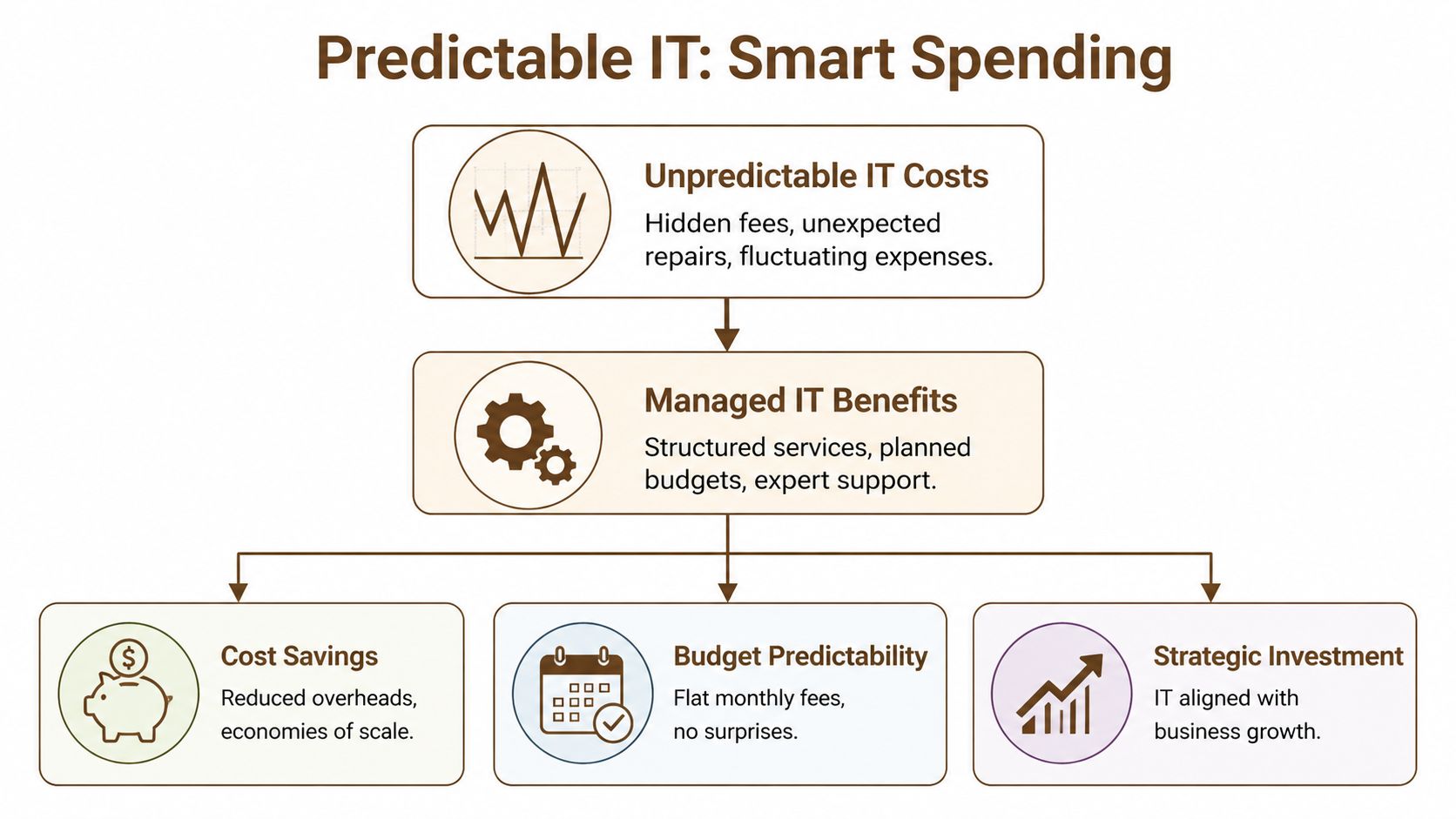
A lot of owners think IT is expensive because they only see it at its worst. Emergency server work. Last-minute hardware purchases. Cleanup after a malware incident. Rush support because nobody can access files. Those bills don’t arrive on a schedule, which makes budgeting harder than it should be.
Managed IT changes that by moving spending into a more predictable operating model. Instead of absorbing every surprise as a separate hit, the business pays for planned support, monitoring, and maintenance as an ongoing service.
Break-fix drains money in the worst way
Break-fix spending is volatile because it shows up when your business can least afford disruption. You’re not just paying the invoice. You’re paying for idle employees, delayed customer work, and management time spent triaging a problem that should never have reached that stage.
That’s one reason many companies switch to managed support. Organizations that contract with managed service providers can reduce overall IT costs by 20 to 30 percent, and 40 percent of business leaders who outsource IT do so specifically to save costs, according to managed services statistics summarized by JumpCloud. The same source notes that MSPs free up about 65 percent of IT budgets that are typically tied up in routine maintenance.
Those numbers matter because maintenance is where internal teams and business owners get trapped. If all your attention goes to software updates, user issues, and recurring device problems, very little is left for projects that improve the business.
Managed IT works a lot like a solid vehicle maintenance plan. Paying for scheduled care is easier to manage than discovering you need a major repair after the engine fails.
A useful local perspective on this financial shift appears in this breakdown of managed IT ROI for Houston businesses, especially if you’re comparing recurring support costs against the cost of interruptions.
What predictable spending actually changes
Predictable spending isn’t just an accounting preference. It changes decisions.
When IT expenses are stable, you can plan hardware refreshes instead of rushing them. You can budget for Microsoft 365 administration, endpoint protection, cloud migrations, and network support without guessing which quarter will get hit by an avoidable emergency. That usually leads to better purchasing decisions and less waste.
Here’s what that looks like in practice:
| Cost model | What usually happens | Business effect |
|---|---|---|
| Break-fix | You pay after failures, outages, and emergency calls | Budget surprises and reactive decisions |
| Managed IT | Support, maintenance, and oversight are planned | Better forecasting and steadier cash flow |
Houston companies also have to think about growth. Maybe you’re opening another office, adding remote staff, or standardizing devices across teams. A managed model lets you absorb those changes more cleanly because support scales with the business instead of resetting every time something changes.
The strongest financial benefit isn’t only lower spend. It’s control. When technology costs become more predictable, IT stops behaving like a random penalty and starts acting like a planned business investment.
Keeping Your Business Running with Proactive Support
The most valuable support call is the one your team never has to make. That’s the core case for managed services.
Reactive support waits for complaints. Proactive support looks for warning signs before users feel the problem. That can include monitoring servers, laptops, Microsoft 365 health, network equipment, backups, and cloud workloads around the clock.

Prevention beats heroic fixes
A lot of business owners have been trained to appreciate fast repair. Fast repair is useful, but prevention is where the money is.
Proactive monitoring in managed IT uses 24/7 oversight and AI-driven tools to detect issues early, with reported reductions in unplanned downtime of up to 80 to 90 percent compared with reactive in-house management. The same source says this can boost productivity by 20 to 30 percent because employees avoid constant helpdesk disruption, as described in this overview of managed IT support benefits.
That matters because downtime almost never stays inside the IT department. If your CRM is unavailable, sales work slows down. If SharePoint permissions break, operations starts emailing attachments around. If wireless coverage drops in a warehouse or retail location, customer-facing work gets messy quickly.
For a practical local example, this article on preventing downtime with managed IT support shows why prevention usually beats emergency response.
What proactive support looks like day to day
Good proactive support isn’t mysterious. It’s a series of unglamorous actions done consistently:
- Monitoring key systems: Servers, endpoints, firewalls, Microsoft 365 tenants, and cloud resources are watched for failures, abnormal behavior, and capacity issues.
- Applying updates on purpose: Patches are scheduled, tested, and rolled out in a controlled way instead of waiting until a vulnerability or bug creates urgency.
- Resolving small issues early: Storage fills up. A laptop starts throwing errors. A failed backup job appears. These are minor if handled early and expensive if ignored.
- Supporting users quickly: Password resets and access problems still happen. The difference is that they don’t consume your internal staff all day.
If your staff regularly says, "The system has been acting weird for a while," you’re already paying the price of reactive IT.
The business result is simple. Your team keeps working. Customers get faster responses. Managers spend less time chasing avoidable disruptions. That’s one of the clearest benefits of managed IT services because it shows up in day-to-day operations, not just in a technology report.
Protecting Your Data with Advanced Cybersecurity
Most small and midsize businesses don’t need more security products. They need a security system that fits together.
That’s where managed IT often delivers the biggest practical value. A strong provider can combine endpoint protection, identity controls, patching, network security, email defense, cloud configuration, and monitoring into one operating model instead of leaving you with disconnected tools.

Security works best in layers
Single-tool security rarely holds up. Antivirus alone won’t protect a cloud-heavy environment. A firewall alone won’t stop a user from approving a fake login prompt. Security gets stronger when each layer supports the next one.
Managed IT services can reduce breach risks by 50 to 70 percent versus traditional security approaches, according to this analysis of managed security benefits. That same source points to AI-powered threat detection through SentinelOne that can flag anomalies in under 60 seconds, along with 99 percent patch compliance through managed processes.
For a Houston business using Microsoft 365, Azure, Google Workspace, or hybrid on-prem systems, the stack often includes tools and practices like these:
- Endpoint protection with SentinelOne: Useful for spotting suspicious behavior on laptops and servers, not just known malware signatures.
- Zero-trust access controls: Users get access based on role and verification, not because they happen to be on the office network.
- Network segmentation with platforms like Arista: Helpful when you want to limit how far a compromise can spread.
- Mobile and device policy through Intune: Strong for enforcing encryption, updates, and access rules across company devices.
- Cloud logging in Microsoft 365 and SharePoint: Important for tracing activity and supporting internal reviews.
A lot of owners assume security is about buying software. In practice, software without management creates blind spots. Alerts pile up. Patches get delayed. Exceptions multiply. Nobody checks whether the controls still match how employees work.
Compliance gets easier when the basics are automated
This matters even more in healthcare, finance, legal services, and other regulated industries. Compliance requirements often sound separate from security, but in practice they overlap. If devices aren’t patched, access isn’t controlled, and logs aren’t available, both security and compliance suffer.
Managed services can automate audit trails for frameworks like HIPAA and maintain patch discipline so you’re not trying to reconstruct history during an audit or after an incident. That doesn’t remove your responsibility as the business owner. It does make the work more manageable.
This short overview is useful if you want a broader look at why layered security matters in modern environments.
Good cybersecurity support doesn’t just block attacks. It gives you evidence, process, and accountability when something suspicious happens.
One caution is worth stating plainly. More security tools do not automatically mean better protection. If policies are too aggressive, teams start finding workarounds. If alerts are too noisy, real threats get buried. The right managed partner knows how to balance protection with usability so the business stays secure without slowing everyone down.
Ensuring Resilience with Backup and Disaster Recovery
Security tries to stop bad events. Backup and disaster recovery assumes something will still go wrong.
That “something” might be ransomware, but it could just as easily be a failed server, a deleted folder, water damage, a power issue, or an employee mistake. Businesses get into trouble when they treat backup as a checkbox instead of a recovery plan.
Recovery speed matters as much as prevention
A backup is only useful if you can restore it fast enough for the business to keep functioning. That’s why two questions matter more than backup jargon.
First, how fast do you need to be operational again? That’s what IT teams call recovery time. Second, how much recent data can you afford to lose? That’s your acceptable data loss window. Owners don’t need the acronyms to make smart decisions. They need honest answers.
The urgency is real because downtime can cost businesses an average of $5,600 per minute, according to this business continuity discussion on managed IT services. The same source highlights the 3-2-1 backup rule, which means keeping three copies of data, on two types of media, with one copy offsite.
That rule is simple because it works. If one backup set fails, another is still available. If the office is inaccessible, offsite data still exists.
What a usable recovery plan includes
A real disaster recovery plan usually includes a mix of cloud backup, local recovery options, system documentation, and restore testing. The test matters. Plenty of companies discover they have backups only when they try to restore something important and run into corruption, missing permissions, or an incomplete system image.
A practical plan often covers:
- Core systems first: Accounting, line-of-business apps, shared files, and email come before lower-priority systems.
- Clear recovery order: Staff should know what gets restored first and who makes the call.
- Offsite protection: Backups stored away from the primary environment protect against physical and site-wide problems.
- Restore testing: Teams should verify that files, systems, and permissions come back the way users need them.
A useful local reference is this guide to cloud backup and continuity during disasters.
The goal of backup isn’t to own backup software. The goal is to stay in business after a bad day.
For Houston businesses, resilience has a local dimension too. Storms, building access issues, and site outages can all interrupt operations even when your cybersecurity controls are solid. Managed IT helps by treating recovery as an operating process, not a one-time purchase.
Scaling Your Technology as Your Business Grows
Growth puts pressure on systems that used to feel adequate. A ten-person office can get by with informal processes for device setup, file sharing, Wi-Fi coverage, and account permissions. A larger team usually can’t.
That’s one of the less obvious benefits of managed IT services. It gives you a way to scale technology without rebuilding your approach every time the business adds people, locations, or new software.
Growth creates IT strain fast
A business often feels healthy right before IT starts lagging behind it. Hiring speeds up. Remote employees need secure access. Teams adopt Microsoft Teams, SharePoint, Azure services, or Google Cloud tools. Somebody opens a second site and expects the network, phones, and printers to work on day one.
If you rely on ad hoc support, every change becomes a mini project. Devices aren’t standardized. Access rules drift. Old hardware stays in service too long. Cloud licenses multiply without much governance. None of that is catastrophic at first, but it creates friction that compounds as the company expands.
A managed partner can make scaling more orderly by handling tasks such as:
- New user onboarding: Creating accounts, securing devices, assigning licenses, and applying policies in a repeatable way.
- Cloud administration: Supporting Microsoft 365, Azure, AWS, or Google Cloud as usage grows.
- Office expansion support: Coordinating Wi-Fi, switching, low-voltage cabling, printers, and endpoint deployment.
- Lifecycle planning: Replacing devices before they become a reliability problem.
Why outside expertise helps at the right time
Most growing companies don’t need one heroic IT generalist. They need access to several kinds of expertise at the moments those skills matter.
Cloud migrations require different knowledge than endpoint security. VoIP and network design are different again. Microsoft 365 administration, Intune policy, SharePoint permissions, virtualization on VMware or Hyper-V, and wireless planning each bring their own details. Hiring all of that in-house usually isn’t realistic for a small or midsize business.
That’s where a managed model provides a strategic advantage. You get access to specialists without carrying a full internal bench. The business can move faster on projects, avoid avoidable missteps, and still keep day-to-day support covered.
For Houston companies, local support still matters. Remote help solves a lot, but there are times when you need hands on site. Office moves, new cabling, hardware swaps, and stubborn connectivity issues usually get resolved faster when the provider can support both remote and physical environments.
The best growth-focused IT support doesn’t just react to tickets. It helps the business absorb change without turning every expansion step into an operational drag.
Finding the Right Managed IT Partner in Houston
Not every managed service provider delivers the same value. Some are strong at helpdesk work but weak on security. Some know Microsoft 365 well but struggle with network design or on-site support. Some look affordable until add-on fees start stacking up.
Choosing well means asking sharper questions before you sign.
Questions worth asking before you sign
Use these questions to pressure-test any provider you’re considering:
- How do you define response times? Ask what happens when users can’t work, not just what the ticketing system promises.
- What’s included in the monthly agreement? You want clarity on helpdesk, monitoring, patching, vendor coordination, after-hours support, and project work.
- Which security platforms do you actively manage? Look for concrete answers involving tools such as SentinelOne, Intune, firewalls, cloud security, and logging.
- Do you support both remote and on-site work? Houston businesses often need both.
- What experience do you have in my industry? Healthcare, legal, retail, logistics, and professional services each create different requirements.
- How do you handle backup verification and restores? Don’t stop at “we back things up.”
- Who owns documentation? Good documentation reduces dependence on any one technician.
- How do you support cloud environments? Ask specifically about Microsoft 365, Azure, AWS, Google Cloud, and hybrid systems if those matter to your business.
A provider that gives vague answers during the sales process usually won’t become more precise once support begins.
What good answers sound like
Good answers are specific, operational, and easy to verify. You should hear clear language about service levels, escalation, security stack management, and how they support day-to-day users.
You should also listen for trade-offs. Honest providers will tell you where standardization is necessary, where legacy systems create risk, and where an aggressive security policy could frustrate staff if it isn’t rolled out carefully. That kind of realism is a good sign.
A few positive indicators stand out:
| What to look for | Why it matters |
|---|---|
| Defined service scope | Prevents billing surprises and support gaps |
| Named tools and partners | Shows the provider actually operates the stack |
| On-site and remote coverage | Fits real business conditions |
| Industry familiarity | Helps with compliance and workflow needs |
| Plain-language communication | Reduces confusion for non-technical leaders |
A strong MSP should make your environment easier to understand, not harder to decipher.
If you’re comparing options in Houston, pay attention to whether the provider talks like a vendor or like an operator. The right partner won’t bury you in jargon. They’ll explain how they protect time, money, and risk in terms your leadership team can put into practice.
If your business needs steadier support, stronger security, and a clearer IT plan, IT Cloud Global, LLC provides Houston-based managed services, cloud support, cybersecurity, backup, and on-site or remote help designed to keep work moving without the usual IT chaos.
Published via Outrank app
- Software Development Services: A Practical Guide for 2026
- How Long Does Data Recovery Take? Realistic Timelines
- What Is a Helpdesk Ticketing System? an SMB Guide
- What Is Virtualization in Computing? Save & Boost Uptime
- Cloud Computing Solutions for Small Business: Houston 2026
- Managed IT Services for Small Business Near Me: Houston
- Network Maintenance Service: A Guide for Houston SMBs