


Structured Cabling Contractors: A Houston SMB Guide
If you are running a Houston office, clinic, warehouse, or retail space, there is a good chance your network closet tells the complete story. A few old switches. Patch cords with no labels. Wi-Fi complaints that seem to move around the building. A VoIP phone that drops calls in one corner. A new camera install that turned into a scavenger hunt because nobody knew which cable fed what.
That isn't just messy. It's expensive.
Every slow troubleshooting session pulls someone away from their actual job. Every office move becomes harder than it should be. Every cloud app, phone system, access point, and security device ends up depending on a physical layer nobody planned properly. That's why structured cabling matters. It gives your business a network that behaves more like a system and less like a pile of extensions.
The demand behind that shift is real. The global structured cabling market is projected to reach USD 26.30 billion by 2033, growing at an 8.5% CAGR, according to Grand View Research's structured cabling market analysis. Businesses aren't investing in cabling because it looks tidy. They're doing it because digital operations depend on reliable infrastructure.
If you're sorting out a new office, a remodel, or a long overdue cleanup, it helps to start with a clear view of how a business network should be built. A practical primer like this business network setup guide gives useful context before you start talking with structured cabling contractors.
Table of Contents
- Your Network's Foundation From Chaos to Control
- The Anatomy of a Structured Cabling System
- Understanding Cabling Components and Standards
- Core Services of a Professional Cabling Contractor
- Scoping Your Project Costs and Timelines
- Hiring the Right Cabling Contractor in Houston
- Future-Proofing Your Network for Cloud and Hybrid Work
Your Network's Foundation From Chaos to Control
A lot of business owners call structured cabling contractors after something has already gone wrong. The office added staff, but there aren't enough clean data drops. The Wi-Fi got upgraded, but the access points were fed by whatever cabling happened to be nearby. The phones moved to VoIP, and now every call problem turns into a debate over whether it's the ISP, the firewall, the switch, or the wiring.
That's the point where a messy closet stops being an eyesore and starts acting like a tax on the business.
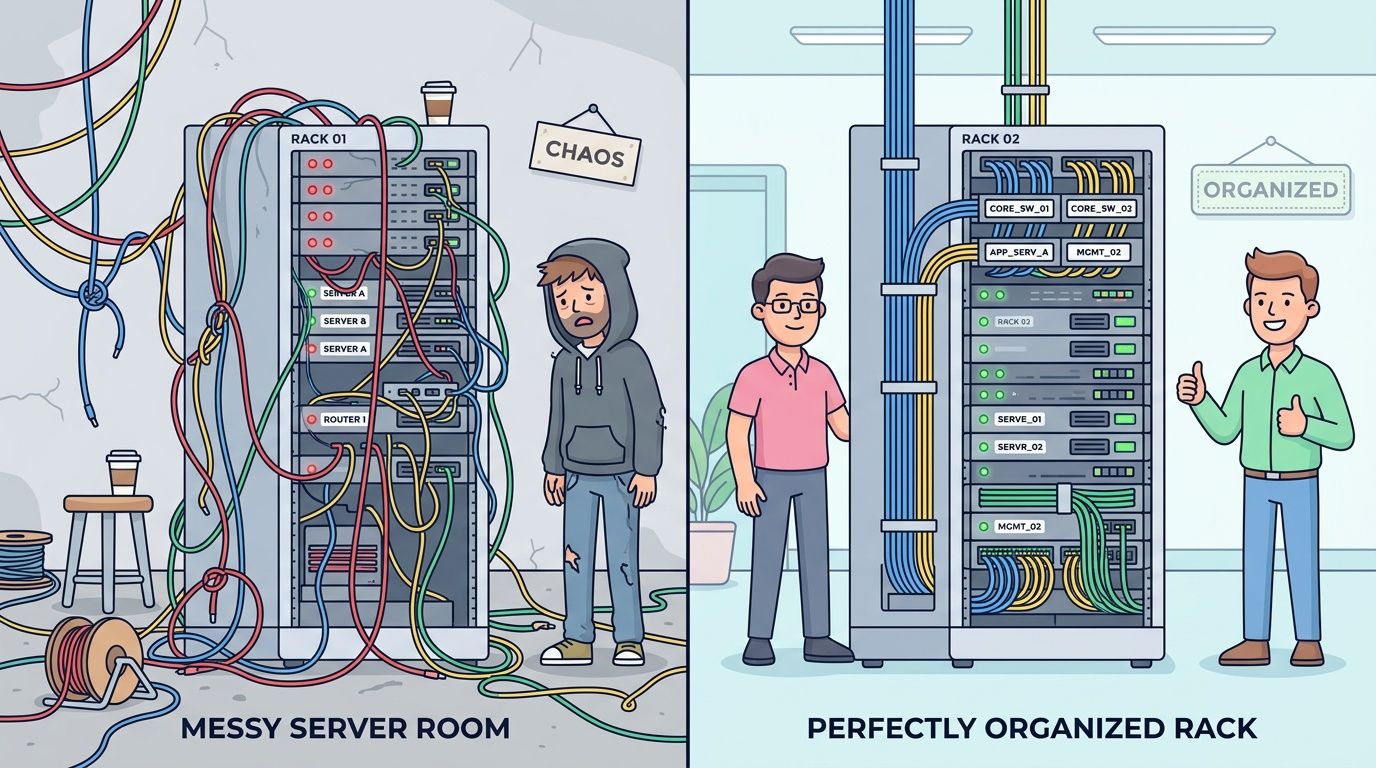
Structured cabling establishes intentional order within your infrastructure. Rather than relying on individual cable runs installed every time a desk moves or a printer is relocated, you receive a strategic layout featuring labeled pathways, defined endpoints, and a framework designed for growth without confusion. This setup provides the same organization found in a breaker panel compared to a room filled with power strips. While both methods distribute electricity, only one remains safe, maintainable, and prepared for future expansion.
What business owners usually notice first
The first benefits aren't abstract. They show up in daily operations:
- Moves get easier: Staff relocations don't require tracing mystery cables across the ceiling.
- Troubleshooting gets faster: A labeled patch panel beats trial and error every time.
- Wireless improves: Access points perform better when the wired side is planned correctly.
- Cloud apps feel steadier: Microsoft 365, line-of-business tools, and VoIP all depend on a stable local network before traffic ever reaches the internet.
Unstructured networks usually don't fail all at once. They fail one confusing ticket at a time.
In Houston, that matters more than many SMBs expect. Businesses are adding cameras, door access, cloud apps, softphones, conference room gear, and more mobile devices in the same footprint. A network designed for a small office a few years ago often isn't designed for today's density.
Control starts at the physical layer
A well-built cabling system becomes the central nervous system of the building. It supports endpoints, but it also supports change. That's the part many owners miss. Good structured cabling contractors aren't just installing cable. They're reducing friction for every future project that touches the network.
That includes office expansions, managed Wi-Fi, VoIP rollouts, security upgrades, and cloud migrations. If the physical layer is sloppy, every one of those projects gets slower and more fragile. If the physical layer is organized, the rest of your IT stack has something solid to stand on.
The Anatomy of a Structured Cabling System
Many professionals hear "structured cabling" and associate it with Ethernet runs in the wall. That is only one component. A complete system more closely resembles a building's nervous system. It includes an entry point, a central hub, primary pathways, local distribution points, and final connections out to the work areas.
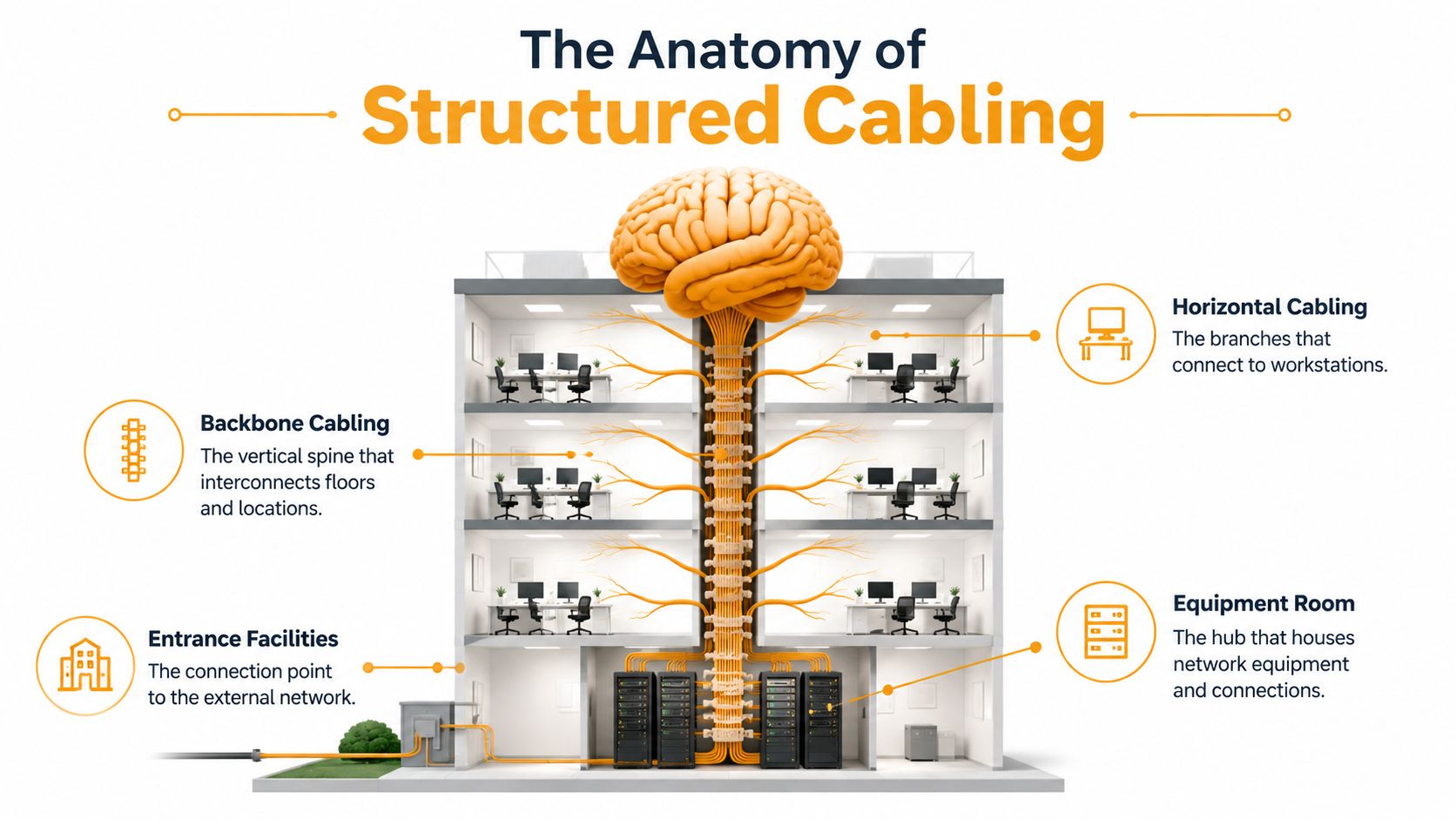
When that architecture is done correctly, the network becomes easier to maintain and easier to expand. As noted in Logical Cabling's overview of structured cabling systems, structured cabling systems using predefined standards and organized pathways deliver measurable uptime improvements because changes can be isolated more cleanly than in unstructured environments.
If you want a second example of how this plays out in a real property environment, this systematic networking guide for hospitality properties is useful because it shows how planning the system matters just as much as selecting the cable.
Why structure matters more than cable count
A business can have plenty of cabling and still have a weak network. I see this often in offices that grew in bursts. They added a copier here, a workstation there, a camera over a back door, a wireless access point in a dead zone. Each addition worked at the time, but nobody stepped back and designed how the pieces should relate.
That's how you end up with one overloaded closet, undocumented patching, and no graceful path for growth.
Practical rule: If a contractor can't explain the layout in plain language, the layout probably isn't clear enough.
The six parts that make the system work
These are the major subsystems structured cabling contractors design around.
| Subsystem | What it is | Why it matters |
|---|---|---|
| Entrance facilities | Where outside service enters the building | Sets the handoff point from carrier to your internal network |
| Equipment room | The main space for core gear like switches, firewalls, and servers | Acts as the main control hub |
| Backbone cabling | The high-capacity links between rooms, floors, or buildings | Carries traffic through the building efficiently |
| Telecommunications room | Local distribution space on a floor or area | Shortens runs and improves organization |
| Horizontal cabling | The cable from telecom room to work areas | Connects desks, phones, APs, printers, and other endpoints |
| Work area | The final outlet and patch connection where users plug in | This is where business productivity meets physical infrastructure |
A simple analogy helps. The backbone is the freeway. Horizontal cabling is the road into the neighborhood. The work area is the driveway. Problems happen when people try to skip the map and build everything like a shortcut.
In a small office, some of these functions may live in one room. In a larger suite, warehouse, or multi-floor location, separating them properly matters more. That's especially true when you need to support cameras, door access, VoIP phones, conference rooms, and cloud-heavy workflows all at once.
The advantage isn't only neatness. It gives the contractor a predictable way to build, test, document, and hand off the system. It gives your IT team a predictable way to manage it later.
Understanding Cabling Components and Standards
A Houston office moves into a new suite, gets internet turned up, adds VoIP phones, installs a few Wi-Fi 6 access points, then starts hiring hybrid staff who live in Teams, Zoom, and cloud apps. Six months later, call quality drops, wireless feels inconsistent, and nobody is sure whether the bottleneck is the carrier, the switch, or the cable in the ceiling. That usually starts with one bad decision. Treating cabling like low-voltage labor instead of long-term infrastructure.
The first question owners ask is usually simple. Do we need Cat6, Cat6A, or fiber? The answer depends on run length, device type, power needs, growth plans, and how long you expect the office layout to last before another remodel or expansion.
The cable choices most SMBs deal with
For most Houston SMBs, the primary choice is between Cat6, Cat6A, and fiber optic cabling.
Cat6 still fits many office drops. It handles desks, printers, standard workstations, and a lot of everyday business traffic well. Cat6A costs more and takes more care to install, but it gives better headroom for higher-bandwidth devices and stronger support for PoE-heavy environments, which matters when one cable may be feeding an access point, phone, camera, or badge reader. Fiber belongs in backbone links, longer distances, MDF-to-IDF runs, multi-floor spaces, and any buildout where you want the core infrastructure ready for future bandwidth growth.
Here is the comparison that matters in practice.
Common Network Cable Types Compared
| Cable Type | Max Speed | Best For | Future-Proofing Level |
|---|---|---|---|
| Cat6 | Gigabit-class business networks and many common office deployments | Desks, printers, phones, standard office runs | Moderate |
| Cat6A | Higher performance copper deployments and demanding endpoint density | Wi-Fi access points, newer office buildouts, PoE-heavy environments | High |
| Fiber optic | High-capacity links over longer distances | Backbones, data room links, multi-floor spaces, multi-building connectivity | Very high |
The trade-off is straightforward. Cat6 saves money up front. Cat6A gives more margin for modern wireless and power delivery. Fiber costs more in the right places, but it prevents the expensive mistake of rebuilding backbone paths later.
That matters more now than it did a few years ago. Cloud apps shifted traffic patterns. VoIP made latency and packet loss more visible. Hybrid work increased dependence on wireless coverage, video calls, and reliable VPN access. A contractor who only asks how many drops you need is missing the essential design question. What will this office need to support over the next five to ten years?
The hardware around the cable matters too
Cable category gets the attention. The supporting hardware decides whether the installation stays reliable.
A clean installation uses the full channel correctly. That includes patch panels, jacks, faceplates, racks, ladder tray or pathway support, cable management, labeling, and test results that match the cable category you paid for. If any part of that is sloppy, performance problems show up later as dropped calls, unstable access points, failed PoE devices, and longer troubleshooting windows.
The supporting components do specific jobs:
- Patch panels create a fixed termination point and keep office changes out of ceilings and walls.
- Racks and cabinets protect switching gear, control airflow, and keep patching organized.
- Jacks and faceplates give users a consistent endpoint instead of improvised cable exits.
- Cable managers protect bend radius and make adds, moves, and changes faster.
- Labels let your IT team trace ports quickly during outages, audits, or moves.
A rack with good labeling works like a breaker panel with a proper directory. Without that map, every change takes longer and every outage costs more.
For fiber backbones or inter-building links, details get even tighter. Connector type, splice quality, pathway protection, and test documentation all matter. Teams comparing copper and fiber options often find useful background in specialist providers such as Amax Fire & Security fiber services, especially for understanding where fiber stops being an upgrade and starts being the correct design choice.
Why standards protect your investment
Standards keep a cabling project from turning into guesswork. ANSI/TIA standards define how the system should be laid out, terminated, labeled, and tested so the finished installation performs like the stated category.
That protects the buyer.
If a contractor installs cable too tightly, exceeds distance limits, ignores separation from electrical lines, or skimps on testing, the network may still come online. It just will not behave consistently under load. That is the expensive part. Problems hide until your phones, cameras, access points, and cloud traffic all compete at once.
BICSI-trained contractors and disciplined low-voltage teams use standards because standards reduce surprises. The result is easier certification, cleaner documentation, and fewer headaches when your Houston office adds more staff, more wireless coverage, more security devices, or a second suite down the hall.
A cable run is not finished when it is punched down. It is finished when it is labeled, tested, and documented.
Core Services of a Professional Cabling Contractor
Many business owners think structured cabling contractors show up, pull wire, terminate jacks, and leave. A professional contractor should do far more than that. The good ones treat the project like infrastructure, not like a quick install.
What the engagement should include
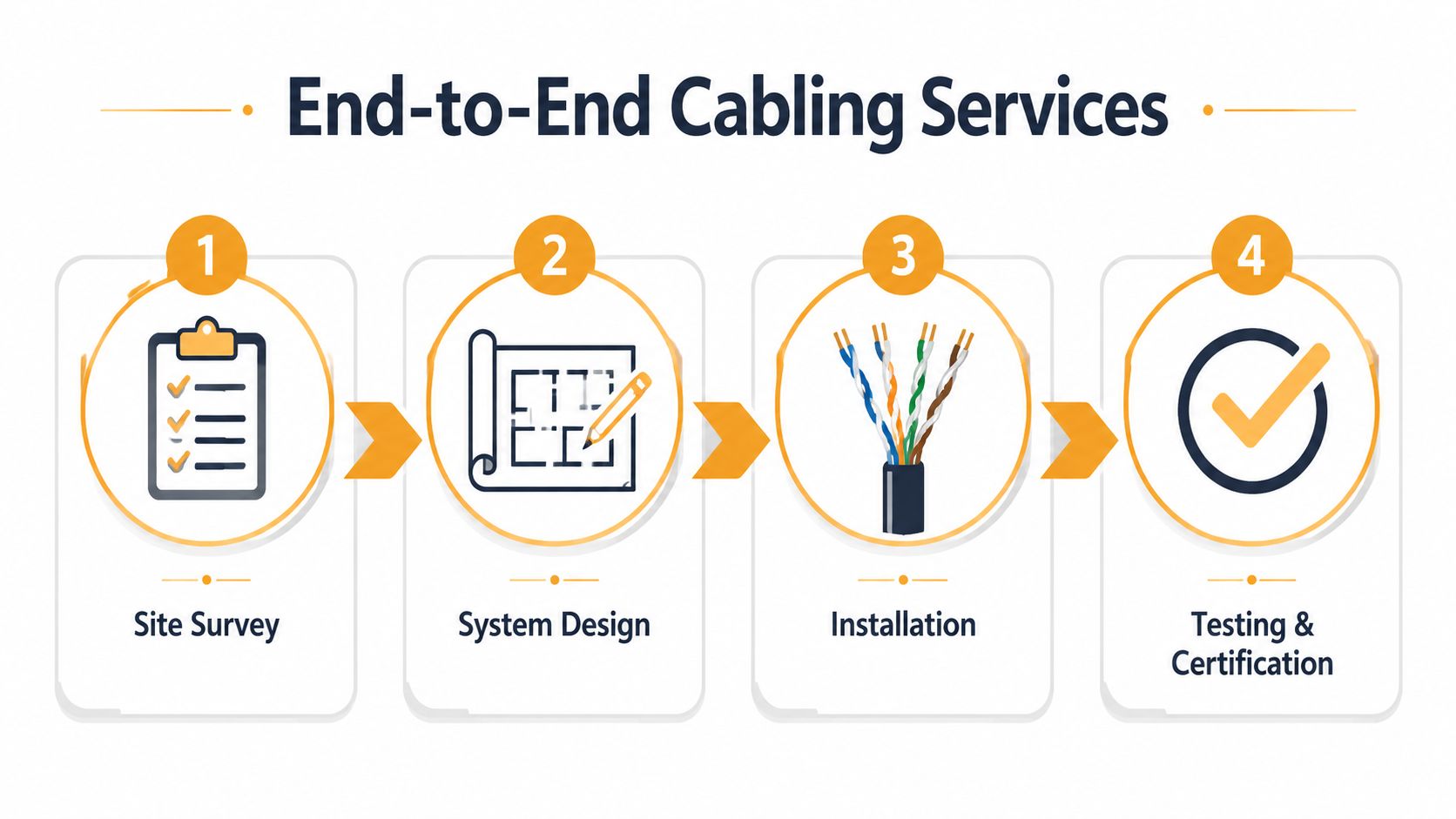
A typical engagement starts with a site survey. The contractor walks the space, checks pathways, identifies obstacles, reviews closet locations, and asks about actual business use. That last part matters. A front desk, a conference room, a security station, and a warehouse workstation don't have the same needs.
Then comes design. That means deciding where drops go, which cable types fit each use case, how closets will be laid out, how backbone links should be handled, and where capacity should be left for growth. In Houston retrofits, design often matters more than installation because older layouts can hide ugly surprises above ceilings and inside walls.
This short video gives a simple visual sense of how professional cabling work is planned and executed:
After that comes the visible work:
Installation in the field
Pulling, routing, dressing, and terminating cable. This may include copper, fiber, racks, patch panels, faceplates, wireless access point cabling, and cleanup of legacy runs.Testing and certification
Every permanent link should be tested and documented. If a contractor skips this or treats it like paperwork, that's a red flag.Documentation and handoff
You should receive labeling maps, test results, and as-built records that make future changes manageable.
What separates a contractor from a cable puller
The difference shows up after move-in day. A cable puller gets you connected. A contractor gives you a maintainable system.
That includes support for retrofits, adds, changes, damaged run replacement, closet cleanup, and existing environment audits. In projects where fiber is involved, a focused provider can also be helpful. For example, Amax Fire & Security fiber services give a good reference point for the sort of specialized fiber work and support businesses should expect when optical cabling enters the scope.
One practical note for local buyers: some firms only handle the low-voltage side, while others also coordinate network hardware, wireless design, cloud connectivity, and VoIP. IT Cloud Global, LLC is one example of a Houston provider that works across cabling, Wi-Fi, VoIP, and cloud environments. That kind of overlap can reduce handoff problems when the physical network and the service layer need to line up.
Scoping Your Project Costs and Timelines
Owners usually ask for a price first. That's understandable, but a cabling project doesn't price well when the scope is fuzzy. The final number depends less on "cost per cable" and more on how the building, the devices, and the access conditions shape the work.

What usually drives cost
A few variables move the budget more than anything else:
- Number of drops: More endpoints mean more labor, more terminations, more patch panel space, and more testing.
- Cable choice: Copper and fiber don't install the same way, and not every area needs the same category.
- Building conditions: Open ceilings are easier than finished spaces. Older walls, active offices, and limited pathways add difficulty.
- Closet readiness: If the rack, power, cooling, grounding, or patching layout is poor, cleanup becomes part of the project.
- After-hours work: Businesses that can't tolerate daytime disruption often pay more for scheduling flexibility.
- Documentation expectations: A well-documented handoff takes effort, but it's worth it.
A cheap quote often hides scope gaps. The contractor may have left out cleanup, rack work, patch cords, testing depth, or labeling detail. That's why lump-sum proposals can be risky. If the estimate doesn't spell out what is and isn't included, change orders show up later.
The lowest number on page one can become the highest invoice by project closeout.
How projects usually unfold
Most projects move through the same phases, even if the duration changes by site.
| Phase | What happens |
|---|---|
| Discovery | Walkthrough, requirements gathering, review of devices and growth plans |
| Design and quote | Cable counts, pathways, room layouts, hardware selection, written proposal |
| Scheduling and procurement | Materials ordered, installation windows confirmed, access coordinated |
| Installation | Cable pulls, terminations, rack work, labeling, cleanup |
| Testing and closeout | Certification, punch list, documentation, handoff |
Retrofits tend to take longer than new buildouts because the building is already in use. People are working, ceilings may be closed, and old cable may need to be identified before anything new can be trusted. For a small office, the work may be straightforward. For a busy medical, legal, warehouse, or retail environment, coordination matters as much as the cable itself.
The best planning move you can make is simple: tell the contractor about your next two years, not just your next two weeks. If you're adding staff, cameras, access points, conference rooms, or cloud-heavy workloads, that should shape the design from day one.
Hiring the Right Cabling Contractor in Houston
Choosing structured cabling contractors isn't the same as choosing a handyman for a one-day repair. You're picking the people who will define the physical layer your business depends on. If they cut corners, you'll feel it later in outage calls, phone issues, weak Wi-Fi, and every office change that should have been easy.

Houston buyers should screen contractors like infrastructure partners, not like commodity installers. A useful parallel is this Houston IT support provider selection guide. The same principle applies. You're not buying labor alone. You're buying judgment, documentation, and long-term reliability.
The checklist that matters
Start with credentials. According to The Network Installers' discussion of BICSI-certified structured cabling companies, engaging BICSI-certified contractors, including those with an RCDD, is critical because these professionals work to ANSI/TIA-568 standards, which helps prevent compliance problems and reduces future troubleshooting and downtime.
That should translate into practical vetting questions:
- Ask who designs the system: If the company sends installers but no qualified design lead, be careful.
- Verify BICSI credentials: INSTC, INSTF, and RCDD are meaningful signals, especially for copper, fiber, and design work.
- Request proof of insurance and licensing: You want documentation, not verbal assurance.
- Ask for test report samples: A serious contractor should be comfortable showing the kind of closeout records they provide.
- Review labeling and as-built examples: Good documentation is part of the deliverable.
- Check local references: Houston building types vary. Experience in similar occupied spaces matters.
- Clarify subcontractor use: You should know who will be on site.
- Discuss warranty support: Not just product warranty. Ask what happens when a run fails, a jack goes bad, or a closet issue shows up after turnover.
A contractor who gets impatient with these questions is telling you something.
A simple RFP outline you can send
If you want cleaner proposals, send a short written scope instead of asking for a generic bid. Keep it plain.
Project overview
- Business type and location
- Existing office, remodel, or new occupancy
- Desired go-live date
Scope requested
- Number of office drops
- Wireless access point locations
- Phone, printer, camera, and conference room requirements
- Any fiber backbone or inter-room links
- Rack, patch panel, and labeling expectations
Contractor response requested
- Recommended cable types by area
- Testing and certification method
- Documentation included at closeout
- Project schedule assumptions
- Clarification of exclusions
Operational notes
- Business hours and access limits
- Cleanliness requirements
- Any compliance or landlord rules
Ask every bidder the same questions. That alone makes the quotes easier to compare.
A good proposal should read like a plan, not like a guess. If one contractor explains the pathway strategy, rack layout, testing process, and documentation in detail while another just lists "install data drops," you already know which one is taking the work seriously.
Future-Proofing Your Network for Cloud and Hybrid Work
Monday at 8:15 a.m., the sales team is on VoIP calls, accounting is inside Microsoft 365, two managers are on Zoom with remote staff, and the warehouse is scanning inventory over Wi-Fi. If the cabling plant was built only for desk PCs from ten years ago, the cloud gets blamed for problems the office wiring created.
That is the gap many cabling-only conversations miss. Cloud apps still depend on local switching, clean copper runs, proper AP placement, power delivery for edge devices, and backbone capacity between closets. Hybrid work did not reduce the importance of the office network. It changed what the office network has to carry.
A Houston SMB may have fewer people at fixed desks than it did before, but it usually has more connected devices, more conference room traffic, more wireless dependence, and less tolerance for downtime. Users do not care whether the slowdown comes from a bad patch panel, an overloaded uplink, or a poorly placed access point. They just see calls dropping, file sync lagging, and meetings freezing.
Physical design and cloud strategy meet here. A business choosing between public, private, and hybrid cloud services still needs the office side designed to support that choice. This guide to public, private, and hybrid cloud options for Houston companies helps frame the service decision. The cabling plan has to support it with enough bandwidth, clean pathways, and room to add devices without rebuilding the closet six months later.
What future-proofing looks like in practice
Future-proofing is not about installing the most expensive cable in every ceiling. It is about avoiding design choices that force expensive rework when your business adds people, moves teams, upgrades Wi-Fi, or rolls out more cloud-based communications.
A good design usually includes:
- Cable runs planned for device growth: Not just desks. Access points, cameras, badge readers, room schedulers, and conference systems all need ports.
- PoE capacity considered early: Phones and wireless APs are easy to add on paper and harder to support if heat, switch power, and cable bundles were ignored.
- Backbone links sized for real traffic: Cloud apps reduce on-prem server dependence, but they increase east-west traffic between APs, switches, firewalls, and internet circuits.
- Rack and patching space left open: Full racks on day one create messy adds, poor airflow, and harder troubleshooting.
- Accurate labeling and test records: Hybrid offices change faster. Good documentation turns a move or adds project into a simple patching task instead of a half-day hunt.
Standards help here for the same reason a street grid helps traffic. They give every run a predictable path, naming method, and termination point so changes do not turn into guesswork. Topology matters too. A star layout back to the closet is easier to test, isolate, and expand than a patchwork of extensions and undocumented workarounds.
The payoff is operational, not theoretical. A future-ready cabling system lets a Houston business add a new VoIP platform, upgrade to Wi-Fi 6 or 7, reassign office space for hybrid teams, or bring more services into the cloud without reopening finished areas and starting over.
A future-proof network does not stop change. It keeps change from becoming a disruption.
If your Houston business needs a network that supports cloud access, VoIP, Wi-Fi, and day-to-day operations without constant patchwork, IT Cloud Global, LLC handles managed IT, network setup, cloud services, telecommuting, and low-voltage cabling for local businesses. A practical next step is a site review focused on what your current wiring can support, where the weak points are, and how to build a cleaner path for growth.